It’s the “+” button at the bottom of the sidebar. You can add new sections, then inside each section, add whatever you want.
Adding things is reasonably straightforward. The hard part is removing things, because that requires a browser extension like Stylus, to apply client-side overrides to the stylesheet.
Ah really? So the new WYSIWYG editor on Discourse Meta also has layout issues? Interesting. I remember having to look for an emergency fix for that same issue with the original Markdown post editor after an update. I believe it had something to do with margin-left: var(--d-sidebar-width); and width: auto; looks like they need to apply something similar to the new composer’s class as well. Since we’re not promoting the new editor here it’s not urgent, but if you do happen to come up with any of your CSS magic tricks then please ping me so I can implement it in the BLF Common Tweaks theme component.
Thanks a lot for confirming, and sorry for my slow reply, I was waiting until I could find time to download Brave and test it on my tablet. Glad it’s working for you now.
It had layout issues when I had my local overrides enabled. But it worked as intended when I turned off overrides. So I assume the issue is some sort of mismatch between the new upstream code and my old code. Whatever I did to increase the page width must be interacting badly with the new editor.
The upstream site with no overrides is really quite narrow, and so was the editor. With overrides they’re both quite a bit wider, but the editor is sometimes offset so part of it falls out of the window.
Given how it changes position with zoom level, I’m guessing the upstream folks did something fancy with screen resolution-sensitive style rules. Not a fan of fancy. So I’ll likely have to find those thresholds and test/fix each one individually. There’s also a very high chance that some things are broken on phones, and I haven’t even tried to test that yet.
Well thanks for remembering and taking the time to restore this functionality… I did just try it and it is back to working the way I was used to using it.
Of course I had just about gotten used to using my custom menu items…
THX
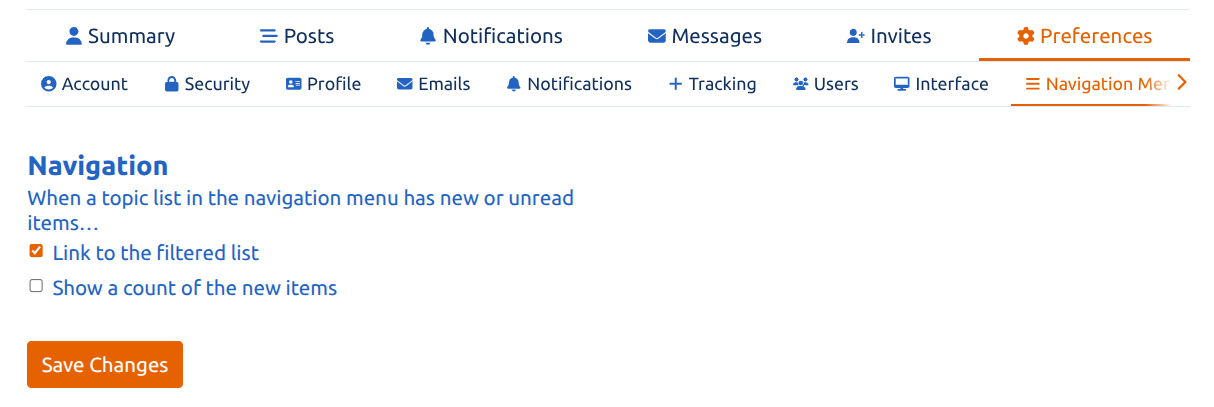
As a matter of fact it looks like you’ll have to manually enable that preference now. Sorry for the configuration whiplash. It’s because I received a message from a user that brought to my attention the fact that this default setting makes it only show unread threads in category listings, so it’s a rather confusing default that I just reverted back to disabled-by-default.
Good to know. I just came here to mention that the check box you showed me how to use above had mysteriously unchecked itself…again. Would you think that it should stay checked going forward… or is this something that will take attention going forward on a regular basis?
BTW, I didn’t notice that the setting changes category listings. When checked it seems that it shows unread posts for each category when clicking on the “topics” selection.
First in the unread category. Then when all of those are read It goes to unread in the “new” category, then goes to the latest category when all of those have been read. All of the categories are still shown at the header level at the top.
Edit. I figured something out. When there are no unread posts in either unread or new, they disappear from the headers at the top next to categories. Which is unexpected behavior.
Which makes the custom menus that we setup for me come in real handy! OTH they are empty so there is not much reason to need to access them.
No, it will stay that way now, it was just because I had forced that configuration setting to be activated, which applied it across all users, and then I later reverted it for all users when I realized it wasn’t an ideal default.
Right.
I was used to that behavior because the New filter has always disappeared when there are no more un-viewed (or all dismissed) new topics. But yeah, now that you mention it I guess that is unexpected.
Did BLF get updated since yesterday?
Starting today, when I click on many threads, it doesn’t register on the first try and BLF thinks that I didn’t click on the thread.
I’m using the web browser Floorp, and Floorp updated on my PCs yesterday, so that could be the problem.
See that turquoise dot on the far right.
It doesn’t go away even after a couple of minutes.
Also, when editing this post, the BLF software was struggling a lot, and BLF even went down for a minute or so.

 If you want, that behavior can be controlled in the user preferences: