It is a nice feature, but honestly, I use the Mc3000 almost always for LiIon cells. The reason I go to it is because I use the same setting quite regularly It remembers program selection (for all slots) between sessions, so all I have to do is pop cells in and hit enter. For some reason I can’t get the S8000 to do this simple thing. It is always a bunch of button presses to get where I need to be… I know… how lazy am I ??  But really, when charging a bunch of cells of the same type on many occasions over time it just makes the process much easier and less time consuming.
Bump - to see if anyone else has a view on this battery auto-recognition feature (or lack thereof in the S8000) - especially since they ARE going to put in 8-cell chargers.
Thanks for your feedback!
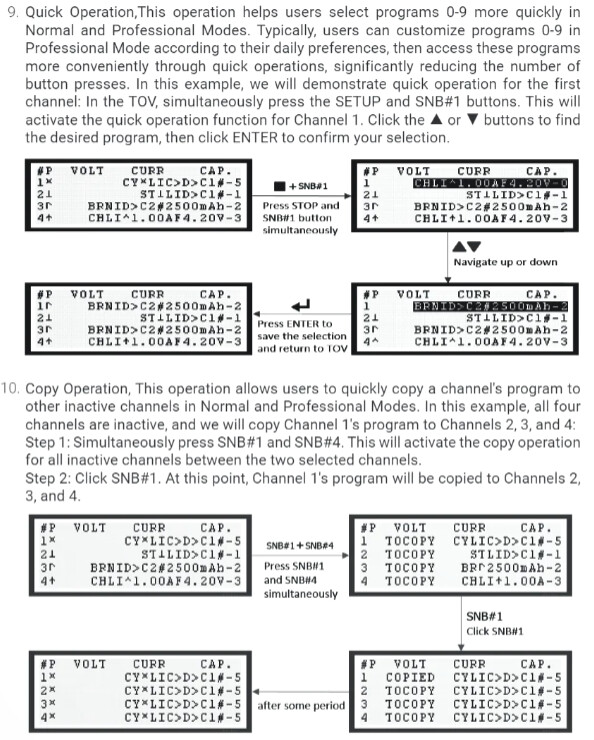
In Pro mode, users can customize programs in CPV and save frequently used ones to 0–9 for quick access (this quick access is also supported in Normal mode). In GSV, users can set their most-used program as the default for each channel—either the same across all channels or different for each. Additionally, the “Copy” operation allows a program from one channel to be quickly applied to others, greatly improving setup efficiency; and the “Restore Default” operation lets users reset all channels to their respective default programs with one click.
Once familiar with these features, users can configure and select programs more efficiently—with both speed and flexibility.

Thankyou for that, Enova, and also for being so responsive to the user community.
I can see those options you mention. BUT I still don’t really see why we can’t have a CHOICE of auto-recognition in “normal (or simple)” mode in the S8000 - especially since you say you will be equipping your forthcoming All88 chargers with it. Maybe I am just missing something.
for the All-88 the auto-recognition is not a new feature …
the charger has been equipped with that mode since 2017 …
the very first version from 2016 just had a manual selection of the right charging mode :
“standard” Li-Ion 4,20V, Li-Ion HV 4,30V, Li-Ion HV 4,35V, LiFePO4 and NiMH …
near the display was written : “Please select the suitable charging voltage !”
in a quick update in 2017 an automatic recognition mode was installed additionally (“of course” just with the two options Li-Ion 4,20V and NiMH), as can be assumed to prevent incorrect settings, and the charger then was delivered from the factory in this automatic mode …
so with the All-88 it’s “a different story” … 
Thank you. I will need to try to learn how to set the defaults so my preferred settings “stick”. But you can get any easier or faster than just having the machine store the last used program as the default until it is changed by the user. IOW, just have it default to the last used program. Even after being disconnected from power. Could this be made an option?
The first thing you mention about resetting the default program, is, of course, dependent on figuring out how to set that up for each slot. This charger is the only one I have where I keep the manual sitting next to it at all times.
In fact I have it open to the section that covers the copy function with the text highlighted.
The saving programs to the first 9 program slots does work, but I still have to push various buttons to select the desired program for a slot and then to copy it to all the slots. Which is what I have been doing. But it adds effort and time to the process. Probably half a dozen button presses. If I can figure out how to just have all the slots remember my most used program, I am sure I will use the charger more often.
When I do specialized testing I don’t mind setting up a program to do that and using it. I love the flexibility of the charger. It is just the day to day routine use that seems too complex for it to displace the MC3000 as my GO TO. I will try your suggestions though, because I really want to love this machine.
This is my point too. It just seems too complicated to use for charging daily. I want to love this machine too and would value its flexibility like @Mandrake50 when I am setting up specialized testing.
Just give us the CHOICE of auto-battery recognition in “Normal” mode. I will buy one - and I bet it will sell much better since it can be advertised as having a genuine ‘simple’ mode.
Thank you for your feedback! Only through suggestions from real users can we continuously improve the product experience.
The design philosophy behind the S8000 and S4000 Pro is to ensure flexibility while minimizing the number of button operations.
Program slots 0–9 can be used to store frequently used user programs. For example, when entering the quick setup interface, users can quickly select program 0 or 9 with just one UP or DOWN action and one confirmation (Enter).
In addition, the charger provides four default program slots, recommended for storing the most frequently used programs. For instance, programs 28 to 31 can be assigned as default programs for channels 1 to 4, respectively. When multiple channels need to use default programs, a single copy operation enables quick and efficient setup.
Steps to set default programs:
- Configure programs 28 to 31 as needed.
- Go to the menu:
GSV -> #1-4 DEF_PRGMand assign programs 28–31 to channels 1–4 as their default programs.
If channel 1 is assigned default program 28, updating program 28 will automatically update the default for channel 1(similar operations for other channels are omitted here for brevity).
After a power cycle or executing the restore-default operation, each channel will automatically run its assigned default program.
Restoring default programs is simple. Just press and hold the SETUP button, and all channels will revert to their default programs with one action.
For example, if channel 1 is currently running a temporary program, channel 2 is using program 10, channel 3 is on program 15, and channel 4 is using program 16, pressing and holding SETUP will quickly restore channels 1–4 to default programs 28–31.
Finally, Do any fellow BLF members have trusted YouTube reviewers or content creators you’d recommend? We’re looking to collaborate through video content to help users better and more efficiently understand the operation of the S8000 and S4000 Pro, as well as the powerful scripting capabilities of TC.
2 Thanks
Thank you for your feedback! The S8000 and S4000 Pro are designed as professional-grade devices with a strong emphasis on long-term stability and reliability. We truly appreciate your valuable input, which helps us continuously improve our products.
Then lets have auto-recognition (like the MC3000 has and as pointed out by @mandrake50 above) in “Normal mode” and there will be even fewer button operations.
This is interesting. I don’t recall seeing this process in the manual. Is this limited to programs 28-31 for use as the defaults? Or can I use any program that is setup as the default for each slot?
Finding someone good to do a video tutorial would be great. Over time there was lots of content created on using the MC3000. Both video and documentation. I found this very valuable in learning how to use the device. With the level of complexity in the UI it is difficult to learn to use it effectively by just reading the manual that is provided.
For instance, I will probably spend a good bit of time just finding
I mean, the notation is quite cryptic and there are quite a number of button pushes to get there. I do understand that there are a limited number of buttons and display area for naming things. But that doesn’t make it any easier to find things and make changes.
I have mentioned this. I most often use the Android App to configure the MC3000. The GUI with clearly labeled functions makes it much easier. I can also store programs and give them meaningful names. I don’t know whether the hardware is able to support Bluetooth connectivity, but if it can, developing a good app would go a long way towards making the S8000 user friendly.
Please don’t take this wrong. When I take the time to wade through the manual and get everything working, I am quite happy with the results that I get when using the S8000. It is a great charger. Maybe if I used it everyday it would be different. I just find it frustrating to have to spend lots of time relearning how to setup what should be simple charging routines and then all of the button pushes to find a program that cannot be easily identified by name (I have to select it and go through all of the settings to make sure it is what I want). Then copy it to the correct slots.
I will try the process you mention for setting defaults for the slots. It sounds like it will be helpful for reducing the time required to just start charging.
BTW, I tried installing the PC software for windows right after I did the last firmware update. Even though the updater found the S8000 and updated the firmware just fine. The test software would never connect. Using the same cable, port, etc. No idea why, but I gave up. A good tutorial on this would be great as well.
That was just an example. You can set any program as the default for any slot.
Do you mean TestController? @HKJ is in charge for this awesome piece of software. Not sure what you have to do under Windows, but I have no problems with it under Linux.
1 Thank
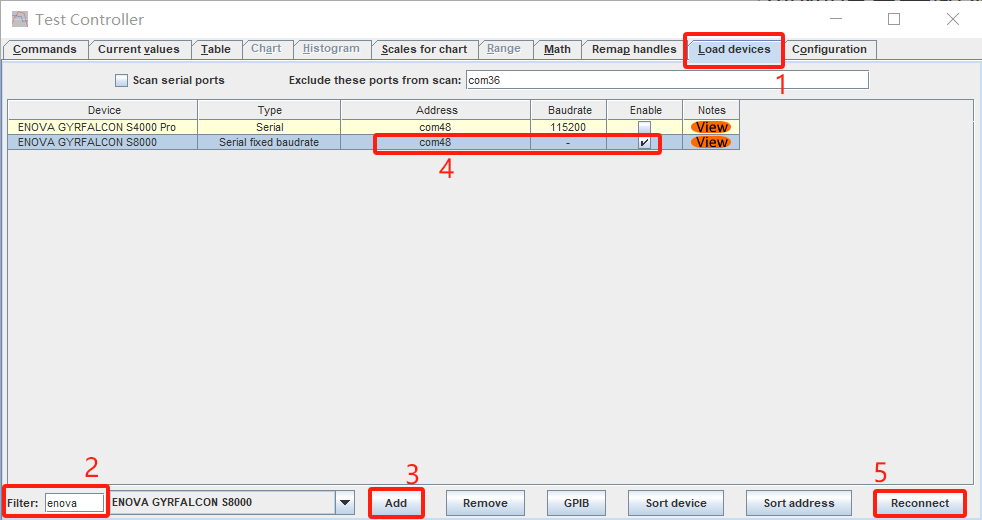
If you have successfully installed Java and have downloaded and opened TC (TestController), please follow the steps shown in the image below to select the correct port. This will establish the connection between TC and your device.
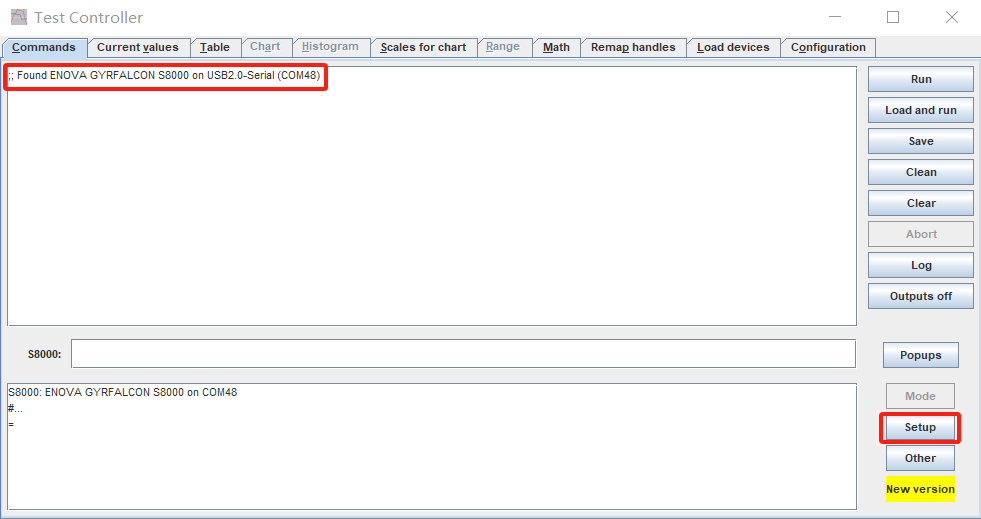
Once the connection is successful, a confirmation message will appear in the log window. Then, click the “Setup” button to enter the GUI for the Gyrfalcon charger.
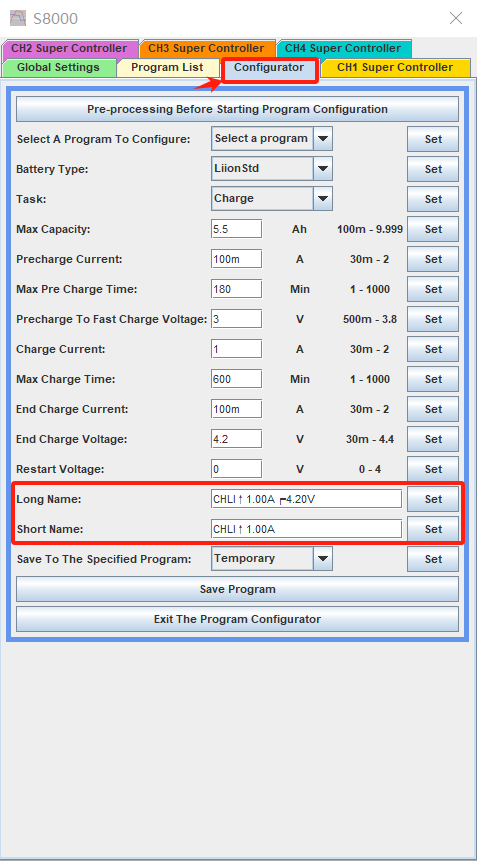
The GUI → Configurator allows you to customize names.
@dmenezes has created a very interesting project: by using an external ESP32-S3-USB-OTG Bluetooth module, he successfully established communication with the S8000. This allows for remote access and control using TestController as well as his own custom scripts. However, we have not yet developed a mobile app. Once he publishes his full review, it will likely include detailed information about this project.
1 Thank
Thanks. This does look interesting. I was able to get my PC to connect once and observe a charging cycle. But for some reason not when I came back later and tried to reconnect. I am sure this is due to some error on my part. I will play with it some more. Hopefully, with time, I can figure out how to use Test Controller effectively. This is a great addition and enhancement for the usability of the charger. It looks like there is a lot to learn though.
I set the defaults for each slot as you suggested. Now I get the same functionality that I am used to with the MC3000.
I just drop the cells into a slot and hit enter to start charging. This is wonderful. I wish that I had understood this process a long time ago. Thank you!!
Now, if I could just do something about the sliders. Any chance that you could sell me a retrofit kit with the newly configured sliders?
For liion you mean - not BOTH liion and NiMH?
There is no auto detect for cell chemistries. But that was secondary to what I wanted. I was able to set the default for all of the slots to be the program that I use for the bulk of my18650/21700/26xx LiIon cells. This process gives me that. Put the cells in hit enter and walk away.
We can provide the necessary components for replacement, but before proceeding, please confirm that you are willing to perform this operation. Both the positive and negative contacts, as well as the sliders, need to be replaced. The positive contact and slider require soldering. Additionally, some adjustments are needed where the front cover makes contact with the tail of the negative contact.
2 Thanks
Hi, I just received my S4000 Pro and it seems very good. Just one thing I’m not quite sure about and I can’t find the answer in the manual or the reviews. If you have a cycle programme such as C>D>C, does the recorded capacity / energy reflect only the final phase? If so, to get a realistic discharge capacity, I guess one should always end with a Discharge phase?
Thanks
Rob
If I am not mistaken… my 8000 retains the capacity numbers of the discharge phase of the C>D>C cycle.