So, noctigon-kr4-nofet, I presume… quick sanity check: as it is right now (ie, still with the original firmware) does it actually blink “0212” as the model number part of its version check (15C) response?
Confirm. KR4 no FET and 0212 model
1 Thank
Probably stupid question of the day, but, is there somewhere I can get the current branch code NOT on bazzar?
I never could get Anything to access that before when I got the Pre multi channel code… Got it off of IIRC this now non existant repository on Git; https://github.com/lukeadair/anduril2
I think. Its been a few months…
ANYway. IS there a copy of the current version (721?) of the multichannel somewhere on Git?
Ideally just looking for a zip file here… any other features of Git escape me at present. lol.
I found this,
Which looks infinately easier to edit, in a way, but I’d like to have the original on hand too…
Edit to add; just noticed the Avatar is the same… is that your repo @wolfgirl42 ? 
2 Thanks
AHA!!
Think I found it!
And download tarball.
1 Thank
Then you should be good to go with the anduril.noctigon-kr4.hex image in the ZIP file I linked above.
Yep, this is the source code for the original release from TK. I actually linked to it when I first posted about my 8C mod.
2 Thanks
**Face Palm**
lol, I must not be able to read. I remember that post, just didn’t register to me that was what you linked.
1 Thank
No prob, and please don’t feel bad about it; at least since Twitter, TL;DR has definitely taken the world by storm, it’s very rare nowadays that people can actually read longer stuff carefully and distill everything it it. And it wasn’t proeminently marked in my post either, so that also didn’t help.
I did not go through your 300 plus posts.
I would think someone may have mentioned this?
In advanced UI.
Having to go to the top of the ramp and then double click for Turbo is ridiculous.
No double click from on ,no double click from off
It is an option, settable in the config menu built in already. you can have (A) double click to top of ramp, or ramp to top, then double to turbo, (B)just double to turbo from anywhere without needing to top ramp first, or (C) no turbo at all.
See here for setting;
scroll down for 10H from ON in Advanced,
Ramp extras config menu.
- Item 1: Disable manual memory and go back to automatic memory. (doesn’t matter what value the user enters at the prompt)
- Item 2: Configure the manual memory timer. Sets the timer to N minutes, where N is the number of clicks. A value of 0 (no clicks) turns the timer off.
-
Item 3: Configure whether to ramp up after Off →
1H.- 0: Ramp up after moon.
- 1: Don’t ramp up, just stay at the floor level.
-
Item 4: Configure Advanced UI’s turbo style:
- 0: No turbo, only ceiling.
- 1: Anduril 1 style. Ramp →
2Cgoes to full power. - 2: Anduril 2 style. Ramp →
2Cgoes to ceiling, or goes to full power if user ramped up to ceiling first. This value also affects momentary turbo in Ramp and Off modes.
So, 10H from on, hold past the 4th flash, release, it enters the stutter/low strobe;
Do nothing for no turbo,
click once for 2C any time turbo,
clicking twice gets what you already have, ramping up first, then 2C again to turbo.
I set this myself a few hours ago. On a daily use light, out of the 3 configurable ramps, I prefer no turbo on 2 of them, and Anduril1 style on one high output ramp(normally the Simple UI).
On another light I have it set with only 2 steps, a high ceiling, and turbo on the Anduril 2 mode. There I get basically turbo 1 with 2C to top of ramp, and turbo 2 with another 2C to full power. Its very fast to top two outputs.
5 Thanks
Appreciate the though, but I couldn’t blame that, I’ve never used twitter, and I have a high intake of novels and tech manuals… Wall of text is easy… I’m sure you’ve noticed how deathly long winded I type too. 
I just apparantly wrote that memory to RAM instead of HD… lol
Or I was distracted by the colorful flashing lights… 
1 Thank
I don’t know if I understood it correctly.
When I get the flashlights, today a TS25.
The first thing I do is factory reset I switch to advanced mode and put it to charge or charge it before.
In all with anduril 2 I have turbo with 2c in any mode.
But it is not in simple UI or I have not tested it because the ramp has the ceiling at maximum or so I think.
I take this opportunity to know how you guys configure it for a nice mode.
I change the actual temperature, because it measures more degrees in cold than the ambient temperature.
But I have never changed the safety or ceiling temperature I see it complicated and I do not know what would be appropriate.
I don’t know what is the default one.
I would like at least 55° maybe 60°.
It’s hot here and it would kick in soon.
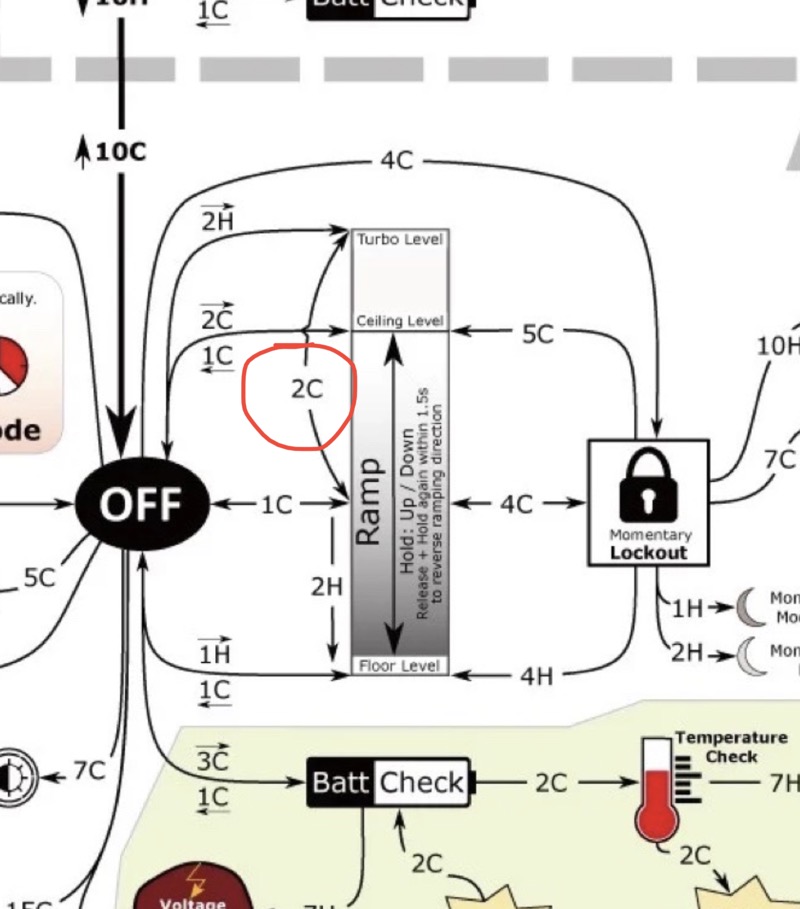
Edit:
Here also appears 2C direct to the turbo I don’t know where I got the schematic from.
The other one is from my flashlight and this one I don’t remember from where but it’s from May this year.
I hope it helps you, but in the txt or in the link they gave you there are more options that are not in the schematic.
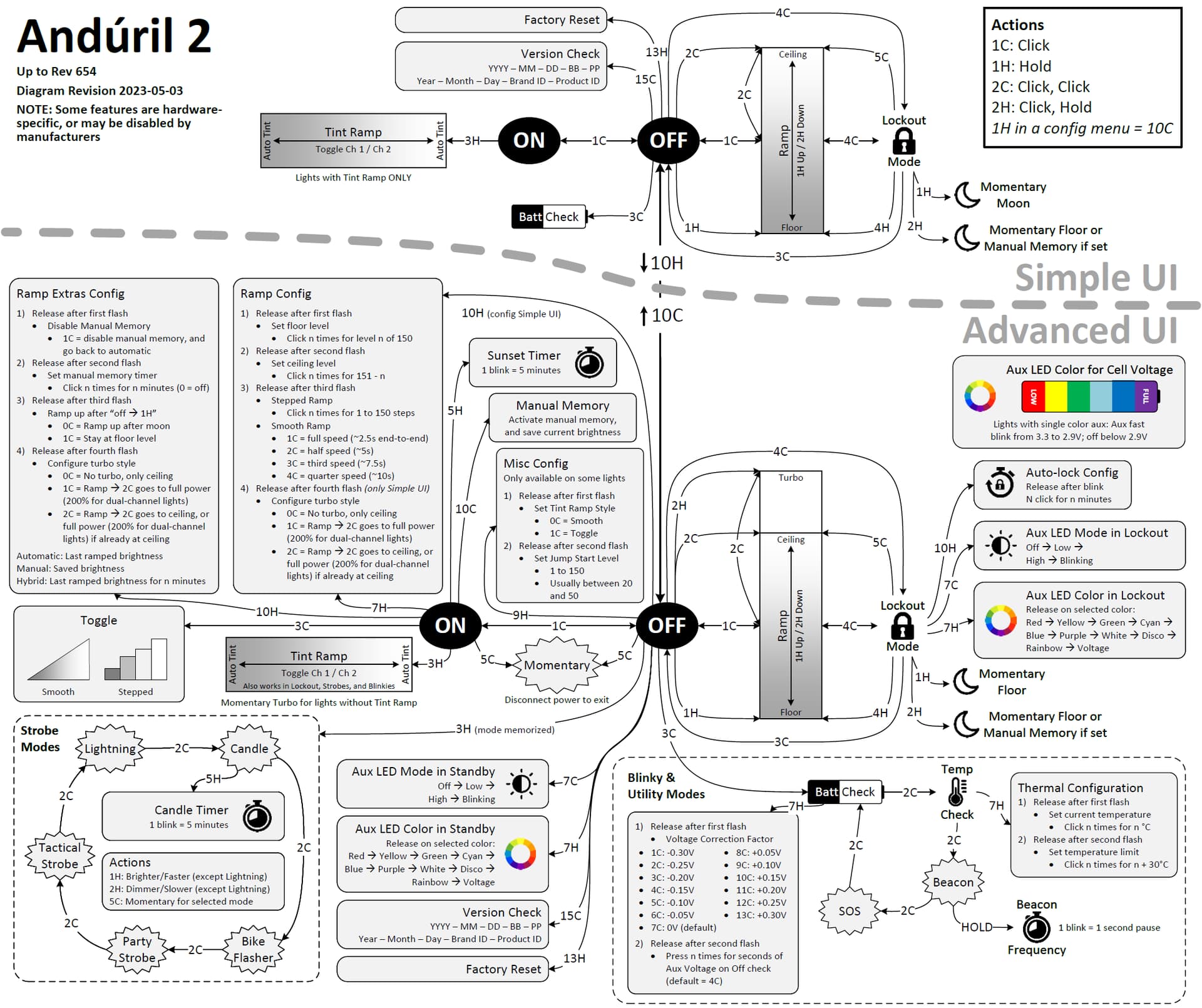
2 Thanks
Thank you.
Ok. My light won’t arrive till next week. I’m watching videos and learning Anduril2. The Extensive video I saw he didn’t mention that. I just remember him saying in advance UI that you can only access Turbo by ramping up all the way and then double clicking.
It starts at the 6 Minute 35 second Mark of this video. He says you cannot access Turbo directly from on.
I’m glad I said something on here and I hope you’re right! Other than that his video is very informative. 30 minutes long.
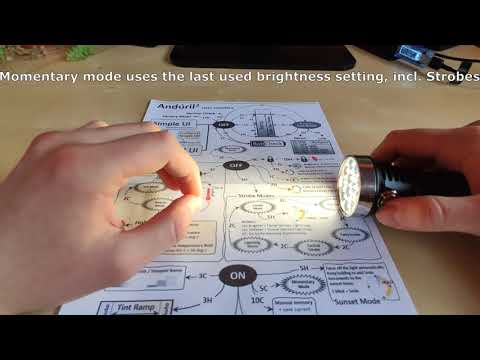
Yes, Ive seen the video, but never made it that far in, I found them too confusing… I had to have directions I could read 10 times as I tried it, and see it in real time… Really really glad I found, and thankfull Ivans’ page exists! Without it I’d never have learned these lights.
It will depend on what light you are receiving too. Not all Anduril2 installs are set up the same. Different manufacturers set it different, and even vary it for different models.
It sounds like the Wurrkos TS25 that @litris has is set to Anduril1 style, a 2C to turbo from anywhere.
My Sofirn SC31 Pro was set with the Anduril2 style, 2C to top of ramp, and then 2C turbo. And it would 2C turbo from off too. In the advanced UI that is. Simple UI had no Turbo available. And for whatever reason, you cant 3C from locked to off… only 4C to on. But both my other lights can 3C to off. I think its a newer feature than when the SC31s were compiled for.
I think my Wurkkos TS11 was set to 2C turbo from anywhere, even in Simple UI(unsure, I reset everything in it to custom over a month ago)
My Sofirn SP10 Pro on the other hand was set up with No turbo at all, its ceiling/top of ramps are all set to max output, there isn’t anything above it to turbo with… I think Sofirn decided that 900 Lum max was low enough thy might as well give it all to begin with.
you get the idea… Will probably just need to look at what you get, and try it out. A couple of mine came with documentation that was accurate… One came with the generic graphic, and wasn’t quite right for the lights setup. (think that was the SP10 but I’m not sure its been months).
1 Thank
To the excellent advice that @litris and @AK-Adventurist already gave you, I would add:
- You might want to give the Anduril manual a good read; You haven’t told us which light you’re getting, but presuming it’s Anduril2 (from the video you linked) and a relatively recent revision, this should do: ~toykeeper/flashlight-firmware/anduril2 : contents of ToyKeeper/spaghetti-monster/anduril/anduril-manual.txt at revision 657
- The best way IMO to learn Anduril is with flashlight in hand and then try what the manual, diagrams, videos, etc tell you; trying to “armchair learn” it before even receiving the light is going to make things unnecessarily hard.
- You don’t have to understand all of Anduril commands and operations in one go; I perhaps understand less than 50% of it, and use regularly less than 10%. WIth practice you’re going to learn exactly the subset of it that’s useful to you, and memorize it by daily practice.
2 Thanks
Vídeo 2C Turbo any mode:
SC31Pro T1616 anduril 2
Edit: I learned with the flashlight but before I saw the TXT it helps a lot, there are other functions that do not appear in the diagram.
Manual my SC31Pro:
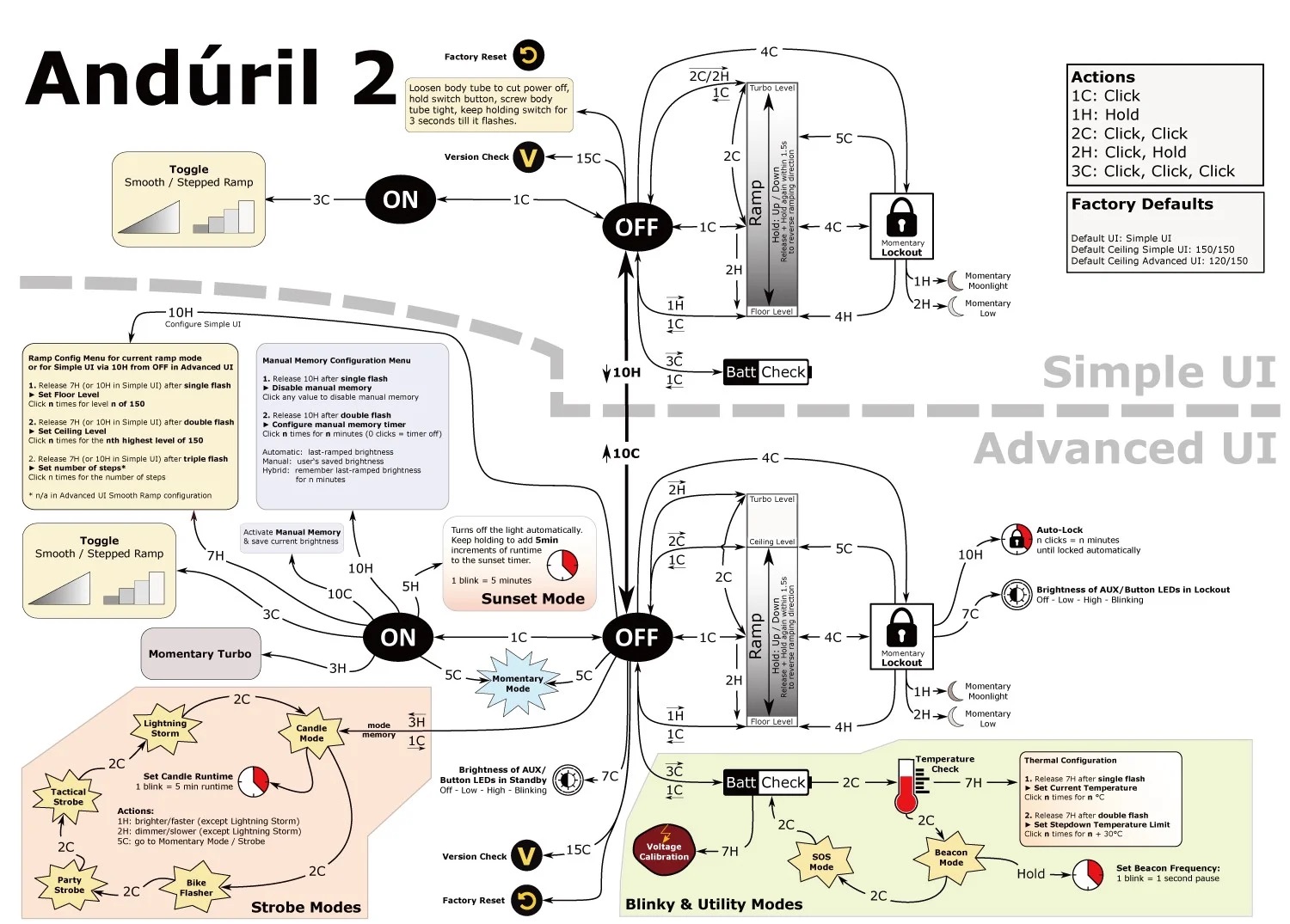
So does my SC31Pro, TS10 and TS25 all 2C turbo from on or off and from ramp down it does not go up to ramp ceiling it goes straight up to turbo.
Look at the video my version I do not remember what it was but the manual that brings is that I put in ls photo and shows that jumps to turbo with 2C without going up ramp.
I guess it will be the version.
I literally spent several hours looking at different lights in the Father’s Day sale. There were some great lights but I couldn’t see getting a lot of them who had an output of two or 3000 lumens with a 14500/18350 battery.
My light is the WURRKOS FC13… I should have mentioned that. I need another dog walking light.
90% of my lights are modified throwers. For $27 I don’t think you can beat it. 30% off plus I think it was already on sale.
I’m going to follow the suggestion of AK Adventurist and the steps he mentioned for two clicks from anywhere to get turbo. I hope it works. I don’t want to have to ramp all the way up and then double click for Turbo like the video said. Especially since I only use two modes on the trail. Turbo and a very low mode to cool the light off.
I myself like Simplicity, three or four modes , with the ability to activate Turbo from on in any mode or off in one or two clicks.
The modified lights I have are all set up I have about 20 different mode groups and there is no step down, and turbo can be accessed by pressing and holding from off, depending on the light or double clicks from on /off or in any other mode.
For me all the stuff is just too much effort, too complicated.
I have my notes (4 X 6 card)and I’m ready for when the light arrives.
1 Thank
Some of my lights with Andruil 2 are set to use 2 clicks to the top of ramp, then 2 clicks to turbo. I have the top of ramp set to the max sustainable level (100/150 to in some cases 120/150 depending on the light). That gives the level that the light will be at after 30 seconds (or less) in turbo. But still allows 2 click bursts from there… for short periods. There is enough flexibility that you should be able to get something that fits your use case.
Of course, I tend to use my light differently from you. Turbo is used rarely. But, still, once you figure out exactly what you need, more than likely you can set the light up to do that. The configuration options in Andruil 2 are mind boggling.
1 Thank
Congrats, you got yourself a great flashlight! I just got mine a couple of days ago and I couldn’t be happier. It might actually dethrone the TS10 as my preferred light.
As the owner of an FC13 myself, I can guarantee you that’s not going to happen, even with the original firmware.
Fortunately Anduril is here to end all that “simplicity” 
Just relax and enjoy your light when it arrives, I’m pretty sure it won’t give you any hard time.
2 Thanks
Can you tell which led you ordered?
If it is the XHP50.2 you will comment on your experience is one that I am missing in the collection of leds I have.
Thanks.