I have some new information about the Firmware version 0713-2023-07-29 that is shipping on Most TS10V2 lights (except Copper and MAO).
The Smooth Ramping Ceiling in Advanced mode is mistakenly set to Turbo, level 150/150. I caution you Not to use that output as repeated and or prolonged use can burn the LEDs.
This post shows burned TS10 LEDs.
The Solution is to
-
adjust the Ceilings to a lower level, I recommend 100/150 which will give about 400 lumens. And
-
I disable Turbo.
My priority is to avoid excessively high outputs that are unsustainable, produces excess heat and can potentially fry the LEDs
here is a flowchart marking how to change Ceilings and how to disable Turbo.
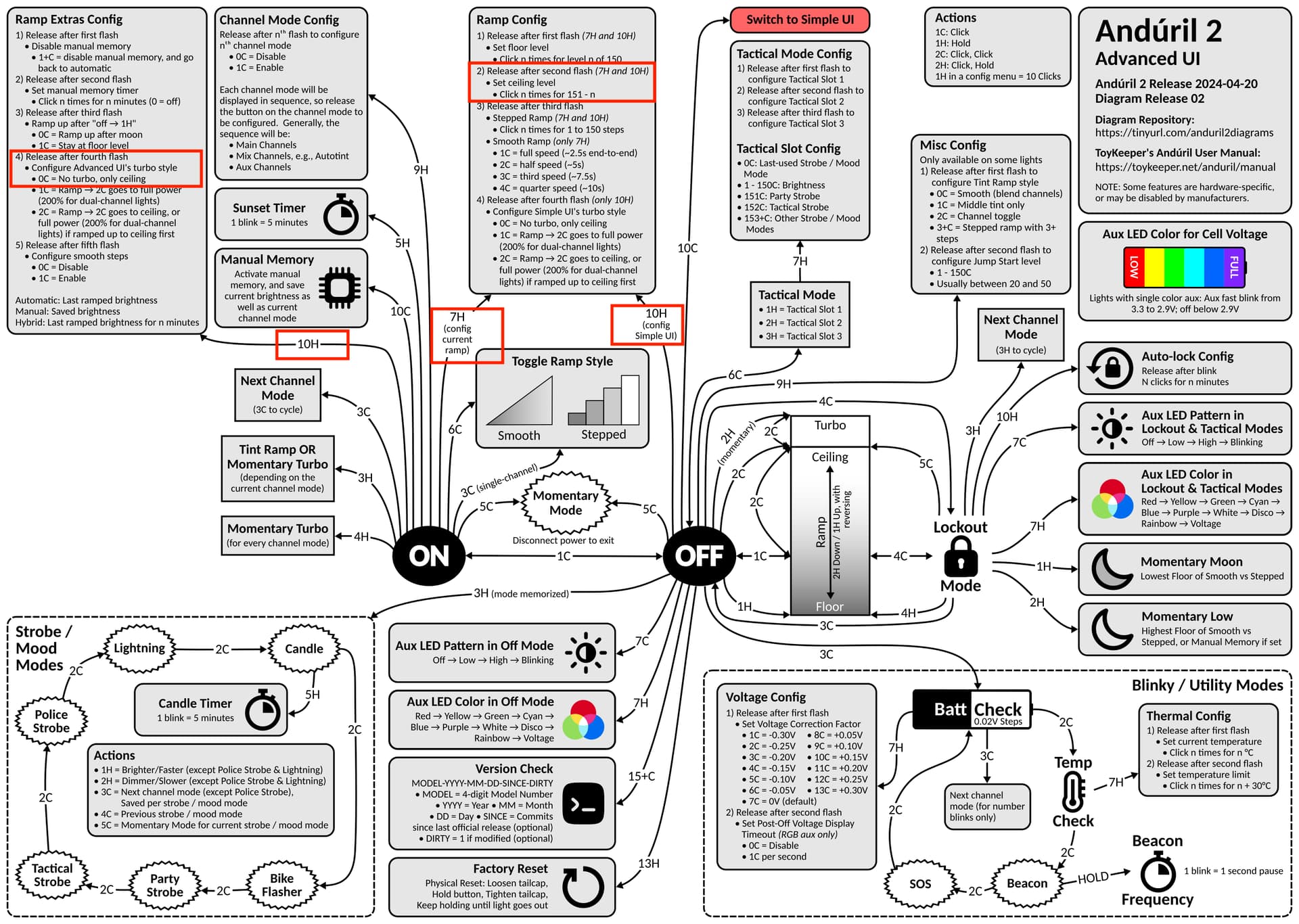
Here are the Text instructions, the light must be in Advanced mode to make these changes:
- To disable Turbo, start with the light ON
do 10H and release on 4th flash
do nothing else, just wait til the light finishes flickering… done
2a. To change a ceiling for Advanced Smooth Ramping
Start with the light ON, in Advanced Smooth Ramping
do 7H and release on the 2nd flash
clic 1 time followed by 1H, 1H, 1H, 1H, 1H (each 1H counts as 10 clics)
do nothing else, just wait til the light finishes flickering… done
2b. To change a ceiling for Advanced Stepped Ramping
Start with the light ON, in Advanced Stepped Ramping
do 7H and release on the 2nd flash
clic 1 time followed by 1H, 1H, 1H, 1H, 1H
do nothing else, just wait til the light finishes flickering… done
(In Advanced Mode, there are Separate Ceilings for Smooth and Stepped ramping)
2c. To change both Smooth and Stepped ceilings for Simple Mode
Start with the light Off, in Advanced Mode
do 10H and release on the 2nd flash
clic 1 time followed by 1H, 1H, 1H, 1H, 1H (each 1H counts as 10 clics)
do nothing else, just wait til the light finishes flickering… done
(In Simple Mode, we only need to set either the Stepped or Smooth ceiling as they both use the same value)


 ). Actual maximum is MAX. That’ll be our “turbo”.