So the flat-top 14500 batteries I ordered have arrived and I’m finally able to use my Emisar D2 Dual. One emitter is the Nichia 519A/4500K, and the other emitter is the UV configuration with the ZWB2 glass in front of it.
Given that configuration, tint ramping makes no sense. Except that’s how it was configured when I received it. No problem, I’ll just change it so that it does instant channel switching. I followed the guidelines for Anduril 2, and something’s not right. According to the manual, when the light is on in ramp mode, I’m supposed to do a 3H to switch channels. Except it’s not switching channels. Instead, 3H is enabling turbo on channel 1, not switching over to channel 2.
Messing around with it a bit, I was able to get channel 2 going, but only at the same time as channel 1.
So I started over, re-doing the steps to disable tint ramping and enabling instant channel switching. No dice… it still does the same thing when I try switching channels with 3H – it turbos channel 1.
While you’re D2 is ON in the smooth ramping mode, go to the stepped ramping mode with 3C. If a press & hold doesn’t ramp up, then you’re essentially at turbo because you only have 1 stepped level. You should probably add some stepped levels using the ramping menu with 7H. See if that works.
Also, most Anduril 2 lights ship in “simple UI”. Follow the instructions in the Anduril 2 chart to switch to “Advanced UI” before attempting to change configuration (10H from off).
I confirmed it was in Advanced UI before changing the ramp mode to instant channel switching. Then when things weren’t working properly, I double-checked again that it was in the Advanced UI. It’s been in the Advanced UI the entire time.
I hadn’t been using 3C for anything. 3H is supposed to do instant channel switching, but instead it’s going to turbo mode on channel 1. But because you just mentioned it, I tried using 3C… and 3C is doing something really weird:
When channel 1 is the only one active (let’s call this “A”), 3C instantly switches channels from channel 1 to channel 2. (Let’s call channel 2 being the only one active “B.”) When I use 3C in channel 2, it enables channel 1 at the same time, so both channels are active (Call this “C”). Pressing 3C here leaves both channels active but changes their outputs so channel 1 is brighter and channel 2 is dimmer (Call this “D.”) Pressing 3C again, it adjusts both brightnesses again, but not much (Call this “E.”). Pressing 3C again returns it to “A,” which is channel 1 only.
3H, which (according to the manual) is supposed to do instant channel switching, still turbos. It does this in modes A, B, and C only – not in D or E. 3H does nothing that I can see in D or E.
I’ve cycled through this sequence a few times now so that I could describe it here. and the behavior is consistent.
I’m lost, truly. I don’t see anything in the Anduril 2 manual that matches this behavior.
Respectfully, I find your mixing of the terms ‘channel’ and ‘mode’ is making it impossible for me to understand the steps you’ve been taking.
If you would be willing to describe again what steps you’re following by using the nomenclature from the Andúril-2 manual, hopefully this will help you describe precisely what you’re dealing with more clearly, but more to the point, help you figure out the programming sequences yourself. All the best!
I’m not trying to be argumentative but I think you mean 3c to channel switch, not 3h.
And to the OP, it would help if we knew the version of Anduril on your light.
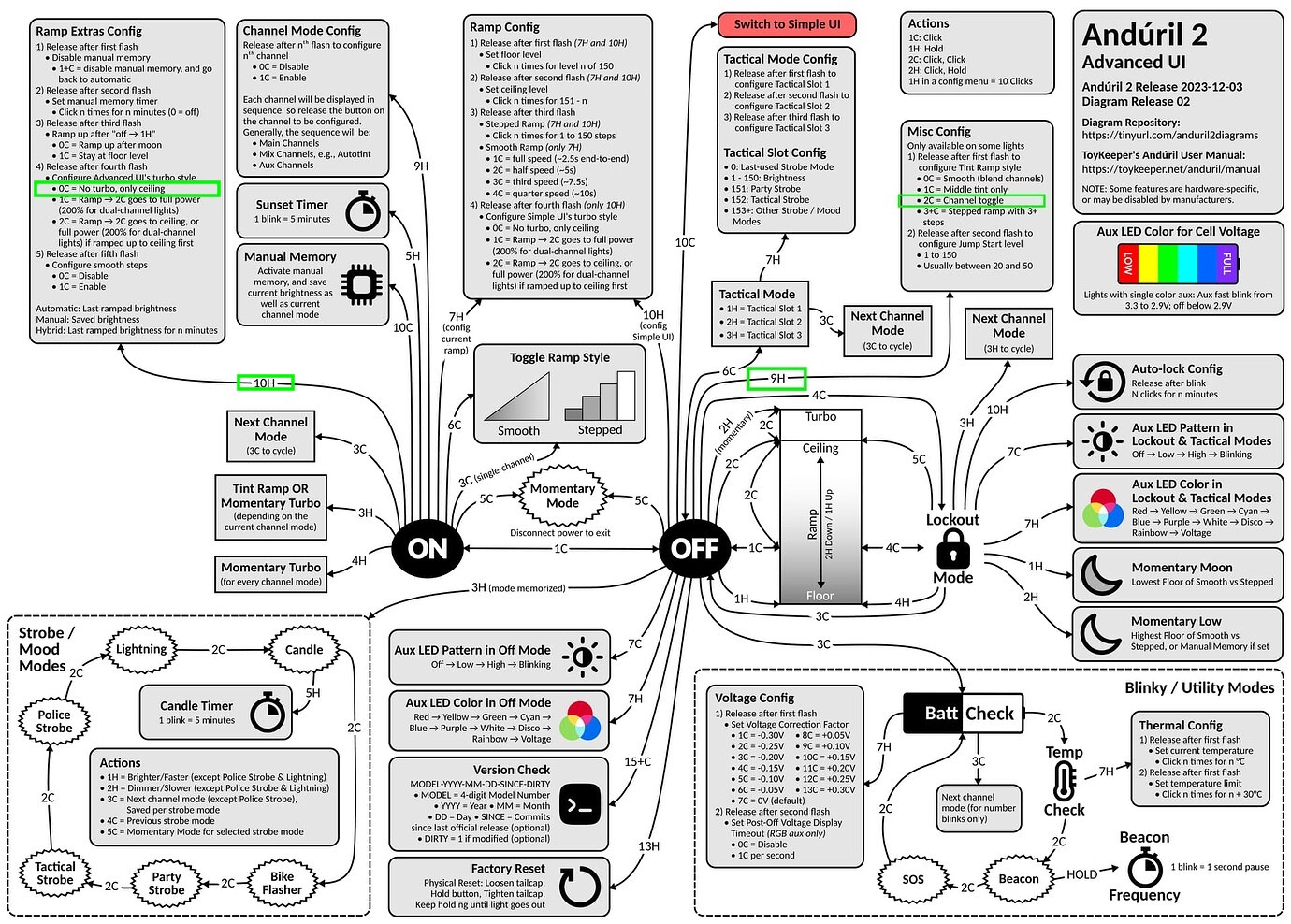
If you only want to switch between 2 channels then from on 9h will enter the Channel Mode Config as on the chart. I believe then you leave the first 2 channels enabled and disable the mix channels.
If successful you can then switch channels with 3c while on with no mixing channels.
Yes, it very much sounds like OP is using a manual/chart for an older version of Anduril2.
@OP: If it’s a recent version, then you need 9H from ON to enter “channel mode configuration” and turn off the modes you don’t want to use. This will only make sense to you if you’re looking at a recent version of the chart.
Thank you.
Which firmware version does the OP have?
I got my Emisar D2 on August 10, 2023, with firmware 2021 12 13 0135
If the instructions I posted do not work for the OP, he should check if his firmware version is the same as dirtydancing, and follow those instructions.
First, apologies for the delay since my last post. I’ve been away for a few days and only just got back.
I had high hopes when I saw that you also had a D2. I followed the steps you describe here, twice, and they did not result in the light working as you describe. 3H from ON does not switch channels; it runs whatever channel is active at full brightness while holding, in the modes I previously described as A through C. It still switches from A to B to C to D to E round-robin style when I use 3C.
I realize there are several more posts here offering advice. I’m going to dig through them and see if I can get this figured out. Thank you to all who replied.
apparently your light uses a different firmware than mine
you can do a version check to confirm if your light uses the firmware that dirtydancing describes here, or just try his instructions to see if it works
Alright – after a bunch of trial and error, I finally have this light working as I want it to. I was able to disable the three blended modes eventually (after first accidentally enabling a sixth mode, aux orange/yellow only). Now it switches between channel 1 and channel 2 with 3C (not 3H). I set the floor and ceiling to 3 and 115, which works well for me, and level 150 is available with 2C.
Thanks everybody for your help and advice. I now find myself wondering why such a useful little light – definitely designed to be an EDC-type light – has no attachment point for a lanyard. (I’m not a fan of clips.)
Pegleg – I got through it by following the flowchart for a very recent Anduril 2 multi-channel release. But the basic gist is this:
The light arrives with five modes active:
Channel 1
Channel 2
1 & 2 blended together equally
1 & 2 blended one way
1 & 2 blended another way
None of the combined modes make any sense to me in a light with one visible light channel and one UV channel. So I disabled the three blended modes.
To do this, you begin with the light turned ON. Then 9H will put you into channel mode config. While holding that 9th press, the light will begin to cycle through the channels. You’ll want to continue holding the switch until the fifth mode is displayed, then release it. The light will flash, and what you want to do at this point is nothing. If you don’t click the switch during those few seconds of flashing, that mode will be disabled.
Then repeat the process, releasing the switch when you see the fourth channel mode displayed. (You don’t have to recognize what the modes are – just count them, releasing when the 4th one is displayed.) Again, you’ll want to do nothing while the light flashes to disable that mode.
Then repeat the process again, releasing the switch when you see the third channel mode displayed.
You can re-enable a channel by following the same procedure but clicking once while the light flashes.
If you continue holding too long after 9H, you might accidentally enable one of the aux channel modes that are disabled by default. If you do, you can disable it the same way as described above, just waiting until that channel is displayed before releasing the switch after 9H.
Remember that in normal use, you switch between channels with 3C from ON.
I agree with moondigger’s instructions… Im going to say the same thing, in a slightly different way
will be glad to help.
Is the problem that both LED channels are turning on together? If So
Disable channel 3,4 and 5
to do that:
go to Advanced mode (to get to Advanced do 10H from Off)
From On, do 9H, while holding the button, the 1st channel turns on, keep holding, the second channel turns on, keep holding:
at the 3rd step, which turns on both LEDs, let go of the button and do nothing. Just wait for the light to stop flickering… This disables channel 3.
Now start over, Do 9H from on, and at the 4th step, which turns on both LEDs, let go of the button and do nothing. Just wait for the light to stop flickering… This disables channel 4.
Now start over, Do 9H from on, and at the 5th step, which turns on both LEDs, let go of the button and do nothing. Just wait for the light to stop flickering… This disables channel 5.
thats all
Now only channel 1 and channel 2 are active. To switch between them, use 3C from On.
Thank you both so much. I was so excited for this light and it has been driving me batty for the week I’ve had it. I must have been using guides for an older Anduril release. I’m not at home now and don’t have the light with me, but I’ll try this later and report back.