I’ve built 5 or 6 over the years not to mention taking them apart to clean and rebuild etc. Honestly, it is EXTREMELY easy, if you have any experience installing Windows and programs to get it set up, then you should be able to build a computer no problem. What I always do now is get the newest drivers available for my parts before I build the PC, burn them to a disk or put them on a flash drive then build the thing and install all drivers etc. I don’t bother with the driver disks that come with things as they are all usually months old and many versions behind by the time you get them.
That said, if you aren’t terribly good with PCs and are willing to spend a bit more a premade PC is the better way to go, you get support and a full system warranty in case stuff happens. I do usually recommend that to friends who want a new PC and don’t want to mess with it too much, as I don’t want to be 24/7 tech support, lol.
After decades of being an AMD devotee I recently sold out and spent way way too much money on a 1155 Z77/i5 3750K water cooled setup... if you do anything that requires serious computational horsepower, like video encoding or gaming, the AMD stuff is lagging far behind. But I suspect if you did stuff that needed the extra HP you'd already know at least in general which way to go on choosing hardware.
For normal use - web browsing, photo editing, video playback - even the current range of low-end parts is plenty good enough. Even today's CPUs with integrated graphics are good enough. If you only need one hard drive + one DVD, any motherboard will have more than enough SATA ports, so you can look at the cheaper slimmed-down miniATX versions.
Dual-core AMD socket FM2 system will do everything you need for about half the money of even the cheapest low-end Intel stuff.
Yea, I am sure a lot of advice can be offered. I would recommend a Intel Core i5 Ivey Bridge with 8-16gb RAM, SSD boot drive, 1 or 2TB storage drive and just use the built in graphics capability of the i5 as you don’t need gaming.
Edit: oh, by the way… that nzxt internal usb hub is JUNK… im still using my second and anything that requires data transfer is pretty much hit or miss on it. maybe they are on to a new revision now, but i dont think i will use it again. they now have these usb header 2 port adapters… that i will use next time, and deal with the wires to my other usb ports on the front
Who could forget plug and pray, MS-DOS 6.22, undelete, msav, 8MB of ram cost $400+!
I stayed with windows 3.11 for quite a while, it wasn’t till the next upgrade that I used 95 extensively.
GFX: ATi HD7750 Core (Get one of the better branded boards) $90
RAM: Patriot Viper 8GB (1866 5-5-5-6) $60
HDD: WD Caviar Blue 1TB $99
Optical: LG Blu-ray Combo $54
OS: +
Networking: +
Monitor: +
Interface peripherals: +
So far I've upgraded with 16GB ram for video editing and added about 4TB of internal storage. I've also bought a USB3.0 PCI Card, you might wanna just get a mobo with USB3.0 support.
If you wanna video edit, go Intel. (But I pretty much just game.)
Despite what someone up there said, my AMD gets higher FPS in any game than any Intel i5 I've come across that costs >$100 more.
Don't burn the latest drivers to a disk, that's a waste of a disk. Just stick it on a thumb drive. If your mobo doesn't support USB natively from the get-go (ie. you should be able to boot from your USB device) then it's too old.
This is way off topic, but the new 3570k at stock speed is around 1/3 faster in all benchmarks than the old Phenom II 955 overclocked to 3.95ghz. And the thing that finally pushed me over to the dark side, is disk throughput on the AMD chipsets flat out sucks. Z77 is nearly twice as fast as the AMD SB850 with the same SSD (tested with both Neutron GTX & Kingston HyperX), and I tried every possible driver/config combination to help it out... no dice. AMD(ATI) driver issues are a PITA, too. Random crashes, event logs full of errors there are no solutions for other than 'just be patient, maybe they'll fix it in the next release' (of course, they never do).
Here’s a few pics of my creation running slightly overclocked from stock 2.8Ghz to 4.2Ghz. The Prolimatech Megahalems heatsink is slighter larger than what you’d find in a typical flashlight, and does the job very nicely and I listed a few of the specs below:
HAF-932 Case
Asus P6X58D LGA 1366
Corsair XMS 2GB DDR 1600
SeaSonic X750 Gold 750w Power Supply
EVGA GeForce GTS 250 1 GB DDR3 Video Card
Sanyo Denki San Ace Case Fans throughout (5)
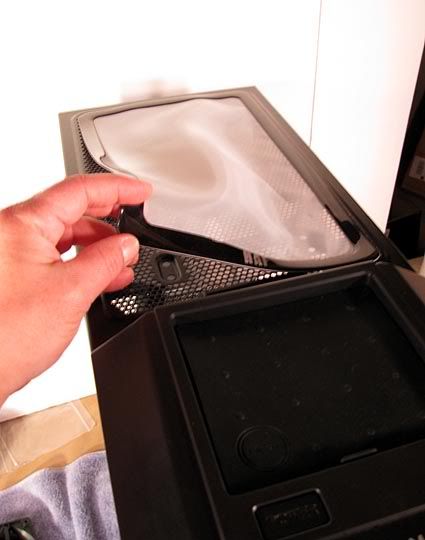
DEMCi Flex Magnetic Fan Dust Filters x 4
Lamptron Digital Temp/Fan Controller
yes its very fast . you can burn a movie and watch a movie and have 50 browsers open and do some video edditing all at once and itl run at 60 70 %
32 gigs of ram memory .i have 3 1 tera byte hd disks in there for storage . bought it to play crysis 2 .took me 2 months to finish . those 3 legged aliens kept killing me for a few weeks!
 and I listed a few of the specs below: