Why Computers Die – POST it here…
A few pics from the collection.
All the Best,
Jeff
If you’ve got some more - Stories or Pictures – Let’s see them!
Don’t Touch that Floppy,
You don’t know where it’s been…
Client states: “System won’t power on” “There has been no water damage in our office”
In with the clean air out with – Not very much.
Power Supply failed, must be defective fan….
Why smoking and computers do not mix
You can’t imagine how bad one of these smells…
Client states: Computer was making a noise, but it finally stopped. But now it won’t boot.
Think maybe you should have had a service when the fan started grinding?
I was an IT tech and saw some gnarly stuff, mostly human-caused.
The biggest enemy was heat buildup. Of the components are subjected to excessive heat for long periods, they die faster. Dust, debris, spider webs clog air intakes and fans and heatsinks. I see a lot of sorry fans that don’t get cleaned right, cause g the bearings to fail amd the fans stop or slow.
I’ve had cl9ents who turn their machines off by pulling the plug instead of doing a proper shut down. That cam corrupt the hard drive.
I’d say the majority die of component failure, age or heat.
At least for now, you can put Win11 on older hardware.
Just got to get around the TPM 2.0 and a few other hiccups.
Supposedly less secure than using the supported hardware.
I wonder how much Intel had to fork over to make perfectically good speedy older processors fail the Win11 test.
BUT…
Who knows if/when MS will close that door.
Funny, when Apple nukes an entire older hardware line, well it’s just for the good of all, the fanboys cry.
When a 14 year old printer won’t work in a current Win version - why it’s a conspiracy…
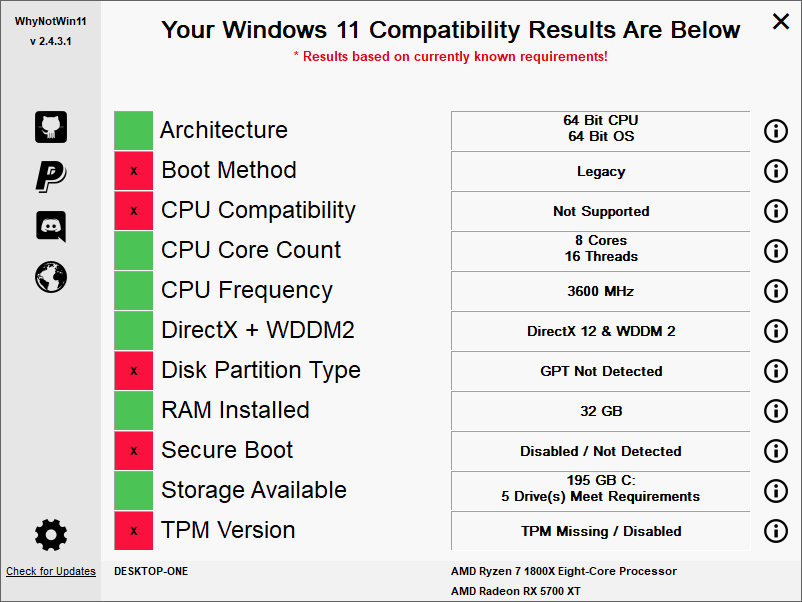
BTW there is a way better Win11 check than the one from MS.
WhyNotWin11 gives more info.
Scroll down to the bottom of the page to find the download.
All the Best,
Jeff
There are actually a number of ways to install Win11 on machines missing TPM 2.0, older CPU’s, etc. The easiest way is to create an install iso using a later version of Rufus . Alternatively one can also make a few registry entries as shown here or here . It’s interesting that different registry entries work. The first set of registry entries work fine on a 10 year old PC I have, while I create an iso using Rufus to install it on my newer pc that doesn’t have TPM 2.
I created dual boots on both pc’s in order to be able to get rid of Win11 if I decided I didn’t like it. To be honest I don’t see any advantages in running Win11 instead of Win10 but I do see some disadvantages. Both pc’s get all the Win11 updates pushed by Microsoft in case anyone is concerned about that.
Unless you really want if for some reason I would skip it for now.
About 15 years ago I used to do side jobs for someone I referred to as “Bob the tractor guy”. He has a small Novell network set up in a trailer, with homebuilt computers and a server, open cases, cables on the floor, in the California High Desert. Absolutely no dust protection whatsoever. The pics in this thread look very much like what I had to deal with
I generally find 90% of computer failures can be traced to PSU problems though. Never, never, EVER skimp on your PSU if you care about your computer.
…If you’re building a throwaway box, well then, put in a throwaway PSU
Windows 7, 8, 8.1, 10, and 11 are so similar, I think if you can install one of them on a computer, you can probably install any of them on that same computer (if you're willing to jump through some hoops.)
My old laptop has started acting strangely after opening the lid. It used to power on automatically and connect to wifi. Now I have to press the power button to power up and usually have to cycle the button off/on to connect to wifi. Is this a POST issue? I’ve tried changing the power options as to when to sleep but no help.
Most likely not a POST problem.
POST is Power On Self Test. That happens before the operating system loads.
More likely is a setting in the power options or perhaps an update to a driver (Less likely).
Even a weaker battery could be causing this. (Forcing the laptop into a hibernation state vs a sleep state).
Take a look at the advanced power options and see if the system is set to go into hibernation after a certain time or battery level.
Sometimes systems get “stuck” in hibernation for some reason.
Also do a manual “Check for Updates” then look at the optional updates and then under drivers.
There may be a driver related to the power settings that could help.
All the Best,
Jeff
Those are fantastic pics Jeff51! Thanks for sharing them.
As an aside, I bought an older 8 year old refurb Dell Windows 10 machine with 16GB ram off of Ebay, stuffed a 2gb SSD drive into it to go with the 2gb HDD it came with and after making the bad choice to try Linux Ubuntu as a dual boot machine leaving windows 10 on, took windows fully off and found true happiness with Linux Mint.
Thanks Jeff. I will try those suggestions. Right now it is almost ok. For a while it would lose wi fi if I moved the laptop to another location. It has stopped doing that. It’s getting old. It has 4 vertical lines on the screen. It doesn’t owe me anything.
I like Mint myself. Interface is easier for Windows users to deal with.
And an SSD is like power steering and Air Conditioning.
Once you have it - you can never go back…
Lately I’ve been playing with Q4OS. It’s based on Debian instead of Ubuntu.
Unless there is some specific iOS or Win software needed, Linux will do for everyday tasks. I prefer LibreOffice to MS mostly.
The only deal with Q4OS - it is the slowest to install and update Distro I’ve ever tried. Seemingly takes forever compared to the rest.
All the Best,
Jeff
I like Mint as well. Have it on an old macbook with a SSD and it is almost as good as my newer Mac — in some ways actually better. I’m certainly not going to Windows — never have liked it. Don’t like the direction that Apple is going though and will not run my business applications on signed software that gives Apple the ultimate say in whether applications that we have developed over decades are even allowed to run! I know I am out on the fringe to be against such a thing but no one has yet to convince me that it is a wise choice to give up control of your own work. We are supposed to have full trust in a large corporation. Why would a large corporation ever do anything that might hurt a customer? They would never actually shut my ability to run my business down simply because they can! I may be fringe but I sure don’t think I’m crazy.