Hello folks! New to the forum here. Can someone point me toward an article or video explaining the purpose. I thought ceiling and ramp were 2 different things but now im thinking no. Purchased a d4k recently.
Ceiling is top of ramp. Meaning, as you press and hold the button to increase brightness, it will stop at the set ceiling. You can configure how bright the ceiling is.
Here’s a link to the written manual that’ll tell you all that’s possible with your new light: anduril/docs/anduril-manual.md at trunk · ToyKeeper/anduril · GitHub
4 Thanks
For starters, what’s your actual concern?
So ceiling and ramp are the same thing.
It’s a question…is there a difference in ceiling and ramp, for starters?
Thank you for your response
Yes. Ramp is the smooth way of reaching a set ceiling. Stepped is the stepped way of reaching the set ceiling.
A ceiling is the maximum set value the ramp can go to. A ramp is just a method to get there.
1 Thank
Ok I’m not making myself clear, been a long day. I guess what i mean is are ceiling and turbo different. Not trying to be hard to get along with.
1 Thank
If you set a ceiling below turbo, holding the button to increase brightness will stop at the new ceiling. However you can still activate max turbo by double-clicking when the light is at the ceiling.
The light generated at max turbo can be enough to burn a hole through a pocket in seconds. Sometimes I set the ceiling at the max pocket-safe brightness. That way if the light accidentally activates it is less likely to damage my pocket.
To get to max turbo I then have to double-click to get to max ramp, then pause a couple seconds and double-click again for max turbo.
4 Thanks
yes,
Ceiling and Turbo different
by default, Ceiling is level 130 of 150
Turbo is level 150 of 150
by default Turbo is Off in Simple UI, and
by default Turbo is On in Advanced UI,
What are you trying to figure out, that makes you ask that question?
6 Thanks
I didn’t get the feeling that you were being hard to get along with, there was just a bit of “lost in translation” going on. Both Jon_slider and Firelight2 have given much more detailed information than I have. To echo Jon’s question, is there anything specific you were trying to accomplish?
If you look up “Anduril 2.0” on the forum, there will be a few results, including a repository and some graphics/flowcharts of the UI that give stipulations and directions on how to customize the firmware.
A belated welcome to BLF, and don’t get too frustrated with Anduril 2…it’s one of those “it just clicks, and holds” situations. (Yes, pun)
1 Thank
Gotcha that answers my question. But no i love Anduril, that is one function i have yet to tinker with. So if a factory reset is administered, does the turbo default to 150?
I believe that no matter what, turbo will always be the equivalent of 150/150. I also believe that it’s possible to set ceiling to 150/150, essentially making ceiling = turbo.
What I’ve personally done is to disable turbo mode, then cap the ceiling to -86, which is right around 150 lumens.
Generally speaking, ramp will hit ceiling, and will require a double click to get into turbo afterwards. So essentially, if turbo is active and you’re sub ceiling, a doubleclick (2C) will get you to ceiling, and a 2c after that gets you to turbo.
2 Thanks
yes
even without a factory reset, Turbo is always level 150
after factory reset, Turbo is On in Advanced UI and Off in Simple UI
true, IF using the Turbo style from Anduril 2.. red arrow:
there is also a different Turbo style, called Anduril 1 style (this is the default after a factory reset)… green arrow:
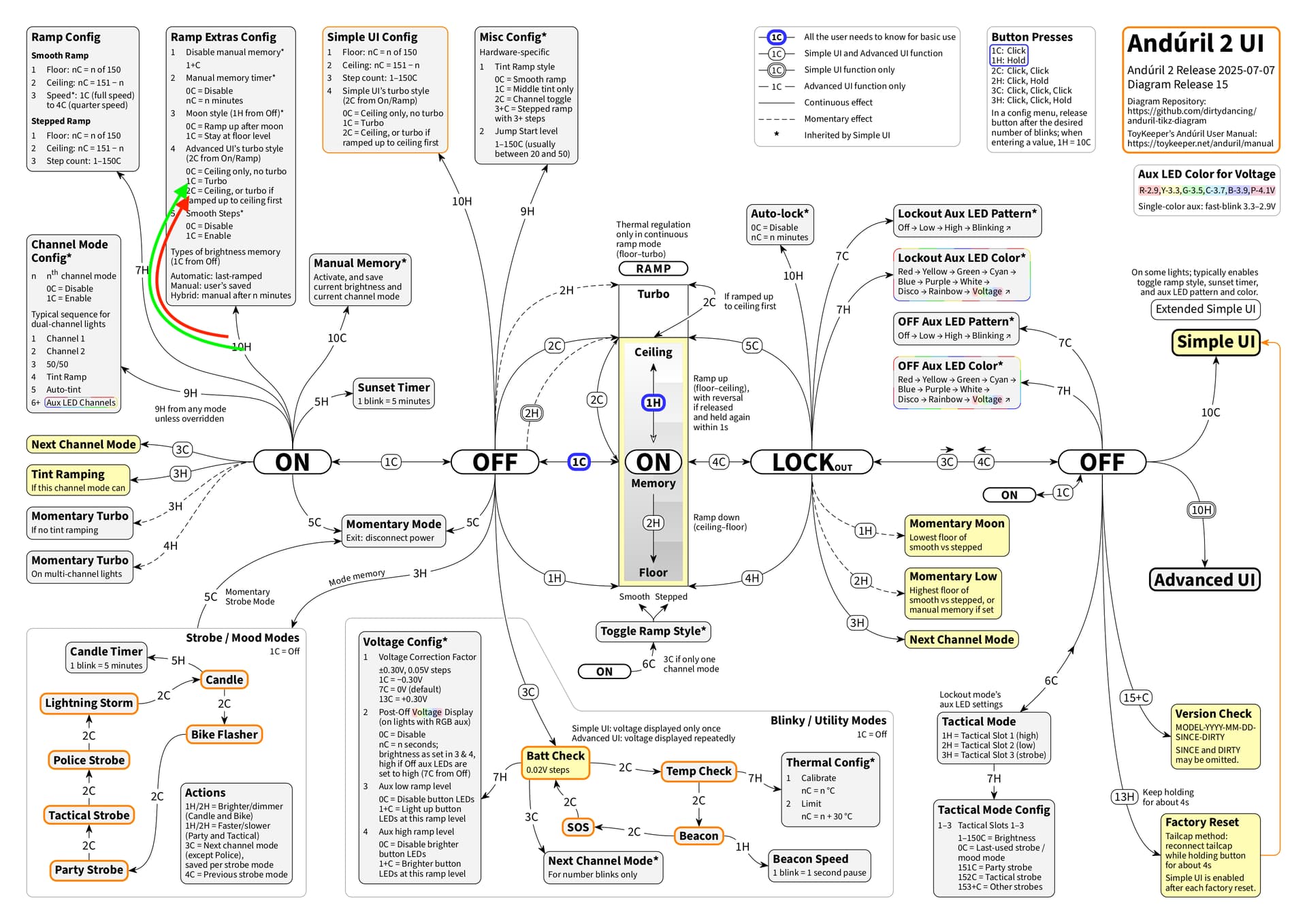
with Anduril 1 style, when the light is On (at any output level), 2C goes straight to Turbo, 2C from On skips Ceiling completely
With both Anduril 1 and Anduril 2 style Turbo.. From Off, 2C goes to Ceiling. But with Anduril 2 style Turbo, the next 2C does not go to Turbo. Only w Anduril 1 style Turbo, does a second 2C go to Turbo.
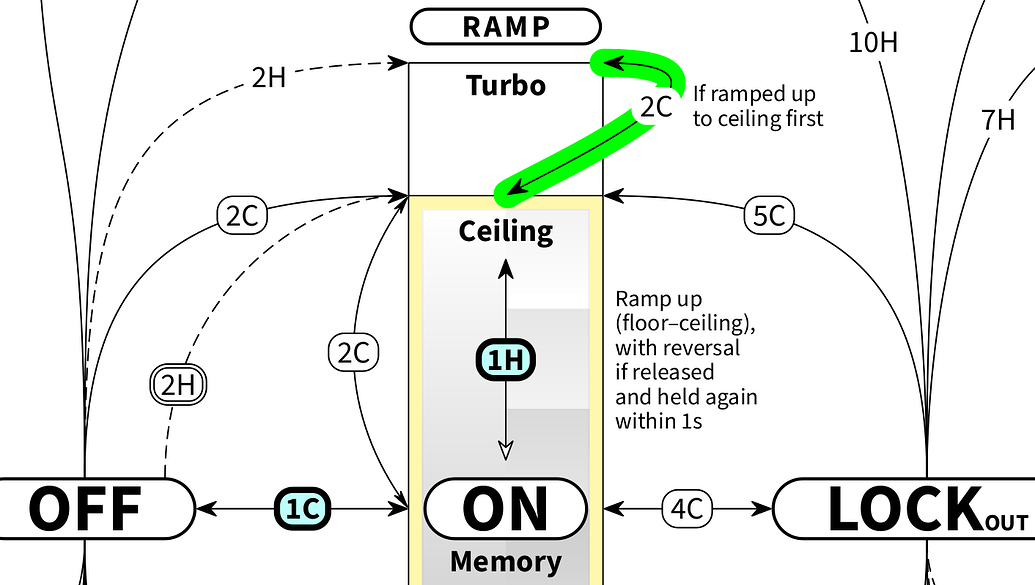
With Anduril 2 style Turbo, the Only way to reach Turbo with 2C, is to Ramp to Ceiling first. Only Then, will 2C from On at Ceiling, go to Turbo.
because of these inconsistencies, I disable Turbo. That way 2C from Off and 2C from On, both produce Ceiling..
I have other reasons not to use Turbo.. for example, battery savings.
I also consider Turbo counter productive because if I use it, my eyes become desensitized to lower outputs.
Another reason I choose to disable Turbo, is that it only works very briefly, and the light quickly steps down, due to heat.
Another reason, is that in the past with the TS10, Turbo would burn the LEDs.
so for all those reasons, I disable Turbo in Advanced UI. It is one of the first settings I change when I receive a new light. (or after a factory reset, which enables Turbo of Anduril 1 style, as a default in Advanced UI)
This is not true with Anduril 2 style Turbo, IF Ceiling is reached by 2C from Off, or by 2C from ON. The next 2C does not go to Turbo, it goes to the previous Ramp output.
I do not use Anduril 2 style Turbo, and it is not a default after a factory reset.
this is from The Online Manual:
- Item 4: Configure Advanced UI’s turbo style:
0: No turbo, only ceiling.
1: Anduril 1 style.Ramp -> 2Cgoes to full power [Turbo].
2: Anduril 2 style.Ramp -> 2Cgoes to ceiling, or goes to full power [Turbo], if user ramped up to ceiling first. This value also affects momentary Turbo in Ramp and Off modes.
1 Thank
Thanks for the info. Looking at D4SV2 for my next Hank lite or DM11 not sure.
1 Thank
You are welcome
I hope it helps you 
Thank you for laying out all the details. Maybe to elaborate some more:
For “vanilla” generic Anduril 2, as the name suggests, Anduril 2 turbo style is the default turbo style. This is why the diagram from above by myself is displaying Anduril 2 turbo style.
Still, for a given light, the default turbo style depends on the model number / manufacturer. For example, Hank lights use Anduril 1 turbo style as the default. Because this differs from the “vanilla” Anduril 2 turbo style default, this has to be configured in the source code, which it is, see hank/anduril.h.
Personally, I have had good experiences with Anduril 2 turbo style (I like having primarily a shortcut to Ceiling, but I also like to have Turbo at hand for mostly brief bursts), so preferences differ.
Just to illustrate (I actually did this): To get Anduril 2 turbo style as the default for example on an Emisar D4K with the old boost driver, model number 0273 (hank-noctigon-dm11-boost), all it would take is to comment out the one line that includes hank/anduril.h (so it would not be included anymore), and recompile. This would give you a “vanilla” Anduril 2, with Anduril 2 turbo style as default (and for example also without “Extended Simple UI”, but rather with “vanilla” generic Anduril 2 Simple UI).
This is currently not possible, neither with Anduril 2 turbo style (again, the second 2C will go back to the previous Ramp output) nor with Anduril 1 turbo style (the first 2C will already go to Turbo, no Ceiling involved here). But there is a pull request over at GitHub to extend the Turbo options to exactly what you described and to allow a “double” 2C to first go to Ceiling and then on to Turbo:
With Anduril2 in advanced mode you can set the ceiling to 150 fairly easily so that the ceiling and turbo are the same. That way double clicking once from off or on gets you to turbo.
While the light is on press the button rapidly 7 times and keep holding the button down on the last press. While holding the button down wait for the light to start flashing and flickering rapidly. Right after the second flash click once and then let go. Wait five seconds for the light to stop flashing.
The hardest part is clicking 7 times and holding on the last. I count 6 quick clicks and then click and hold one final time. Sometimes it takes a few tries.
1 Thank
Yeah. The important thing here is that it is “if user ramped up to ceiling first” (not 2C to ceiling). This is a somewhat tricky distinction, see this post of mine on the visual representation of this in the diagram from above. Picture from the other BLF thread:
3 Thanks
Thank you. I am aware of this, and I actually like the distinction between ceiling and turbo, so I would not want them to be the same. I consider this to be a great functionality of the Anduril 2 brightness ramp, and I almost always use ceiling, and turbo only briefly, if at all.
For example, indoors I will mostly be below-ceiling, so I do 2C to get to ceiling (Anduril 2 turbo style), which almost always is bright enough. At other times, mostly outdoors, I will set ceiling to a sustainable level, possibly to 110, so I can ramp up to ceiling and keep the same brightness going. I can then still do 2C to get to turbo if need be (again, Anduril 2 turbo style), or 3H anyway for momentary turbo.
1 Thank