I have a TS10 V2 that I reflashed to 0712-2025-07-07 (anduril.r2025-07-07.wurkkos-ts10-rgbaux-lowfet.hex), and I just did a factory reset to test the default Turbo style
it uses Anduril 1 Turbo style
if the light is ON at Any output level, 2C goes to Turbo, totally bypassing Ceiling. The light does not need to be at Ceiling to get to Turbo
if the light is OFF, 2C goes to ceiling, and the next 2C goes to Turbo
that matches what dirtydancing said about Emisar lights shipping with Anduril 1 style Turbo.. From On at any level, they go to Turbo, bypassing Ceiling completely.
fwiw, from Off they go to Ceiling, and then from On (in this case at ceiling) 2C goes to Turbo
it is this difference in behavior of 2C from Off (gives Ceiling), as opposed to 2C from On (gives Turbo), that creates the inconsistency I dislike. And is one of the reasons I disable Turbo. That way 2C from Off, and 2C from On, both go to Ceiling.
or you could raise Ceiling to 150 as Firelight2 does. In which case 2C from off will go to a Ceiling (of level 150), that is the same brightness as Turbo (also level 150):
From what I can tell, this only goes for Anduril 1 turbo style. You can only get to ceiling with 2C from OFF, not from ON (goes to turbo), and then, yes, another 2C goes to turbo, which is totally expected with Anduril 1 turbo style.
In contrast, with Anduril 2 turbo style, from ON you indeed need to ramp up to ceiling to then get to turbo with 2C. From ON, 2C will go to ceiling, and another 2C will go back to the last ramped brightness. From OFF, 2C will go to ceiling, and another 2C will also go to the last ramped brightness, not to turbo.
Maybe I am missing something here? I just checked with a DA1K, Anduril 2 untouched as shipped from Hank, version check 0281-2025-07-07. After a factory reset I switched to Advanced UI (by default, ceiling for both smooth and stepped/discrete ramp in Advanced UI is set to 130 in the source code), and Anduril 1 turbo style (default in this light) acted just as I described. I then switched to Anduril 2 turbo style, and it acted just as I described as well.
" From ON, 2C will go to ceiling, and another 2C will go back to the last ramped brightness."
I just got a DA1 that arrived last week. From On, 2C goes straight to turbo. Another 2C goes back to last ramped mode. To save a click. From On, 3H goes to turbo as long as you hold. When I let go it goes back to last ramped. (Momentary Turbo on the flow diagram)
Yes, all looking good to me as well, Anduril 1 turbo style (default for this light) in action here.
Just to clarify, this quote of a sentence of mine relates to Anduril 2 turbo style, see these two sentences:
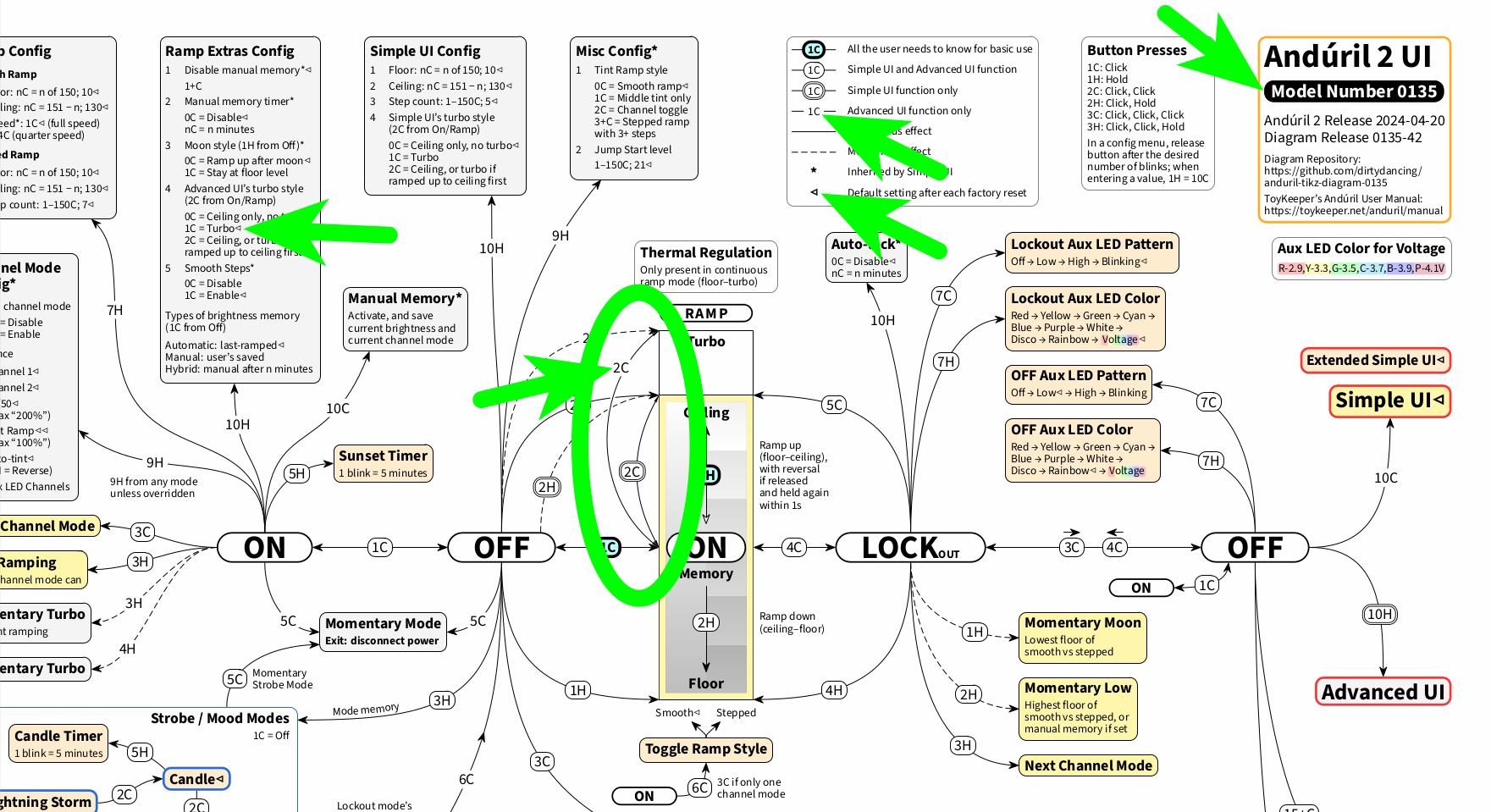
By the way, to try and address these kinds of differences visually, in the past I have created an exemplary model-specific diagram for model number 0135, hank-emisar-2ch (for example for Emisar D2), which displays Anduril 1 turbo style, Extended Simple UI features, and the model-specific default settings (for Anduril 2 release 2024-04-20 only).
As you can see, in Advanced UI, Anduril 1 turbo style is the default turbo style there as well and goes straight to turbo with 2C from ON (source):
Thanks to you for bringing up this subject (again). This has come up before, see for example this BLF thread and also partly this other BLF thread. So there still seems to be some room for Anduril 2 clarification here.
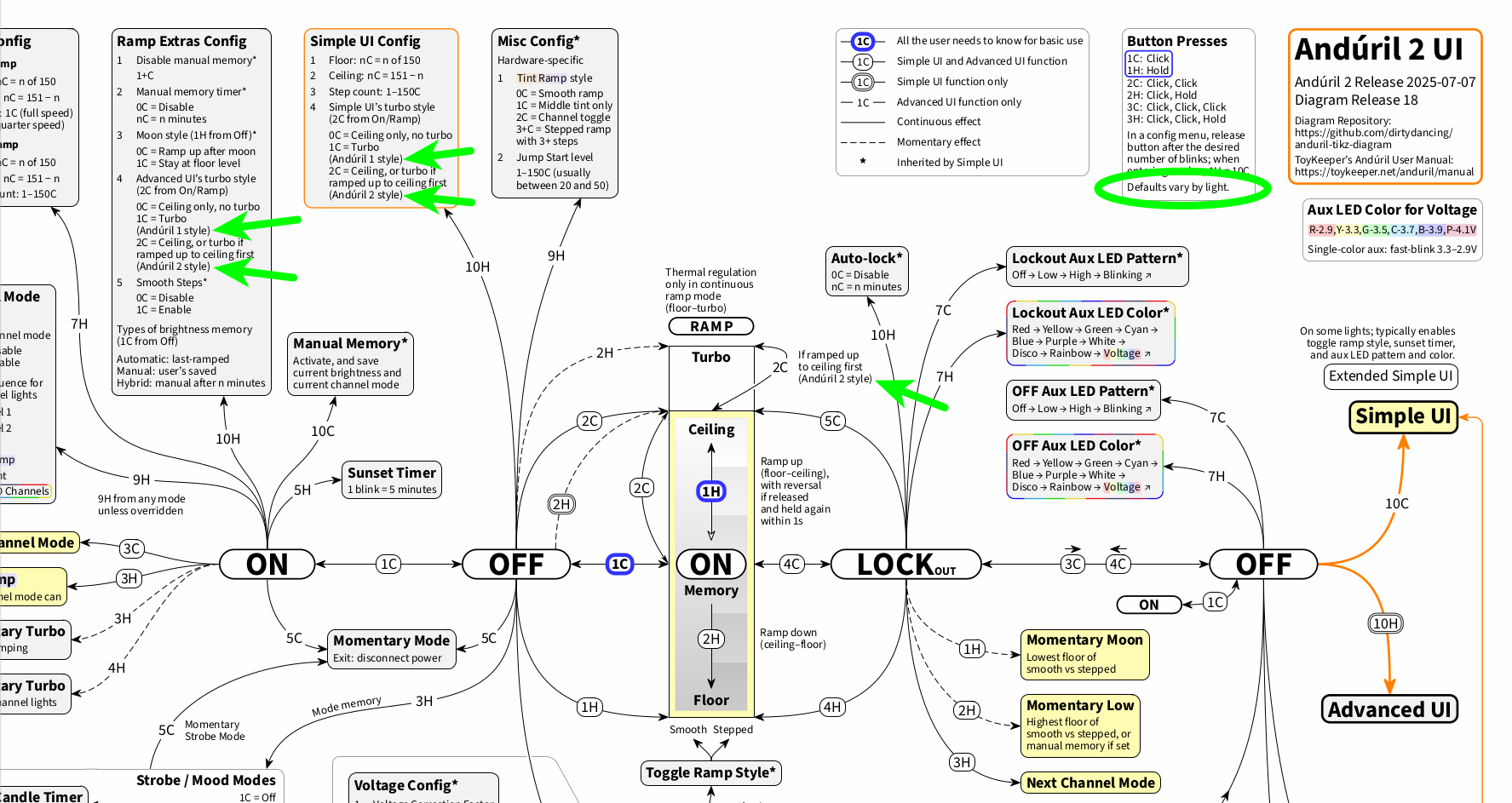
Because this subject has come up once again, I have updated the vanilla generic Anduril 2 diagram by myself (source).
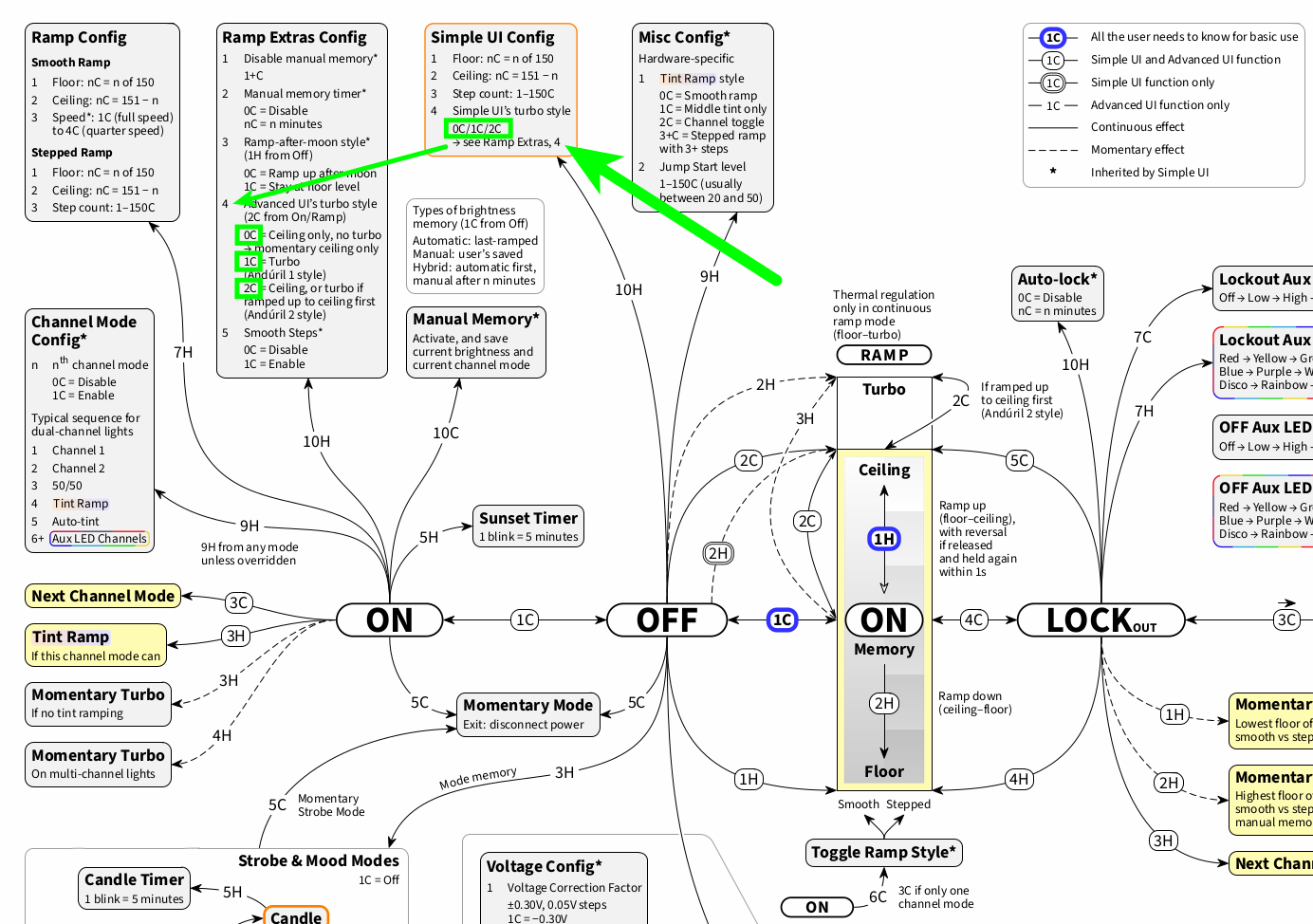
Based on ToyKeeper’s manual, the diagram now includes Andúril 1 style and Andúril 2 style for Advanced UI’s turbo style as well as for Simple UI’s turbo style; Andúril 2 style is now also included next to the ramp image for 2C for turbo in Advanced UI. This way, it should be easier to see what is going on with the turbo style displayed, or at least to know what Anduril 1 turbo style and Anduril 2 turbo style refer to.
In addition, I have added Defaults vary by light. below the config menu information text. With this, it should be clearer that also the default turbo style for a given light may differ from the vanilla generic Anduril 2 turbo style for Advanced UI. So here is to the next discussion about “2C and Anduril 1 or 2 turbo style”, maybe then with a clearer visual understanding of what is going on:
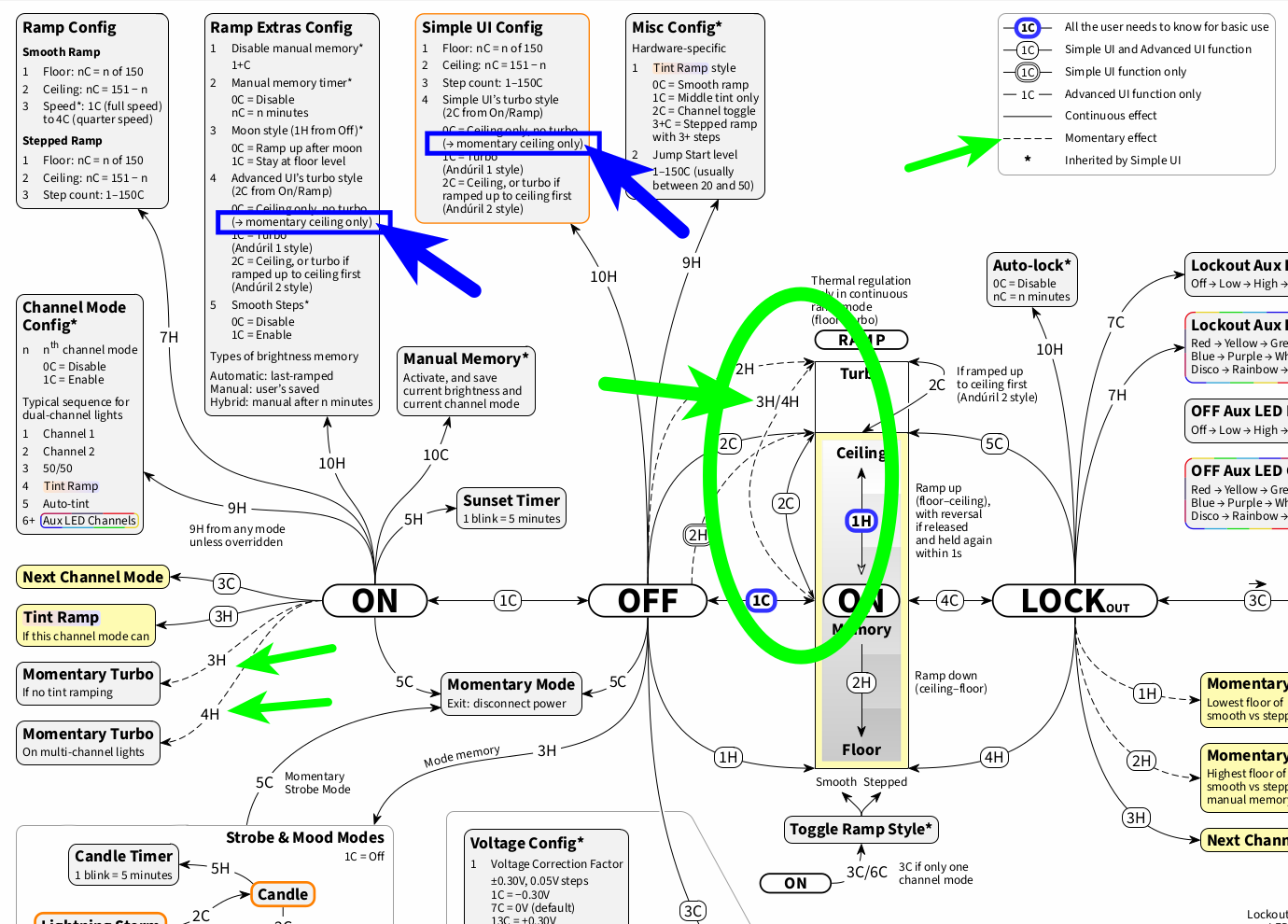
Coming back to this: Thank you for bringing up 3H momentary turbo from On; I regularly use it. When it comes to the three turbo styles and to momentary turbo, Anduril 1 turbo style (1C) and Anduril 2 turbo style (2C) go to momentary turbo, but “ceiling only, no turbo” (0C) goes to momentary ceiling only.
I have documented this for 0C in a new diagram release. In addition, while 3H/4H from On are already included in the diagram on the left-hand side, I have also visualized 3H/4H from On in the ramp image, to make this function more visible and accessible (diagram source):
By the way, this goes to show a (to me) welcome consistency of Anduril 2 turbo style: 2C from On as well as 2C from Off consistently go to ceiling with continuous effect (you still have 2C from On for turbo if ramped up to ceiling first), and there is always momentary turbo available with 2H from Off and 3H from On. 3H is also a good way to tell if you are in Anduril 2 turbo style: If 3H gets even brighter after 2C from On, you are in Anduril 2 turbo style indeed.
Here is a follow-up to the diagram’s turbo style representation: Including the details of turbo style (as discussed here) has taken up a bit of space, so, to keep the diagram flexible for the moving target that is Anduril 2, I have done some repositioning.
Regarding Simple UI’s turbo style, for 0C/1C/2C (which can still be marked as needed) there is now a reference to Ramp Extras, 4 (Advanced UI’s turbo style); this way, there is no need to repeat all the turbo style details once again:
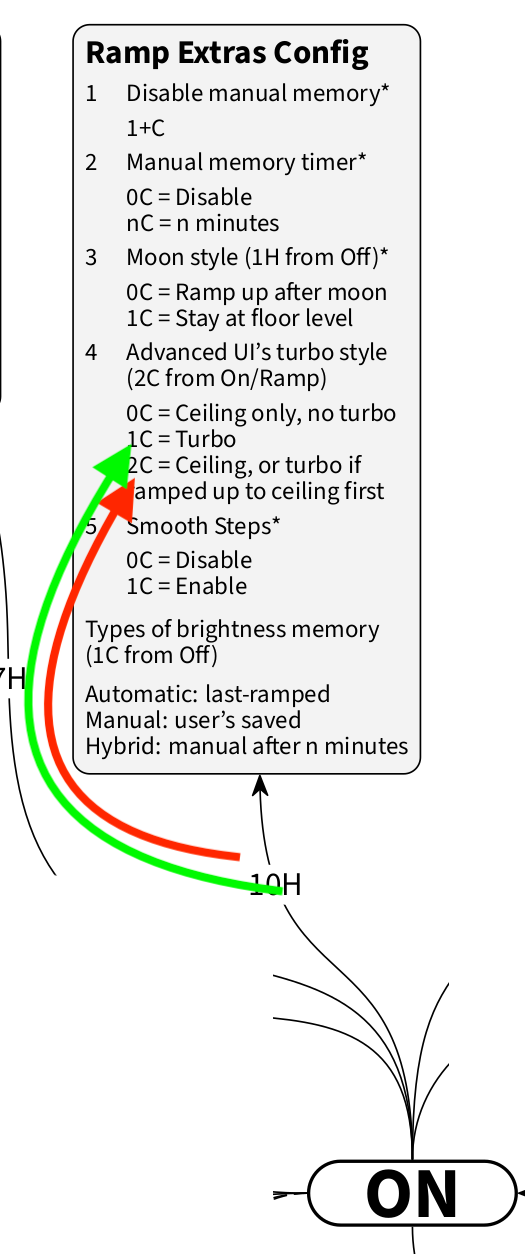
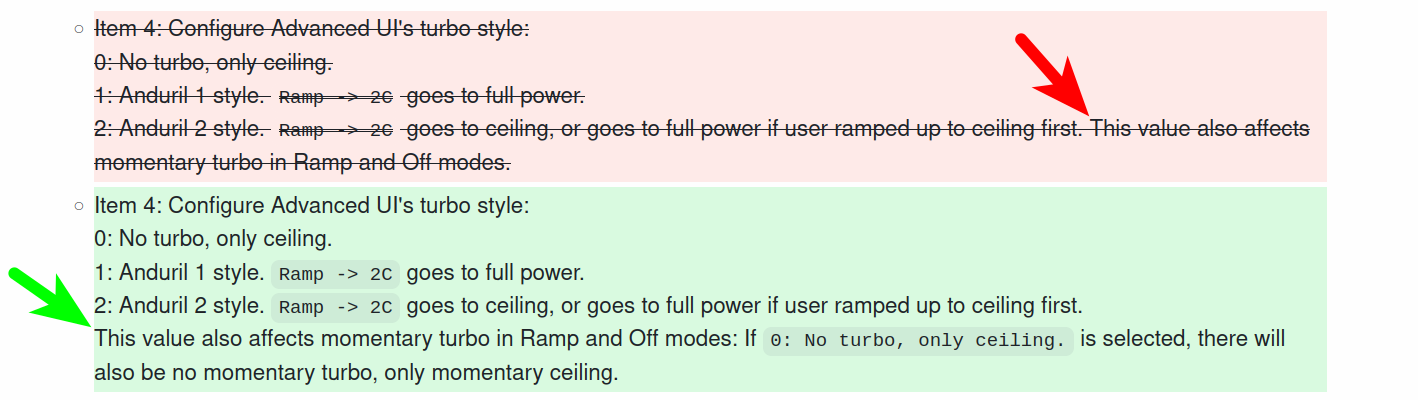
Here is yet another documentation detail: Coming back to the turbo style topic and in particular to momentary turbo and to “This value also affects momentary Turbo in Ramp and Off modes.” in ToyKeeper’s text manual, I have created a pull request over at GitHub to clarify in the manual what this means:
This is a comparison of the present layout (red) and the proposed new layout (green):