Opple Light Master 4 discussion thread (new 2023 model)

I got one by now, it’s really fun to use - my only gripe is that the quantum efficiency is not well calibrated for my unit, so I get a wavy spectral intensity when it should be flat. This obviously messes up CRI and DUV calculation.

v0.2 seems to be entirely uncalibrated, v0.3 is a lot better, but still not entirely right. I’d need a continuous spectrum light with known spectrum so I could calibrate my quantum efficiency :confused:

What is quantum efficiency? It sounds like some sci fi stuff.
Ok I googled it. But how do you know how good or bad the quantum efficiency is? And how it impacts CRI and Duv?

The issue is, sensors are not equally responsive to all wavelengths. The efficiency of a sensor at collecting light is quantum efficiency - an ideal sensor makes 1 electron per photon. However, a real sensor does not, and for example in green there might be 0.5 electrons per photon, in red 0.3 and in blue 0.2 (pulling random numbers just to illustrate).

For professional spectrometers, this is calibrated (they either have a built-in self-calibration function, or you gotta calibrate them with calibrated external lamps).

I do not have such a light, so I do not know how my spectrum really looks like. Might be that green is too high compared to red and blue, might be it is too low (very simplified, in reality the spectral respone of the sensor can have all kinds of dips and peaks and other weird shapes). Since DUV, CRI, R9 and even CCT depend only on the shape of the spectrum, if that shape is off, so are all your results. That’s why it needs to be calibrated, and I have yet to figure out how to do so.

The spectral response function of most monochrome CMOS sensors is pretty wild, here an example (source: https://www.researchgate.net/figure/Spectral-response-of-the-CMOS-sensor_fig12_2977754):

Getting a useful spectrum out of such a sensor without previous calibration is pretty much impossible.

The v0.3 seems to be kinda pre-calibrated (against a “sunlike” lightbulb and a commercial spectrometer), but the results I measure still look off compared to what I’d expect - my LEDs have a green peak they should not have. Maybe there is significant variation between multiple little garden spectrometers.

XHP70.3 HI 4000K R70, reference measurement taken by @koef3 with a professional spectrometer (full review and report here: LED test / review - Cree XLamp XHP70.3 HI N4 color kit 5D (≈ 4000 K, 70 CRI) - domeless performance even at 20 A!):

image

XHP70.3 HI 4000K R70, measurement from my Little Garden (v0.3 software, CCT/CRI evaluation performed with a free but closed source Osram software):

The dips at 520/590nm and the peak at 560/570nm should not be this pronounced, imo. The waveform at 460nm also looks off compared to what koef3 measured.

But I think we are getting too deep into offtopic - sorry steve! I will make a thread for the Little Garden these days when I find time, and show my results and experiences there, so we stop spamming the Opple thread with unrelated stuff.

2 Thanks

Little Garden is awesome. I think as7341’s resolution is not high enough, it can’t detect the small detail of the spectra.

1 Thank

Yeah, the idea with CMOS monochrome sensor is good, but it has to be calibrated. And this would be impossible for most users.

3 Thanks

Either direct or try a white box.

How accurate is the Opple 4 with the windows software? Right now i get some quite good results for CCT and CRI. But compared to a lux meter the Lux number is way to high - roughly around 20%.

Your reply exceeded my expectations. Very well explained.
But you’re right, this is the Opple thread. Please let me know when you make this spectrometer thread

1 Thank

why can’t the seller do calibration, why let the users do the calibration?

I noticed the light source contained in the shipped package box by Little Garden.

My last comment in here regarding this - I created a new thread for the Little Garden:

I think mainly price. These are made and sold by a single hobbyist who probably does not have the resources to calibrate all. The fluorescent lamp is used to calibrate the wavelength, that is fast and easy. The hard part is calibrating the spectral response curve of the CMOS sensor. This where I am struggling right now.

Basically the opposite issue of LM4. I got a spectrum with ~0.6nm resolution (digitally, not quite as high optically), but the intensities of all bands relative to one another are all weird and uncalibrated since CMOS have very different sensitivities for different wavelengths. Opple has few wide bands, so it is difficult to reconstruct a spectrum, but at least every single band is calibrated in its intensity.

1 Thank

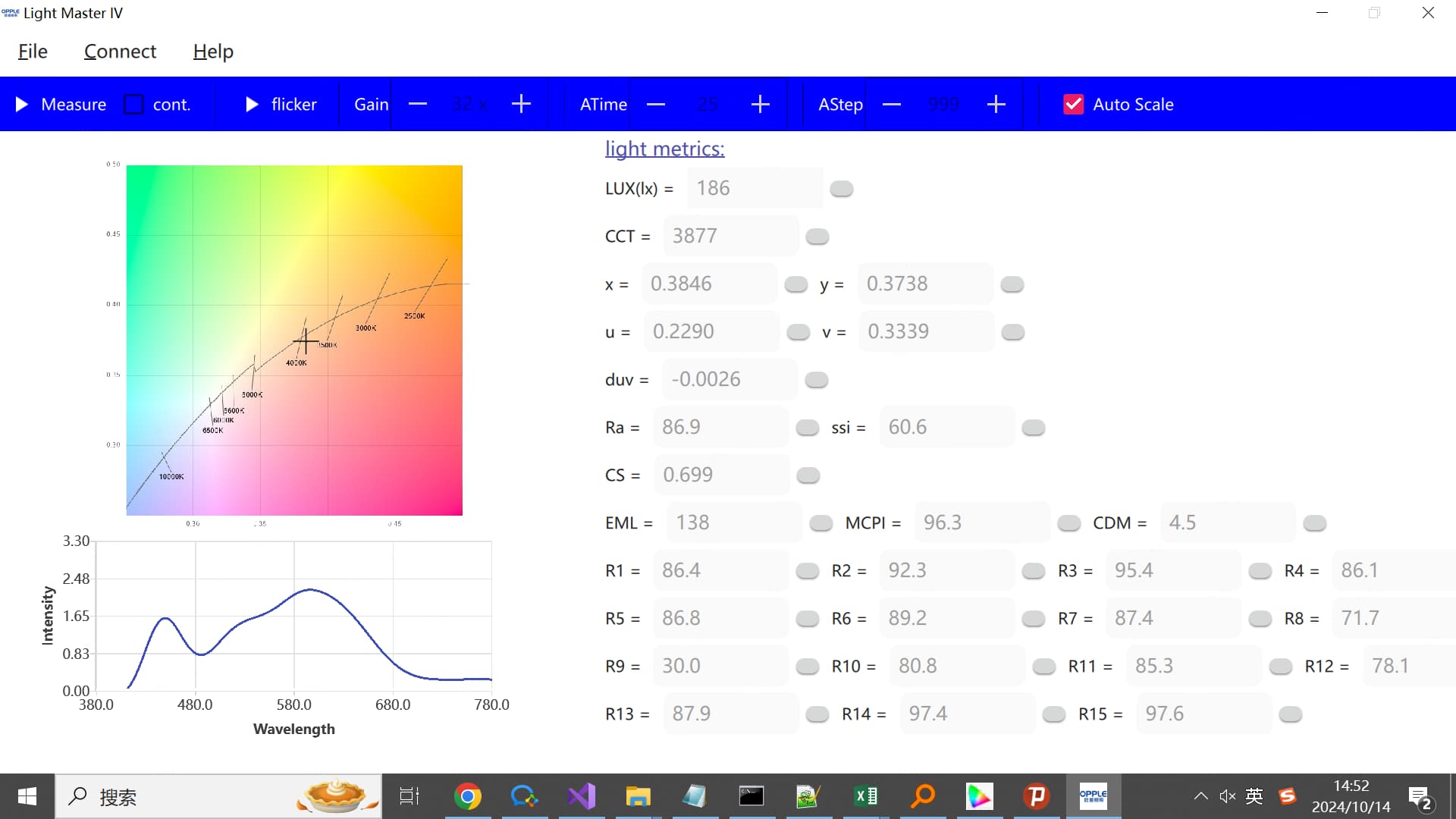
HI guys, I implemented two more metrics(MCPI/CDM) from a professor, the paper link is : https://www.researchgate.net/publication/349168218_Towards_an_optimum_colour_preference_metric_for_white_light_sources_a_comprehensive_investigation_based_on_empirical_data


btw, I use the software for experimental and debug usage, not for releasing to you guys immediately. and the second image is generated by measuring daylight(cloudy). I think it shows as7341 can not reconstruct/detect the details of the spectrum, that corresponds to the low resolution of the as7341 chip.

13 Thanks

Despite of my own warning on the label I was in a masochistic mood this morning and decided to use my LM 4 with some high CRI Nichia LED’s (where it was at least “in the ball park” the first time I used it). I was surprised to find that using Opple Smart App it doesn’t work anymore. LM4 would not connect to either my iphone 15 Pro or my old Android using the Oppel Smart App.

I haven’t followed this thread for awhile; did some change happen that cause this to stop working? Should I give in and toss it to the trash can? :innocent:

Imgur

Stay of execution lol. I was able to connect with my old Android phone. In fact as I am testing LM4 and realize how much more convenient than LM3 it is, I almost cry :innocent: for what could have been.

All light masters are amateur grade device, and as such, I don’t expect exact numbers, ONLY ranges. A Nichia 219b 4500k should be minus 50 to 100, Nichia 519a 4500k should be around 0, and green light special such SBT 90.2 should read some big positive number. I use it to confirm what I see, and to see the range of a particular LED. And look for pro reviews for exact numbers.

As such IMHO LM4 does a good job. CCT, Ra, Duv all in range. If you have a rosy GT-FC40 and tint lottery brings a green GT-FC40, this will confirm what you see. But as seen many months ago when the LM4 first came out, it seems to do a decent job on LED’s of roughly CCT 4500k and below. At higher CCT’s than 4500k, it is not accurate at all, not even ranges.

DUV measurements from LM4 differ significantly from those of LM3. LM3’s DUV readings were reasonably close to more reliable sources, whereas LM4 tended to report higher DUV values for Nichia leds. This suggests that the absolute values (or ranges for that matter) may not hold much significance. Comparing multiple measurements to see if one measures higher or lower than another was far more useful to me.

Here are a couple of measurements from LM3 and LM4
Nichia 219b 4500K, [LM3] -0.0067 , [LM4] -0.0034
Nichia E21a 4500K, [LM3] -0.0060 , [LM4] -0.0019
Nichia E21a 5000K, [LM3] -0.0045, [LM4] 0.0003
Cree XM-L2 6500K, [LM3] 0.0075, [LM4] 0.0030
Cree XP-L HD 5000K, [LM3] 0.0164, [LM4] 0.0156

LM4 shows a clear tendency to report higher DUV values for negative DUV, but this pattern is less pronounced for positive DUV.

Although LM3 appears consistent with more reliable sources, I rarely use it since DUV measurements aren’t directly displayed in the app. LM4 is more useful, as it provides both DUV and R9 measurements (though the R9 values should also be interpreted with caution).

1 Thank

Here are measurements from BLF’s well-known color expert “maukka”, who measured the E21A 5000K in a KR4 flashlight, the same model and setup I have. At level 5 out of 7 in his KR4, the DUV measured 0.0004. My measurements of the same output show: [LM3] -0.0045 and [LM4] 0.0003. In this case, LM4 is spot on, while LM3 is off by a large margin.

I’m not claiming that LM4 is accurate; I’m just highlighting how measurements from Opple devices can be off.

I’m excited to see when the LM5 is ready. :smile:

Way back when, this was my first report of something disastrous is going on. :innocent: I am quoting it here just to show that it appears there has been some change in the software to make SOME of the weird values more accurate now.

My repeat measurements of the same Wurkkos TS30S w/ SBT 90.2 showed the following changes (preliminary findings subjected to changes):

  1. CCT now appears more accurate. It was about 500 points too positive, now it’s reading the correct value.
  2. The crazy 100% R9 is not reported anymore. In fact in all my high power, high CCT, low CRI LEDs (SBT90.2, the Chinese powerful LEDs, etc.), Ra and R9 are no longer reported. In fact I think when they are not reported, this is a sign that you shouldn’t use it for your light.
  3. Duv still off. Showing minus 0.0020 for this green LED.

The software has been updated multiple times, and I find version 3.3.1 the most useful, as it provides the most reasonable R9 numbers among the various revisions I’ve tried. Cod3r has reverse engineered the LM part of Opple Home version and you can download the reverse-engineered version of the app here.

1 Thank

Aren’t we supposed to use the Windows program to get better results? I see a phone screenshot here.

1 Thank

Hi, guys, LM5 is to be terminated, so I am gonna leave opple recently. perhaps after I land on a new job, I 'd like to use some of my spare time to continue to update the windows software.
after a 5.5 years stint at opple, it’s now officially coming to an end. I am very fortunate to work on Light Master project, covering firmware development, machine learning, colorimetry, Windows software for calibration and Qt/C++ desktop software for you guys. I learned a lot, technically I reaped a lot from this project , however this project especially the sold LM4 did caused a lot of annoyance to you guys, I feel sorry for that, although I tried my best.

24 Thanks