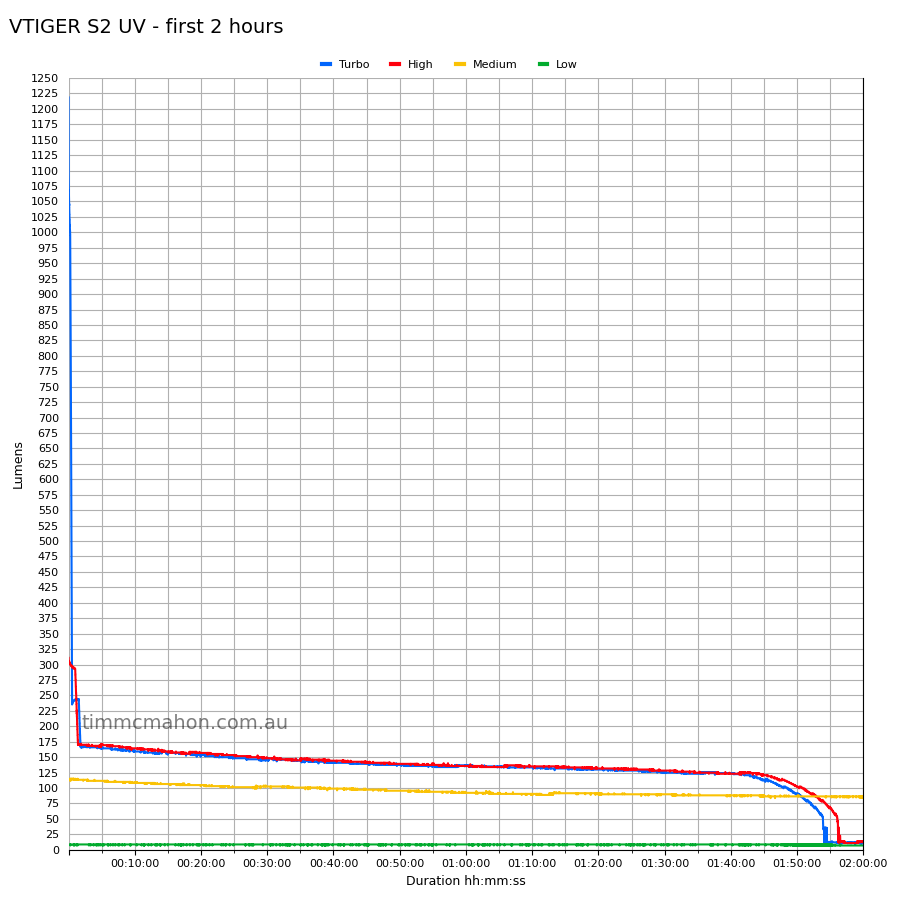
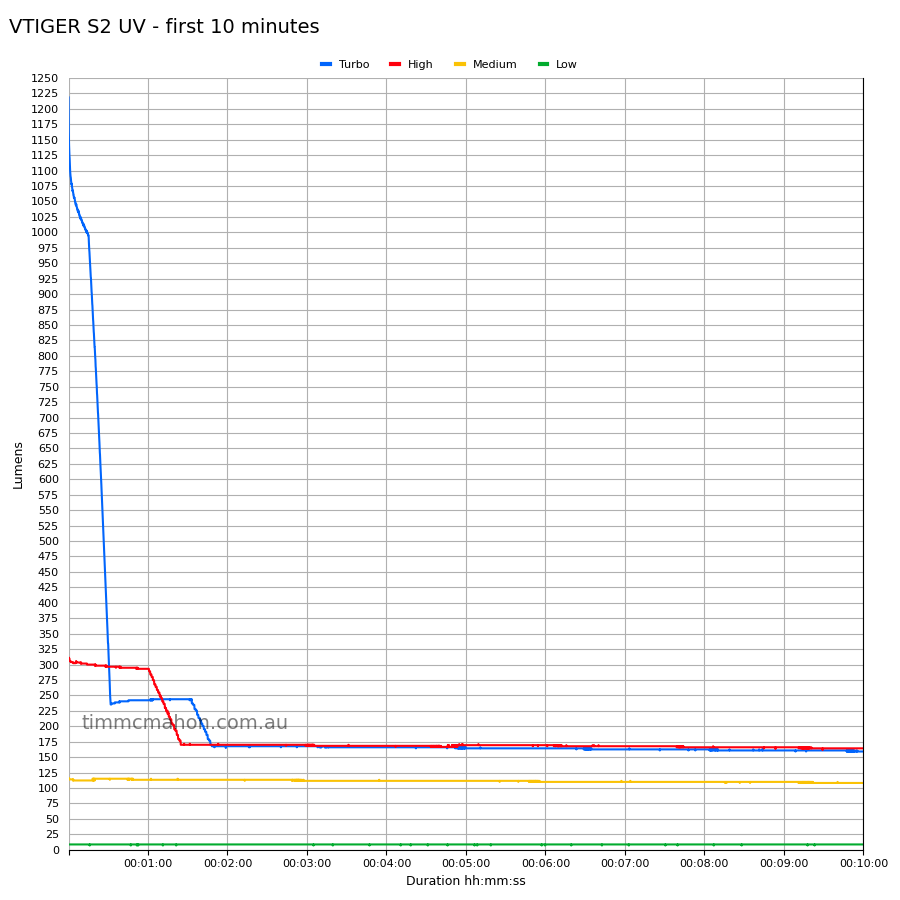
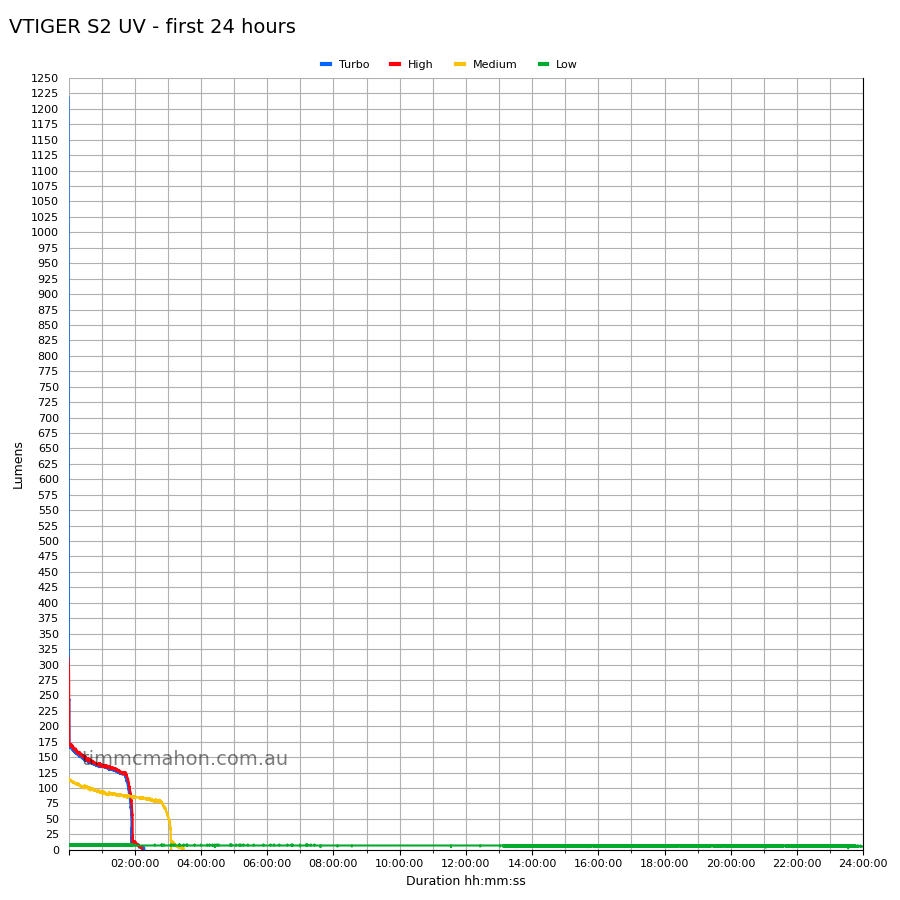
Thank you for your questions. We use different LED for two versions, the max output is the same but not everything as you may notice on the parameter tables. UI is simple.
S2 Dual White light version:
Power On/Off
Click the button to power on and enter the last used brightness level;
In the on state, click the button to power off.
Adjust Brightness Levels
In the on state, press and hold the button to cycle through the brightness levels in the following order: Low Brightness → Medium Brightness → High Brightness. (These three levels are memorized)
Turbo Mode
Double-click the button to enter Turbo mode, and click again to power off. (Not part of the cycle, not memorized)
Strobe Mode
Triple-click the button to enter Strobe mode, and click again to power off. (Not memorized)
One-Key Moonlight Mode
In the off state, press and hold for 1 second to activate Moonlight mode. (Not part of the cycle, not memorized)
Button Lock/Unlock
In the off state, press and hold for 2 seconds to lock the button (the light flashes twice to indicate successful locking);
(In the locked state, clicking the button will cause the light to flash twice, and the green indicator light will flash rapidly, indicating that the button is locked and cannot be turned on)
After the button is locked, press and hold for 2 seconds to unlock the button, and the flashlight will turn on after unlocking.
S2 White&UV version:
Power On/Off
Click the button to power on and enter the memorized brightness level;
In the on state, click the button to power off.
Adjust Brightness Levels
White Light Mode:
In the on state, long-press the button to cycle through brightness levels in the following order: Low Brightness → Medium Brightness → High Brightness → Extreme Brightness. (Memory function enabled)
UV Mode:
In the UV light on state, long-press the button to cycle through output power levels in the following order: UV Low → UV High. (Memory function enabled)
Mode Switching
Double-click the button to switch between UV mode and White Light mode. (Memory function enabled)
Strobe Mode
Triple-click the button to enter strobe mode, and click again to turn off. (No memory function)
One-Key Moonlight Mode
In the off state, long-press for 1 second to activate moonlight mode. (Not part of the cycle, no memory function)
(If the current memory is UV mode, after long-pressing to enter moonlight mode, single-clicking to turn off will not memorize the white light mode;
If, after entering moonlight mode, you continue to long-press to switch to other white light brightness levels, it will be considered a switch to white light mode, and the white light mode will be memorized.)
Button Lock/Unlock
In the off state, long-press for 2 seconds to enter lock mode (the light flashes twice to indicate successful locking);
(In the locked state, clicking the button will cause the light to flash twice, and the green indicator light will flash rapidly, indicating that the button is locked and cannot be turned on.)
After the button is locked, long-press for 2 seconds to unlock the button, and the flashlight will turn on after unlocking.
Buck Driver.