From version check, I’m getting
V1: 161-2025-07-07
V3 162-2025-07-07 with 3 at the end, after the MM/DD?
From version check, I’m getting
V1: 161-2025-07-07
V3 162-2025-07-07 with 3 at the end, after the MM/DD?
reading TK’s reply below, it seems the firmware differences are the issue.. suggest a reflash of the V1, to V3 firmware
I also use an IR thermometer, and I have noticed that default thermal calibration on my KR1AA is not always correct by default.. suggest you verify thermal calibration matches on both lights..
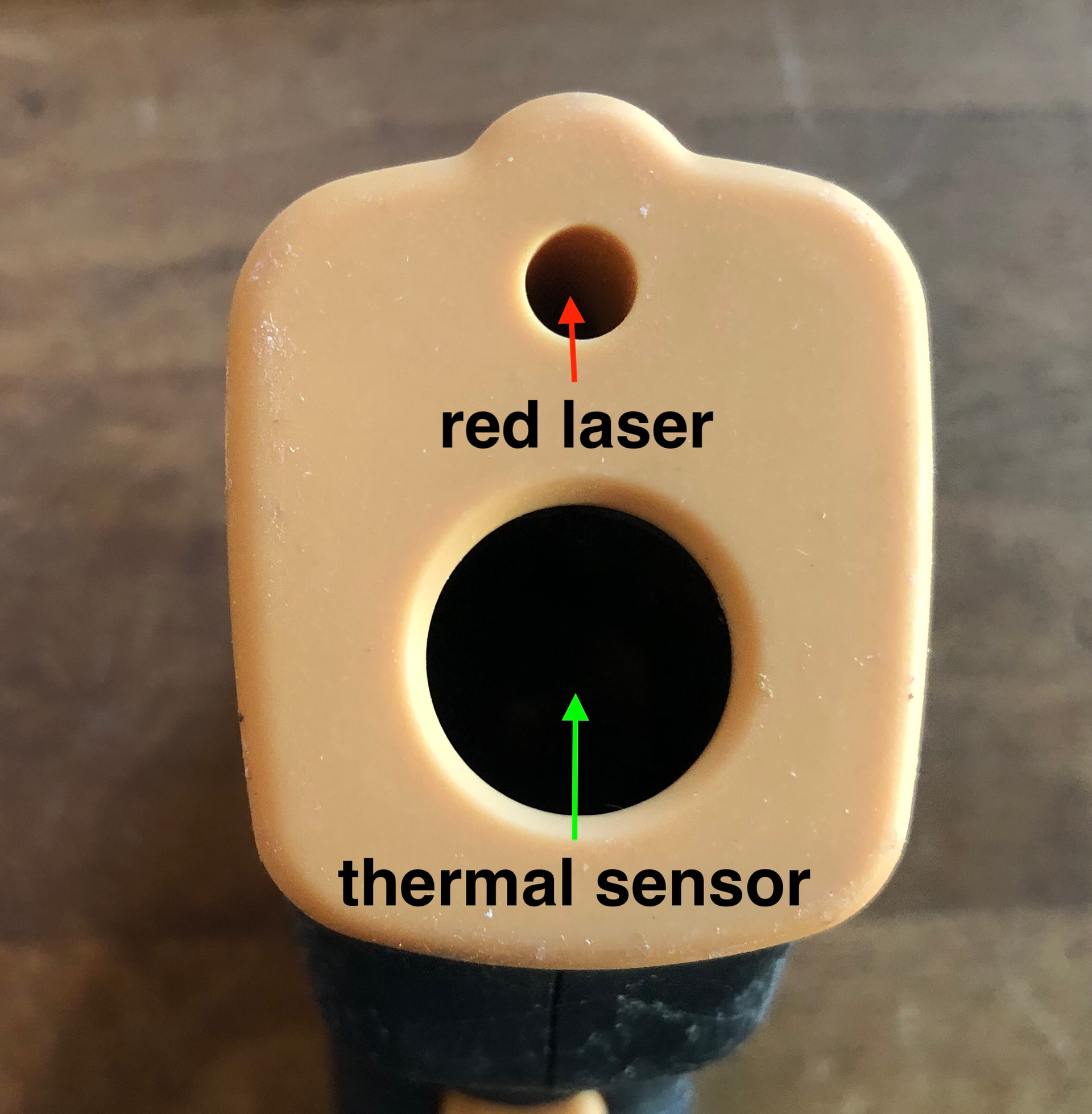
I think the thermal sensor on the IR thermometer is in the big round hole, so if the IR thermometer is placed very close or direcly touching the light.. the heat reading is not at the red dot:
The 0161 model is original firmware from the D3AA. It wasn’t calibrated quite right for KR1AA though, so I made the 0162 firmware. The ramp is a different shape, so the same ramp levels produce different amounts of light. Comparing step 4/7 on the two, for example, won’t be the same power level. The “gear change ratio” was off by about 20%, so it’ll have some significant differences between the two ramps.
As for the “3 at the end”, that means it is 3 revisions newer than the date shown before it. While switching from bzr+launchpad to git+github, the version format changed too. Instead of “build date”, the version is now “release tag date + revisions since then” (with an optional “+1” at the end in case the build is “dirty” and has uncommitted changes).
So the version I see in my testing right now is… 0283-2025-07-07+21+1. Model 0283 for the new KR1K driver, 2025-07-07 was the most recent release tag (but I’m planning to make a new tag soon), plus 21 revisions since then, and a +1 at the end to indicate that I have some uncommitted changes. But when the next release happens, it should shorten the version string to 0283-2026-05-22, for example.
Version strings are weird.
Anyway, if you reflash the older one, I’d recommend the 0162 firmware. Especially if you have a zigzag in your ramp.
Thanks for your feedback, although I’m afraid we do not have the plan for the Ti, brass or copper version.
My silver v3 one seems to drain faster on standby and active as well vs. my v1 Brown. I thought it was just a bad cell like last time, but i fully charged up the same 2 cells and swapped them between the lights and the V3 does seem to drain faster by a bit.
That makes sense..
TK pointed out that the V1 has firmware 0161. My KR1AA V2 and V3 use 0162 firmware:
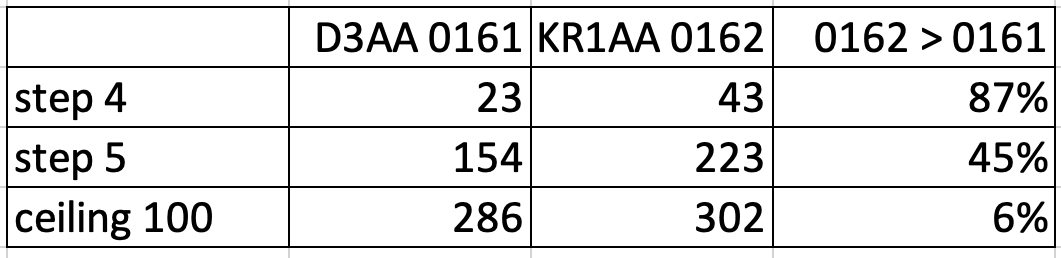
At each step, 0162 firmware has higher output than 0161 firmware, for example:
note: Im not testing 0161 firmware on a KR1AA V1 because I already reflashed it to 0162, but fwiw, both my D3AA and KR1AA V2.5 produce very similar output at ceiling… (the LEDs dont match but their ceiling outputs are within 6%.)
iow, the KR1AA firmware has higher outputs within the ramp steps than the D3AA, even though the ceilings almost match.
It makes sense then, that 0162 firmware in the KR1AA V3 consumes the battery faster, when using the same step as a V1 running 0161 D3AA firmware.
Maybe you can confirm that your V1 on Step 4 has different output than your V3 on Step 4.. if you can measure their outputs…
If anything I’d use my diffuser method with zak’s CB app, lol…Lemme check my version real quick though
**It’s 162. Holy crap I wasn’t expecting an inrermediate flash LOL. blinded myself
The height over bore problem. Since the KR1AA is so small and the IR thermometer measures in a cone, I measured at 1-4 feet. So not perfectly accurate, but likely close enough. When closer than that the temps bounced around more.
Also, thanks for telling me about the firmware thing. I don’t have a 3 pin flasher yet, only soic clip and the regular Hank one. I might try to solder enamel wire straight to the flashing pads, if that doesn’t work, I’ll have to get the gchart adapter
FWIW, Hank recently said he’s planning to sell 3-pin UPDI adapters soon, for reflashing KR1AA and other recent lights. Really glad it’s finally happening.
its only about $10.. here is a gchart post so you can message him
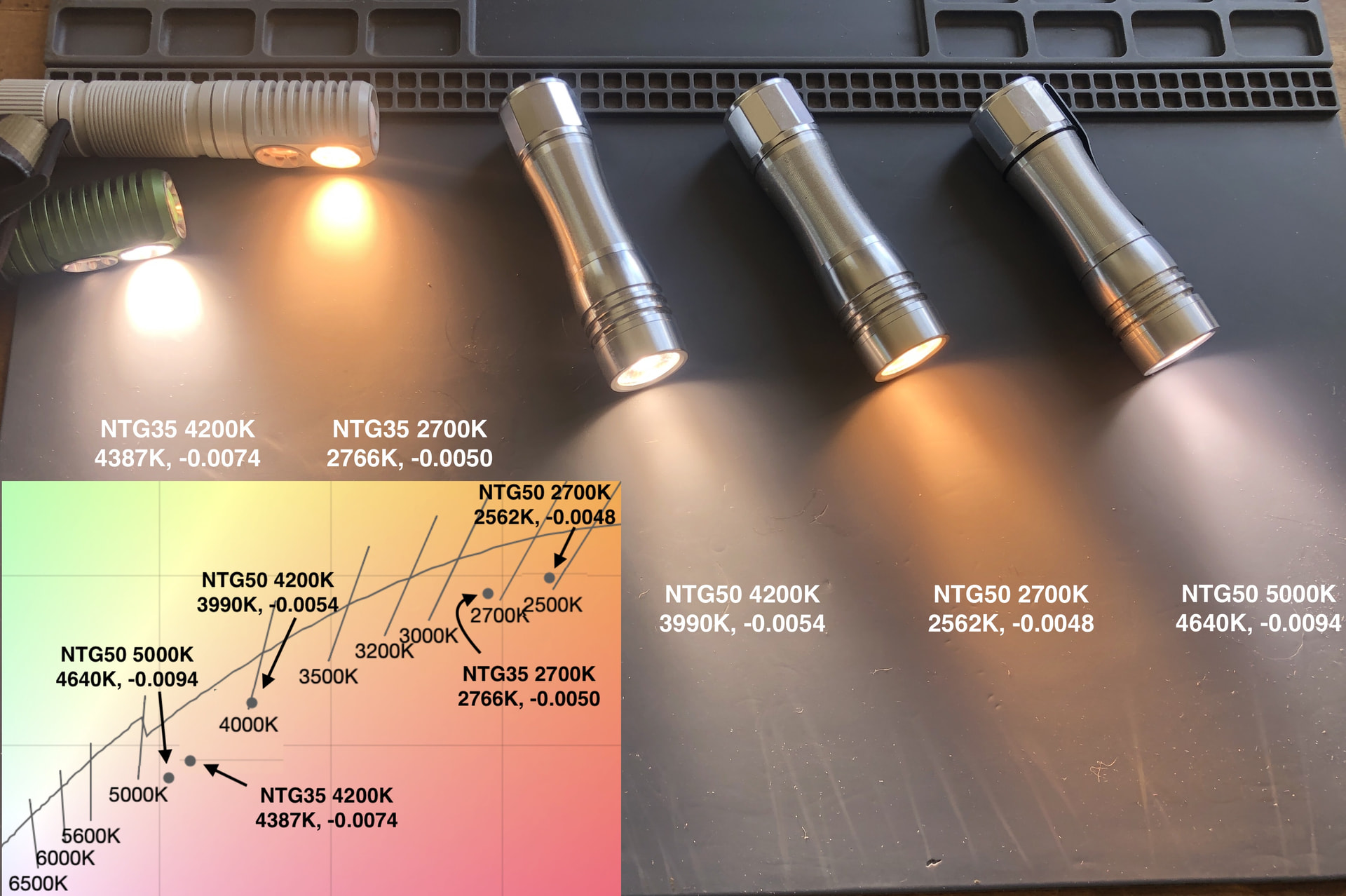
Comparison of cct and tint duv of my three KR1AA w NTG50 2700K, 4200K and 5000K, and comparison to my two Emisar D2 w NTG35 2700K and 5000K:
note all lights are at 100 lm, measured with Opple 3 which is not a calibrated spectrometer.. it serves for comparison purposes of relative differences, but the values are not absolutely accurate. Also note that tint duv values change at different outputs. So this info is just for ballpark comparison purposes.
I have comparison data from a friend’s Hoopocolor (I mailed him some lights I had measured and compared his results to mine), that shows my Opple reads CCT correctly, but the tint duv reads 0.0025 higher than the Hoopolocor.. for example, where the pic shows my NTG50 4200K has a duv of -0.0054, the corrected value would be -0.0079. Same applies to the tint duv values for the other lights.
In all cases I find the tint of these LEDs very nice, and I really enjoy them, because none have greenish tint.
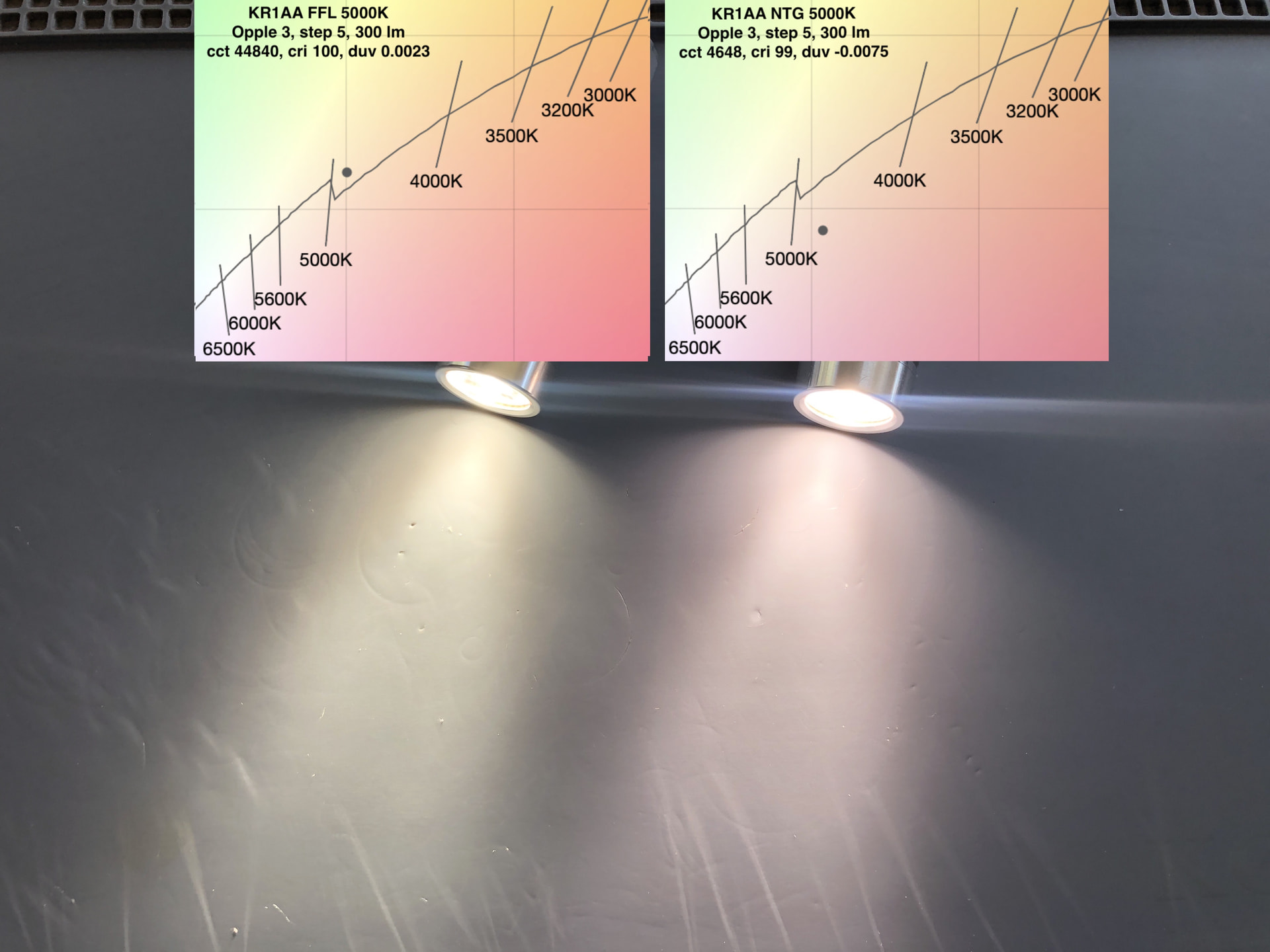
Comparison of Jacksons FFL5009R 5000K that he lists as duv -0.0022 (he uses Opple 4), compared to my NTG50 5000K from Hank:
I use Opple 3, so my duv numbers are different than Jacksons, but we can see from the photo that the tint of the FFL is greener, compared to Hank’s NTG
Thanks jon, as always…I appreciate your photos!
You’d think Hank would take advice like this considering this is coming from someone integral to the lights he makes.
As it turns out, Hank recently announced he’ll be selling 3-pin UPDI flashing adapters soon.
yes
I guess this could be the most relevant thread to post in, but today I have had the first real issue out of either of my KR1AAs. In my V3 raw silver one, I was having an issue where it acted like the switch was continually pressed. I have attached a gif for reference, sped up to reduce file size.
This started this morning, after I had fallen asleep the previous night with the light clipped onto my waistband. When I went to use it it instantly went to turbo, so I unscrewed the head immediately.
After taking the head off I realized the issue: the “wave spring washer” switch inner tube contact ring on the driver had become desoldered or broken loose on two of the three solder points.
Has anyone taken a driver out of these lights, and do you have any tips? Or should I just contact Hank? I’d rather not bother him with sending a new head or whatever when I believe I should be able to easily resolder the ring, my only concern is removing the driver and reinstalling it. I’m assuming they’re glued in? I have some Bob Smith Industries cyanoacrylate glue Un-Cure I’ve previously used for Emissr switches and trits and it worked, it just took a day of “soaking.”
Edit: I have used a food-safe silicone lube (which I’m pretty sure is just dielectric silicone grease) as I have a huge tube of it. I did put a bit of mineral oil on the o-ring when I found it dry at work. 8 don’t know if those would affect this, I’m mostly thinking it’s just come off from dropping the light on concrete.
good gif, sorry it came loose
I would put flux under the loose parts of the spring washer, and also on top of the spring washer,
and resolder it without any disassembly, and without any extra solder, but with lots of flux
we just want the solder that is already there to get rebonded.. flux will help that happen
I would turn the iron up to 400C so it would work fast.. press the spring washer to the driver using the point of some tweezers, and use a narrow enough solder tip so it would not touch anything else except to press on the spring washer, at the existing solder joints
a simpler alternative strategy to consider is to:
put a small amount of solder paste under the loose parts of the spring washer, then without adding any flux, press the spring washer down with tweezers and press the soldering iron on top of the spring washer.
hope those ideas makes sense, I hope it is an easy fix
please share what technique worked for you
I didn’t think about doing it with the driver still in the head, but makes perfect sense, and is a good idea instead of taking it out. I’ll likely try it later today. The light still works if the washer is in the correct spot, but I took the battery out anyway just in case.
I still think it’d be nice to switch from a double-tube design to a ribbon design for tail e-switch lights. The switch doesn’t need a high-amp low-resistance electrical pathway… a thin wire or ribbon is plenty. And with this latest dual-tube design, it’s already using sort of a ribbon anyway.
The idea I have in mind is to eliminate the inner tube entirely, and just carve a thin channel into the outer tube where a thin wire or ribbon would go. Make the end springy and aim it so it lands on a contact ring like it already does, and it should be able to carry a reliable switch signal. But… with hopefully less complications than the dual-tube design, and it could allow the torch to be narrower.
Funny TK, this is how I was recently imagining how to modify an S2+ for eSwitch setups.