New site format

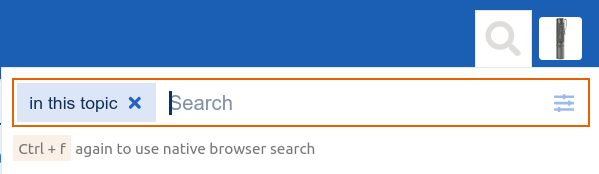
That does indeed work:
Screenshot from 2023-04-02 23-52-17

  • The first time you hit Ctrl+F it uses the site search engine to search within the thread. For those 5,000 post threads this is a fast way to find what you’re looking for.
  • If you hit Ctrl+F again it will use the browser search bar within the loaded context of the thread.
  • If you click the search button it will by default do a search of the whole site.

There is frankly no comparison between the former extremely inadequate and incomplete Google site search with the integrated site search engine that we have now. Please give it a try, it works very well and allows for extremely granular specific searches across the entire site and/or in specific threads or specific categories with a ton of other search criteria if needed here when clicking on the menu inside the magnifying glass icon.

I agree, unless someone is planning on reading 5000 posts 1 by 1 there is always going to be a lot of scanning and searching to quickly parse the thread. But that’s precisely where this new format excels – before you had to scan 30 posts and then click next > , and then repeat. Now you just scroll down. Yes, there is a brief delay as it loads the next chunk of posts, but it’s the same or less than loading the next page in a normal forum. Going any faster than that would just be aimless scrolling.

This specific situation is elegantly handled in the current forum software:
https://budgetlightforum.com/t/new-blf-forum-engine-faqs/217457#where-are-the-pages-2

In those cases you could look here:

You can load as many BLF tabs as you want, just like before. I usually have 4 - 6 open myself at any given moment. You can even respond to a post while navigating in the top pane of BLF to a completely different thread and even quote posts from a different thread within the same interface.

So I would strongly encourage you to read the mentioned FAQs page as well as the analysis specifically about pagination and give the new site a try before reaching hasty conclusions that it won’t work. I know it’s different in some aspects, but at the same time this forum engine is one of the most popular currently and has been successfully running many very large communities for years, and there are definitely some good reasons for that.

5 Thanks

Overall, I really like the new website while viewing it on Windows and Android devices but no matter what browser I use on an up-to-date iPad, the site is not displayed correctly. There is a message at the top that says to use a compatible browser. Has anyone encountered this and found a fix?

Hi there @Nachtfeuerzeug , thanks for the feedback. It sounds like it’s an older iPad running a version of iPadOS older than version 15. If it’s a slightly newer device then please try to upgrade the OS to version 15 or higher. Otherwise it’s an unfortunate case of Apple no longer supporting the device, and the developers of this forum software not wanting to support older browsers with the workarounds that would be required. (In the Apple mobile ecosystem no matter which browser is used they all run on the same web engine, which is tied to the version of the mobile OS.) Personally I don’t agree with policies of forced obsolescence, but unfortunately I have no say over it.

4 Thanks

Thank you SB!

1 Thank

If you can override your browser’s user-agent string, you might be able to get the site to load by pretending to be a newer browser. It’s possible some parts of the site might not work, but it might at least be more functional than the unsupported-browser version of the site.

2 Thanks

Thank you TK! I looked into user-agent string and learned something.
The iPad was actually pending an update so once I cleaned out the storage, full of the kids apps and stuff, it finally updated. I’m enjoying BLF on the iPad!

3 Thanks

Glad to hear that @Nachtfeuerzeug ! Out of curiosity, what version of Safari / iPadOS is it running now?

Hey SB! I’ll let you know later this evening.
@sb56637 Edit: it’s iPadOS 15.7.5

1 Thank

I’m having a little trouble here. Is there a way to increase the font size? I don’t see it in the icons. Also when I try to change the text color I get this instead

Thanks in advance… At least I can make emojis :rofl:

This is the only way that I know how to increase the font size.

larger

Here’s the code of the above line:
# larger
It also creates a link to the left of the line, so it’s not perfect. :slightly_smiling_face:

When you’re on the page hold the Ctrl key and scroll your mousewheel up, or hold Ctrl and hit the + key.

You can change several things with that function and I just figured out a way to only show colored text.

When you click the ‘Text color and highlight’-button, you get the following code:
[wrap=color color=green bgcolor=yellow]

You can manually change the color for both the text and the background (=‘bgcolor’), by changing it to another color, for example: In the code mentioned above, I remove ‘yellow’ (for the background) and type in ‘white’ and I get the following result:

result: FLASHLIGHT

Also changing the color of the text from green to red:
result: FLASHLIGHT

After a bit of trying, I figured out that if you remove part of that code line, you can also get it to only change the text color:
[wrap=color color=green] (Here I removed the ‘bgcolor=yellow’.)

This will result in: FLASHLIGHT

There might be a better/quicker way, but at least it should work!

EDIT: it does work for font size, but this way/method seems to create some issues with vertical spacing of (lines of) text below and/or above it!


I did some digging based on the post from @raccoon below, by doing a ‘right mouse click’ and then ‘inspect’ (in the Chrome browser) on his ‘larger’, to see the website’s code in HTML. I noticed that it showed the following code for his big ‘larger’: < h1> </h1>
(Type without a space between ‘<’ and ‘h’. I just used a space to have it show up.)

Doing it this way, you won’t get the ‘link’ symbol to the left, that Raccoon mentions.

For example:

FLASHLIGHT

By changing the number to a higher number, you can also change it to a smaller size, for example ‘h3’ and ‘h5’:

FLASHLIGHT

FLASHLIGHT

There might be another (and possibly easier) way, but it atleast seems to work this way.

2 Thanks

Wow, that’s pretty cool!
I’ll have to bookmark your post about font size for later. :+1:

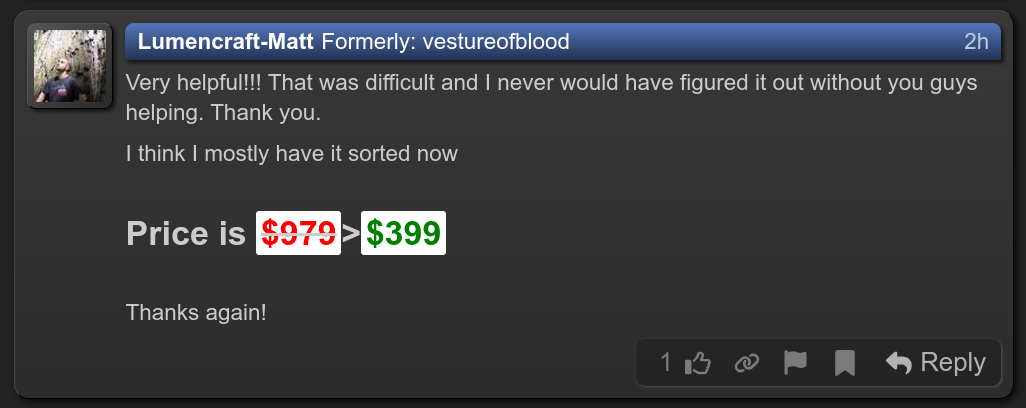
Very helpful!!! That was difficult and I never would have figured it out without you guys helping. Thank you.

I think I mostly have it sorted now

Price is $979>$399

Thanks again!

2 Thanks

For what it’s worth, it’s going to look different depending on which theme the viewer is using. Here’s how it looks in my browser:

The new forum engine intentionally doesn’t make MS Word style text formatting available, because posts are meant to specify the high-level structure of their content, not the low-level formatting.

Custom text colors will be sensitive to the viewer’s chosen theme, so if you specify the colors, it will look better in some themes and worse in other themes. Like, a dark red might look striking in light mode, and be almost invisible in dark mode. So it’s generally advisable to avoid custom colors when possible. It’ll usually look bad on someone’s screen, since their theme might have a light background, or dark, or blue, or green, or red, or purple, or medium grey, or … anything else. Much safer to avoid setting a color at all, and let their theme choose something which fits.

The “#” prefix does make text bigger… but only because it’s meant for indicating a heading. The purpose is not to change the font size, but rather, to indicate structural sections of a long post, like chapters in a book. Different amounts of “#” prefixes translate to the “h1” through “h6” HTML tags, which denote heading (and sub-heading) levels 1 to 6. When used in a top post, these markers define the table of contents.

Bigger text and smaller text should be defined with the <big> and <small> tags instead, like <small>this is small text</small>. Or there’s also bold and italic, using the <b> and <i> tags or, for convenience, just double or single * around a word, like **bold** and *italic*. Or to show things verbatim like I’ve been doing, use backticks, on the same key as ~.

5 Thanks

Welcome to Discourse everyone! Glad to be here, introduced to this forum recently by a dear friend of mine. I am one of the co-founders of Discourse (and Stack Overflow), and if I can ever help in any way please let me know. :yellow_heart:

7 Thanks

Please enjoy your time here, codinghorror!
I recognize your avatar from another Discourse-based forum.
Although Discourse has kinda a steep learning curve at first, I really like the software as an end-user because of its many functions.

1 Thank

There might have been a software update…
Now when I see a post by the Original Poster of a thread, next to their name it says:
🟊OP🟊
At first, I thought it was a custom title, but then I noticed it in a bunch of threads. :slightly_smiling_face:

3 Thanks