Can we change the AVs into square gif please … !?
can we have a theme where we can customize the colors ourselves?
On my phone it switches automatically based on a schedule, but in windows it doesn’t. I don’t think windows 10 will do the same thing without tinkering.
Please no animated avatars
3 Thanks
Why !?
Discourse doesn’t support animated GIF avatars.
1 Thank
That would be really cool, but I don’t think Discourse has any features like that.
However, there is still a way to do it. Install the Stylus browser extension, and you can change anything you want. You don’t even have to mess with the complicated parts… I structured the overrides so you can plug in a list of colors. If you can pick colors from a color-picker widget, you can customize the colors however you like.
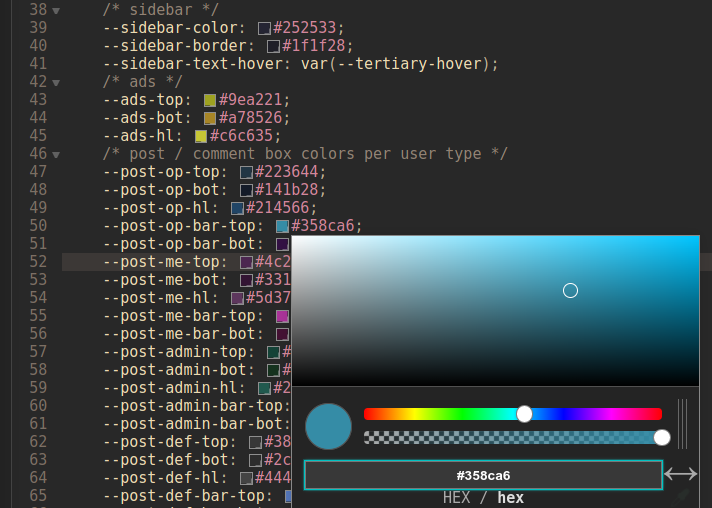
Basically, grab the files linked in the first post, add at least one palette file to Stylus, and start changing colors.
I recommend doing the changes with 2 windows open side-by-side… one to edit the colors, and one to see the results in real time. Just click a color, press Ctrl-S to save, and the changes should update immediately in the other window.
2 Thanks
I agree.
I dislike at least 95% of all animated gifs.
(No offense, TARTARA.)
I much prefer static images. 
1 Thank
It can be an accessibility thing too. Some people find it extremely distracting to have anything moving in their field of view… like, so distracting that they can’t function. So if Discourse ever adds support for animated avatars, it will also need a user-level option to disable the animations.
It’s like how some people leave a TV on just so they can have some background noise while they work… and other people can’t work in the same room as a TV. And these two people should never, ever share an office. 
3 Thanks
Just L☻L !
Im making all kind of AVs over 2ys now, at least give on the members the option so they can put them on !
YES I don’t understand how people can work when someone in TV is constantly talking. I sometimes turn the music on when programming because I think I would feel cool, but I always turn it off after like 3 min, it’s so distracting
2 Thanks
Yep, animated gifs are frequently distracting for me.
Also, sometimes I don’t want to see the specific short animation ever again in my life.
On other forums, I regularly block people’s avatars/signatures with uBlock Origin.
(I don’t do that very much on BLF, though.)
2 Thanks
Just L☻L
Why lol?
It’s an official accessibility requirement, established to ensure everyone can use the web. WCAG 2.2.2 / ISO Standard 40500 requires that any animated information (like moving, blinking, or scrolling) that starts automatically, and is presented in parallel to other information, must either stop within 5 seconds or have a way to pause it or turn it off.
Most animated GIFs fail that requirement, so accessible web sites have to either block animated GIFs or add special functions to override the looping. It seems Discourse’s devs did both:
- Avatars aren’t animated
- Linked GIFs are specially handled, to add a pause button
Although primarily developed to serve the needs of people with disabilities, people don’t need a disability to benefit from the WCAG standard. Like, the standard requires captions on videos, but most people who use captions aren’t hearing-impaired. Videos are just nicer with subtitles… especially lately with big movies like “Tenet” having the speech buried under music and sound effects… or people watching youtube at 2X speed, where it’s easier to read than listen.
Similar story with animated GIFs. Most of the people who turn those off don’t have a disability… they just don’t like it. Blocking animations also helps reduce power use, which is particularly important on battery-powered devices like phones. And it makes the forum usable on e-ink displays, which are wicked cool tech that I’d like to see used more often.
As a popular forum platform used by tens of thousands of sites, Discourse has to care about accessibility, and the default themes are either WCAG compliant or very close to it. (there are also some WCAG-specific themes, but they don’t look much different than default) If I understand correctly, that is the reason why the default Discourse themes look very plain and have a lot of blank space. It may not be fancy, but it is at least accessible.
I personally prefer a denser, more decorated style… which is why I made the theme(s) in this thread. But it’s not for everyone. When someone tells me my theme makes their eyes bleed, I don’t laugh or take it as an insult, and I don’t assume they have a disability or something. It’s about the same as if they told me they hate the taste of tomatoes. Different people just like different things, and I’m glad there are other foods for them to eat (or other Discourse themes they can use). As I said self-mockingly like a week ago… Not everyone wants their forum to look like an explosion in a candy factory. 
… and not everyone wants animations on their screens.
5 Thanks
L☻L Again !
So I’m testing a mix of the great ideas that @ToyKeeper and @Mocarny posted here:
.topic-list .editor {
    white-space: nowrap;
    overflow: hidden;
    text-overflow: ellipsis;
    width: 100px;
    max-width: 260px;
}
This seems to work well in full-width browser windows as well as half-screen or less. Feel free to post here if you have any unexpected issues or suggestions with this.
1 Thank
Great you are working on it.
I think it would look good if we set it to:
theme_15.scss
.topic-list .editor {
    overflow: hidden;
    text-overflow: ellipsis;
    max-width: 126px;
It works fine when I test it.
white-space: nowrap; has no effect if it is just one word, without spaces like IamHungry instead of I am Hungry. By the way, I am really hungry. It’s 4pm and I ate only breakfast.
width and max-width seems to work the same in this case but max-width: 126px works better than width:126px on smaller resolution below 500px or something like that.
and this width to 170px instead of 160px

If you prefer the width to be 160px then you can set the max-width to 116px instead of 126px in .topic-list .editor but then some longer names will be shortened
I have another idea. But don’t know what you all think about it.
Whole names can be visible on mouse hover by adding this below existing class .topic-list .editor
.topic-list .editor:hover {
    overflow: unset;
}
I know you can click on the name, and then it shows the full version (in most cases) but…you know, it’s quicker. And sometimes those elips…euesistensis takes just enough space that without it (or when hovered) name won’t overflow

2 Thanks
Hi again @Mocarny , thanks a lot for the suggestions.
With this it generally looks good, but with one exception: