Anduril is much more flexible than basic UIs with stepped modes that cause some people to ask for output charts, and ask questions about the individual modes, lowest, highest, and spacing
Anduril eliminates all those limitations because it has firefly lows, as low as an HDS Rotary, it has ramping that is smoother than an HDS Rotary, it has battery check, that the HDS lacks, and Anduril can reach higher outputs (briefly) than most lights with a few modes.
for me, Anduril is superior, in every way, even if you just use it out of the box and never change a single option
if you have no interest, thats totally up to you, but you might not know what youre missing…
If you want a Ramping UI, there is no need to spend $400 on an HDS, when you can do everything it does, and more, with a $20 TS10…
basic lights with few modes, usually lack any sort of locator light, for times when the light is in a dark room… Anduril otoh, includes Aux LEDs that can serve that role, without having to invest in Tritiums, nor glow gaskets.
DR Jones !
That is from the wayback machine for sure.
As far as Anduril, different strokes for diff folks.
It is full featured and clumsy at the same time just due to doing everything through one clicky switch.
People who do it on computer and re-flash have it easier in that aspect.
It’s free, I deal with it and ask ?'s here when needed and members usually give me the shortcut and next thing ya know, Jed’s a Millionaire so it’s all good in the neighborhood
Given the constraints under which it operates, Anduril is an amazingly powerful and flexible piece of software.
Where it can falter is in how, and where it is implemented.
There is a school of enthusiasts who believe that Anduril should be in every flashlight, which ignores the practical reality that the vast majority of the market, including those like yourself, don’t see any value in the power and functionality it offers. Many a lay user already struggles with multi-mode lights, and the spaghetti charts that are the subject of this thread would be a complete non-starter.
Anduril lights can be suitable for the broader market, with most of its power hidden and in reserve, but that can be thwarted when the makers don’t pay attention to the details, and ship lights in Advanced Mode.
Even for lights that are targeted at the enthusiast market, there can be disagreement over how certain features are implemented, and/or made default, and a matter of debate, like the POVD feature.
As they say, right tool for the right job.
But, as an open source project, anyone is free to contribute, or create their own fork to meet their own needs and preferences. In that respect, it seemingly falls upon TK, the developer, and a small handful of devoted enthusiasts to advance the project.
I don’t know what sort of arrangements those folks have with the makers whose products employ Anduril, but IMO, they could do more to help advance the project, and not simply profit from it, without giving back in any palpable fashion other than providing evaluation samples.
If that impression is wrong, feel free to correct me.
Great to hear the KISS perspective! With you coming from that perspective, I would be genuinely interested if the “basic use” of Anduril does anything for you.
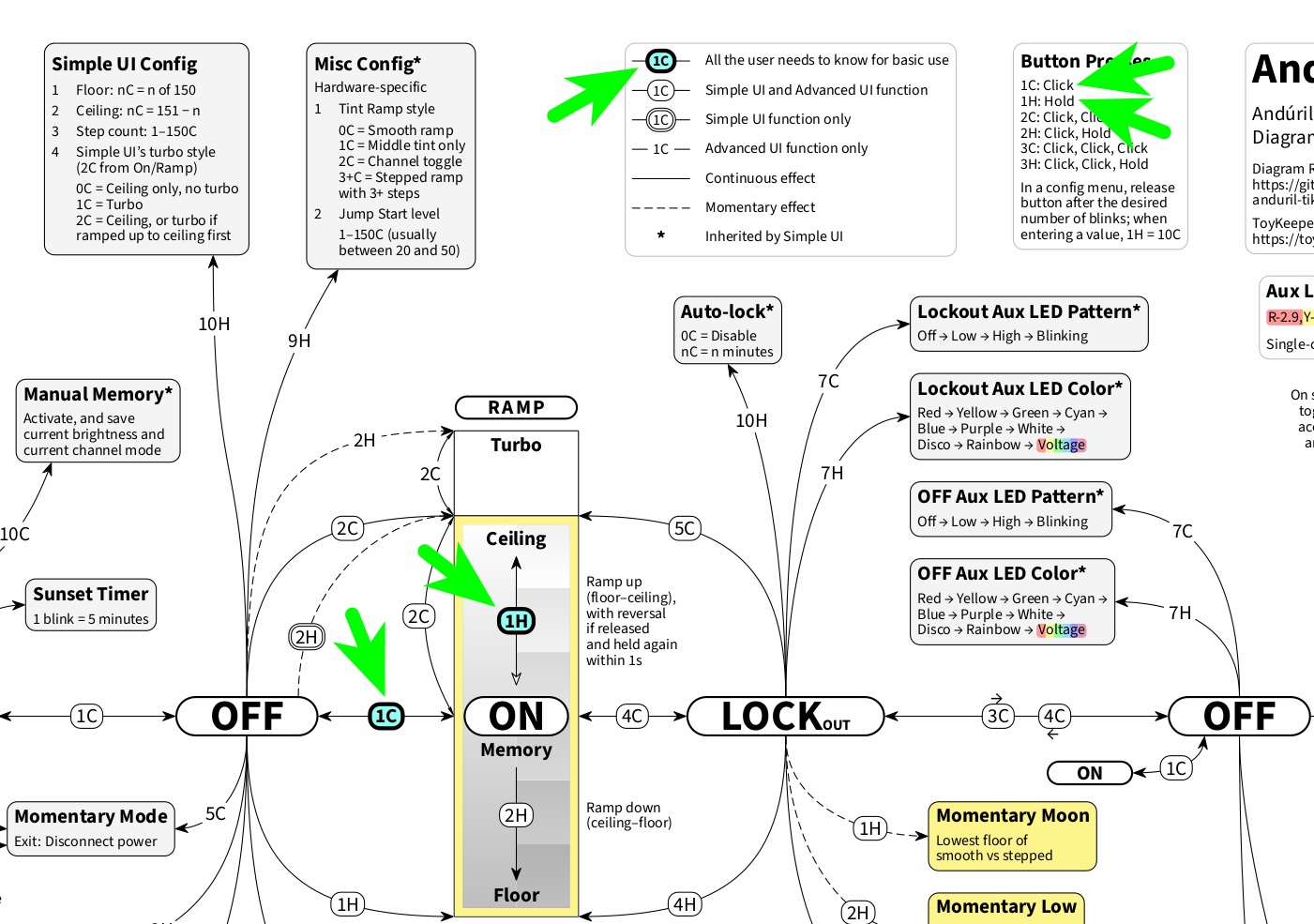
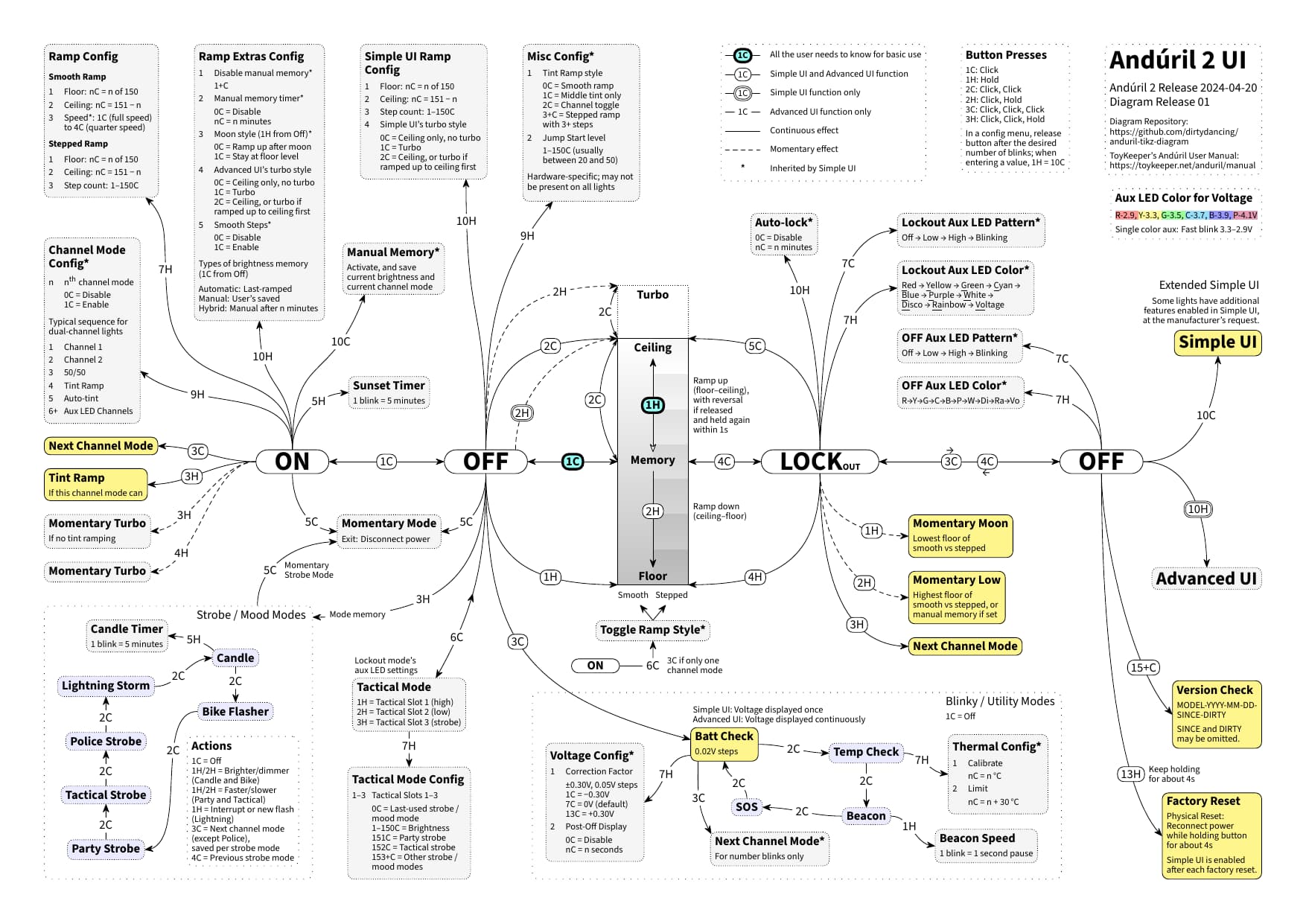
This “basic use” is Click (1C) and Hold (1H) (plus release and hold again). As the manual states: “That is all the user needs to know for basic use, but there are many more modes and features available for people who want more.” This might take away the perceived complexity and just leave the flexibility of Anduril. I have taken a shot at visualizing this “basic use” by placing it in the very center of a diagram:
As to the diagram: For you coming from a KISS perspective, is this kind of visualization of help, or is it just intimidating once again to look at the entire one-page diagram? And if you are visually interested at all, would you have any suggestions on how to better accommodate the KISS school of users?
Hi folks, I would like to tap into your valued Anduril expertise.
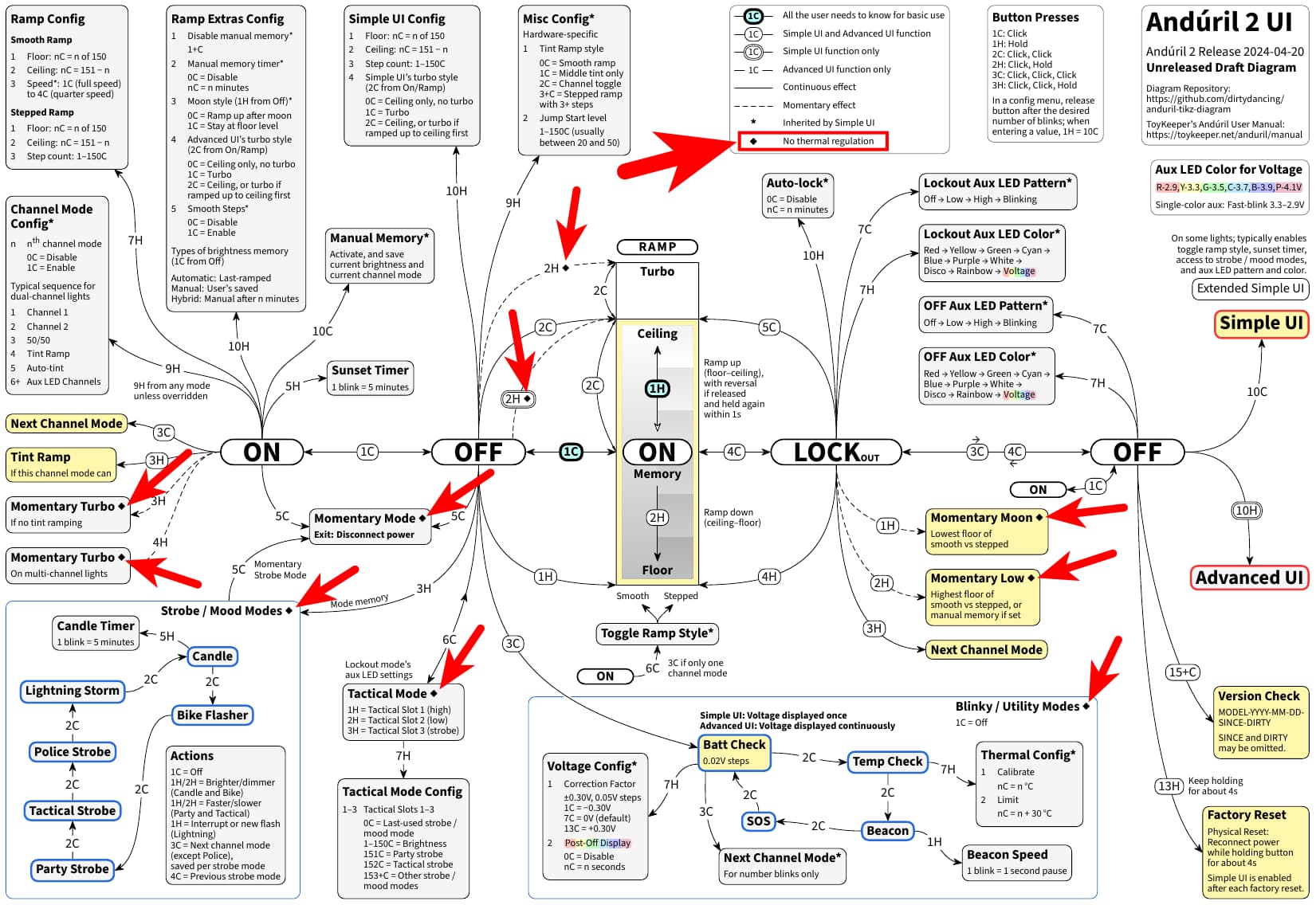
In this diagram by myself, I would like to add where there is currently no thermal regulation. As far as I can tell, this has never been comprehensively documented anywhere, although it feels like this subject has been coming up regularly for years. A while ago, I opened an issue over at TK’s GitHub to include this in the manual:
As there are many open issues and pull requests over at TK’s GitHub, it might take another while until this will possibly be addressed for the manual. So here is an unreleased draft diagram version for you to have a look at. I have done some “quick and dirty” testing (“Can I still hold the light?”) with a D4K 3CH, version check 0151-2024-04-20, with a 519A LED mix and a full Molicel P45B, and this is what I have come up with:
Recently, a question about thermal regulation in Momentary Mode and in Tactical Mode was brought up by @stephenkhere, and testing about this was done by @jon_slider. This led to the conclusion that there is no thermal regulation in both of these modes.
Furthermore, it is known that there is no thermal regulation in the “Blinkies”, which I take refers to the strobe group as well as the blinky group. In the blinky group, I checked with Beacon, and after a longer period of time the light had gone well over the thermal limit there as well (over 50°C instead of the 31°C I set as thermal limit), so I figure that also the blinky / utilily modes have no thermal regulation, in addition to the strobe / mood modes.
Moreover, no thermal regulation for Momentary Moon and Momentary Low from Lockout may be somehwat theoretical, but it depends on how the floors are set. When I set them to 120 and 130, I quickly got temperatures above 60°C, which means that indeed there is also no thermal regulation for these features. In general, apparently there is no thermal regulation for any kind of momentary mode / feature.
Finally, I thought it was notable that there seems to be no thermal regulation for 2H from Off not only for Advanced UI (Turbo), but also for Simple UI (Ceiling). This post is about documenting the current status, but still, apart from no thermal regulation for the strobe / mood modes in Simple UI via Extended Simple UI up to the latest Anduril 2 release 2024-04-20, (access to the strobe / mood modes from Extended Simple UI has been removed in the meantime), this is another instance where the light could get very hot very quickly out of the box in Simple UI.
Thank you for staying with me this far. So my two questions to you are:
Does it make sense to include “No thermal regulation” in the diagram?
If yes to 1., is everything correct and complete in the draft diagram above?
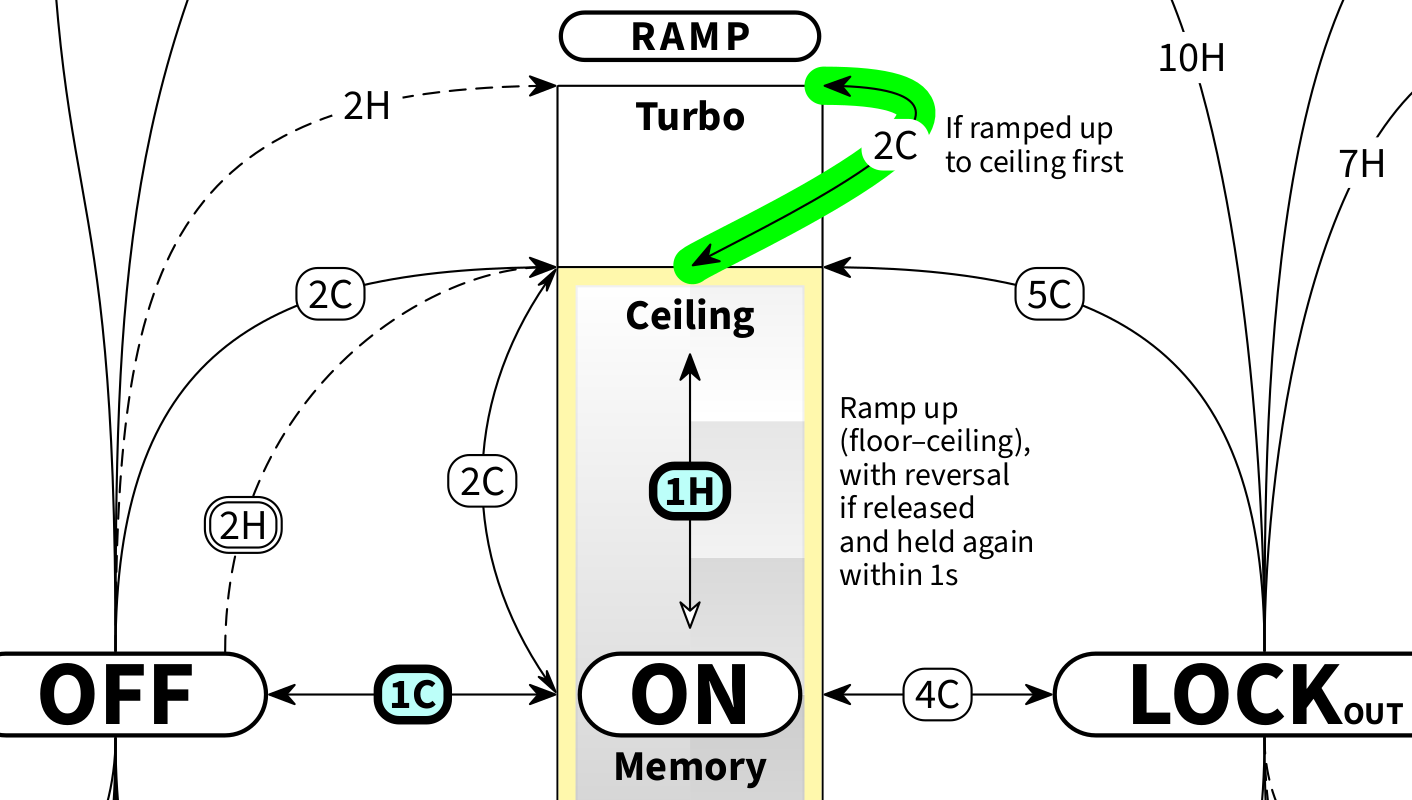
Hmm… Not sure about that. It’s easier to do it the other way around: Which modes do have thermal regulation? It’s implemented in only a single mode: normal ramping mode. The mode when you turn it on (1C, 2C or 1H from off).¹ All other modes lack thermal regulation.
¹ This includes the regular turbo mode because it is just a different level of the normal ramping mode.
Good point! I figure I was coming from the “warning” perspective, so having a kind of “warning” icon that draws the user’s attention to this subject seemed the way to go. I realize that having no step down can also be a welcome feature, so I went with a very neutral black diamond icon, to emphasize this as info, not necessarily as a “warning”.
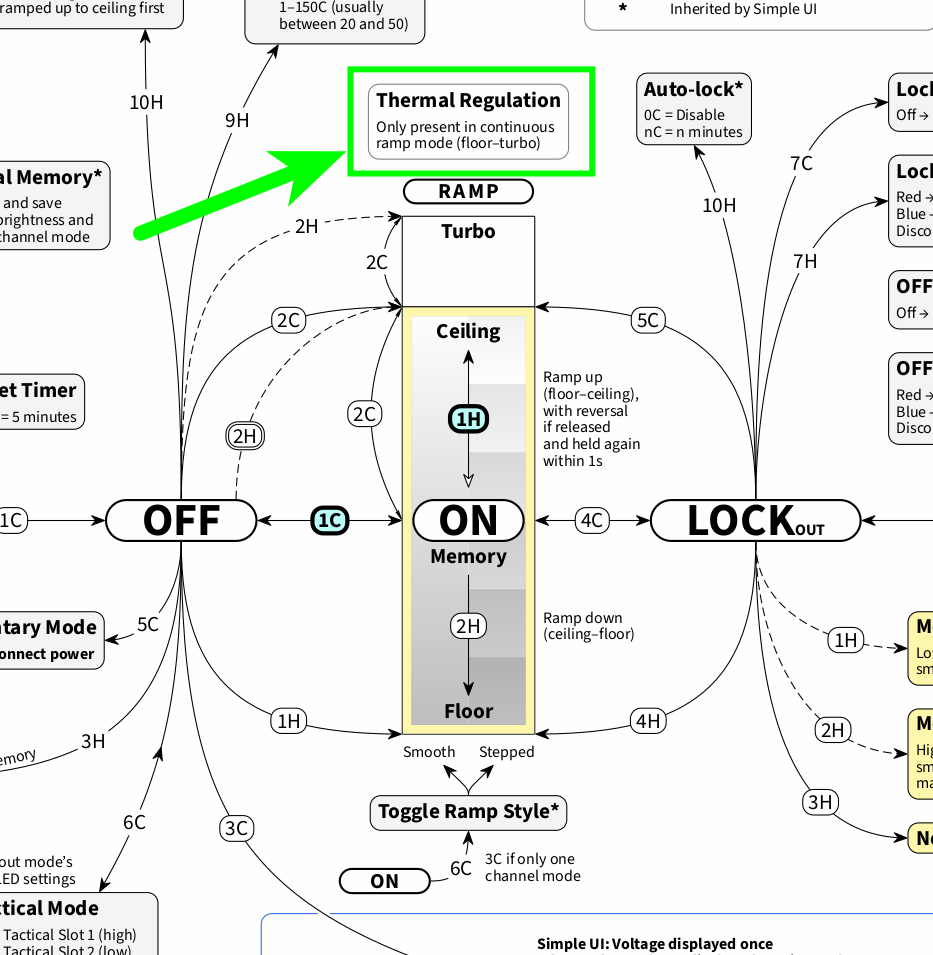
I will look into turning this the other way around to “Thermal regulation” instead of “No thermal regulation”. Two options come to mind right away: Add an icon to the button presses that have “Thermal regulation” (this might become visually tricky), or possibly add an info text about thermal regulation above “RAMP” at the top of the ramp image.
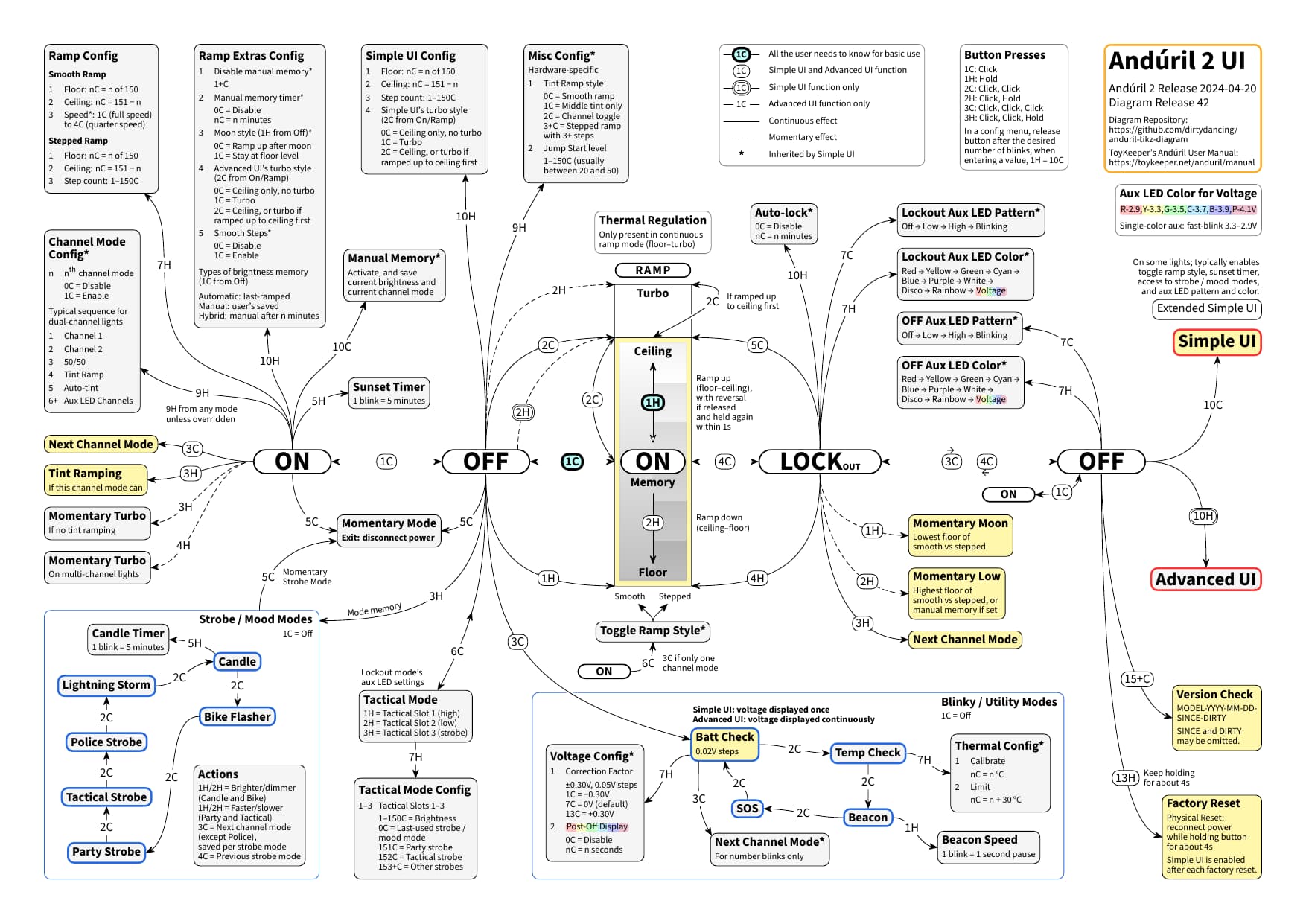
Agreed. I have looked into this, and I have come to the same conclusion. This is how the thermal regulation information is now displayed in the latest diagram release for the first time:
I received my first Anduril 2 flashlight today and so far I am happy with it, but every time I switch it off, the Aux LEDs flash bright blue and purple before they switch to what I want my Aux LEDs to be, somewhat greenish and not bright.
Can I switch that off or change? I haven’t found anything in the UI drawings.
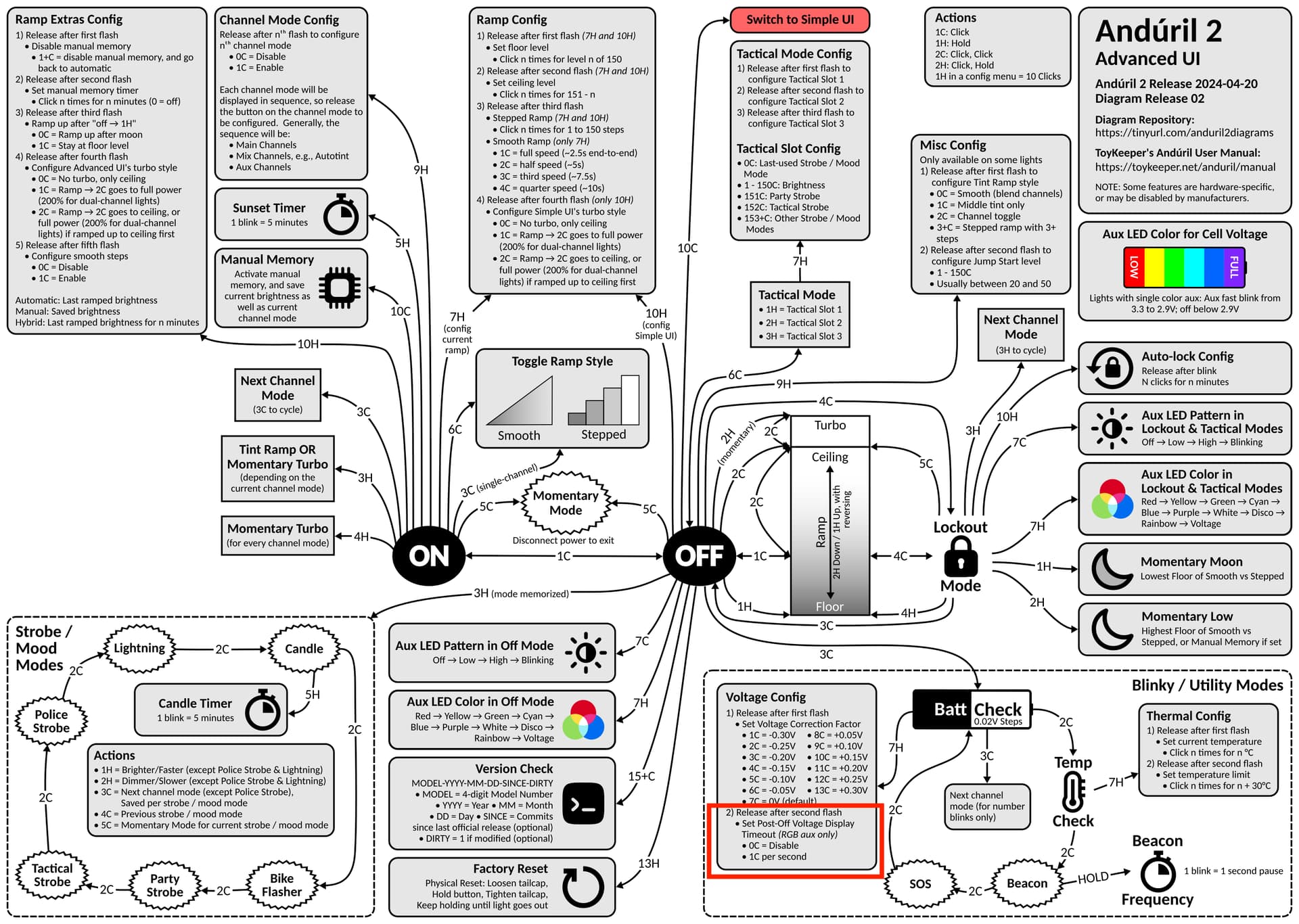
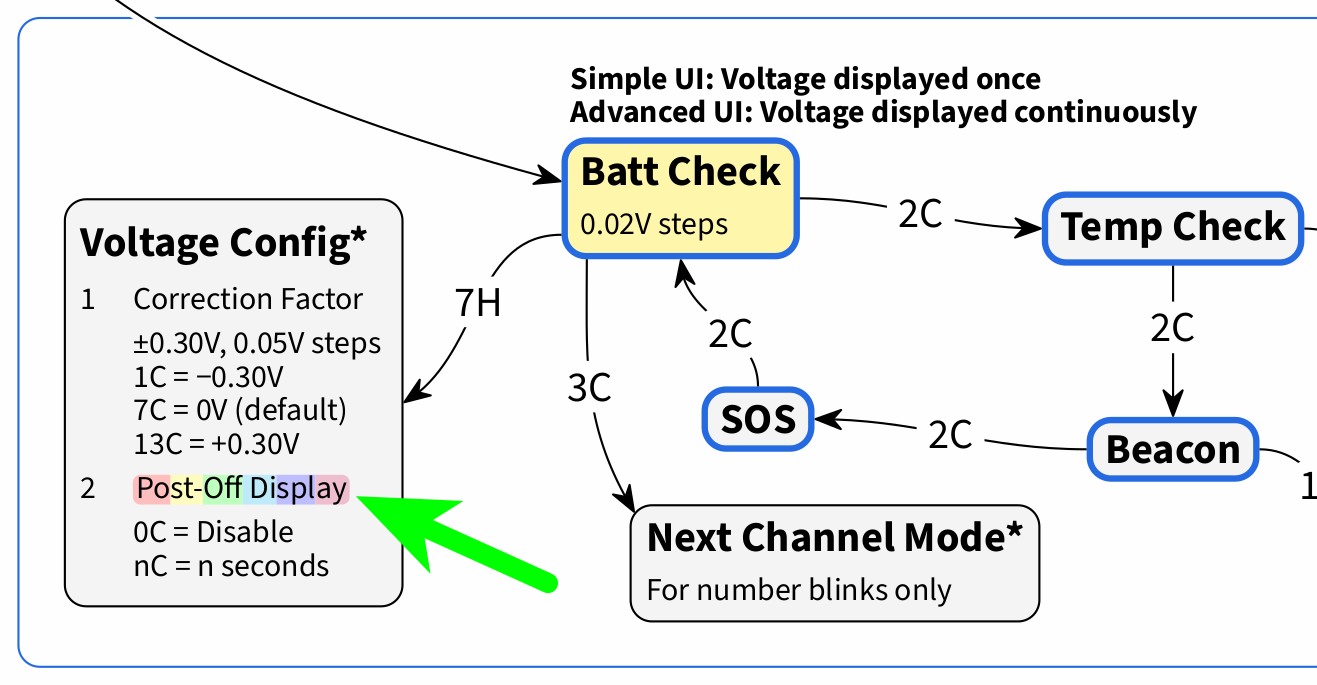
It’s called Post Off Voltage Display. You’ll find it at the bottom of the chart. From off, 3 clicks to enter battery check, then then click 7 times but hold that 7th click, release after the second flash then do nothing.
For your information, in addition to what was already said: Your aux LEDs were alternating between purple and blue because your battery voltage was just on the edge between these two colors.
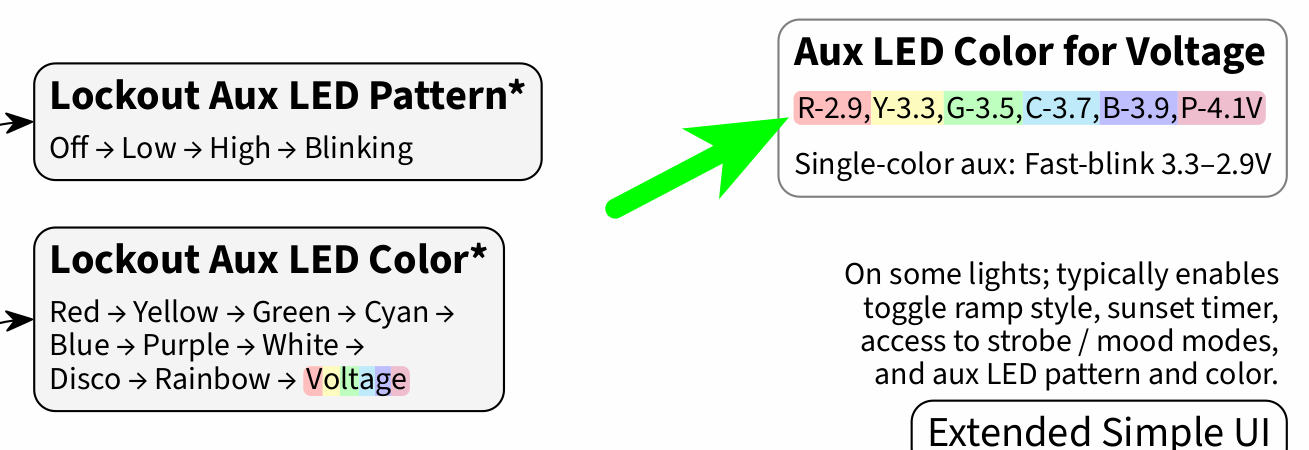
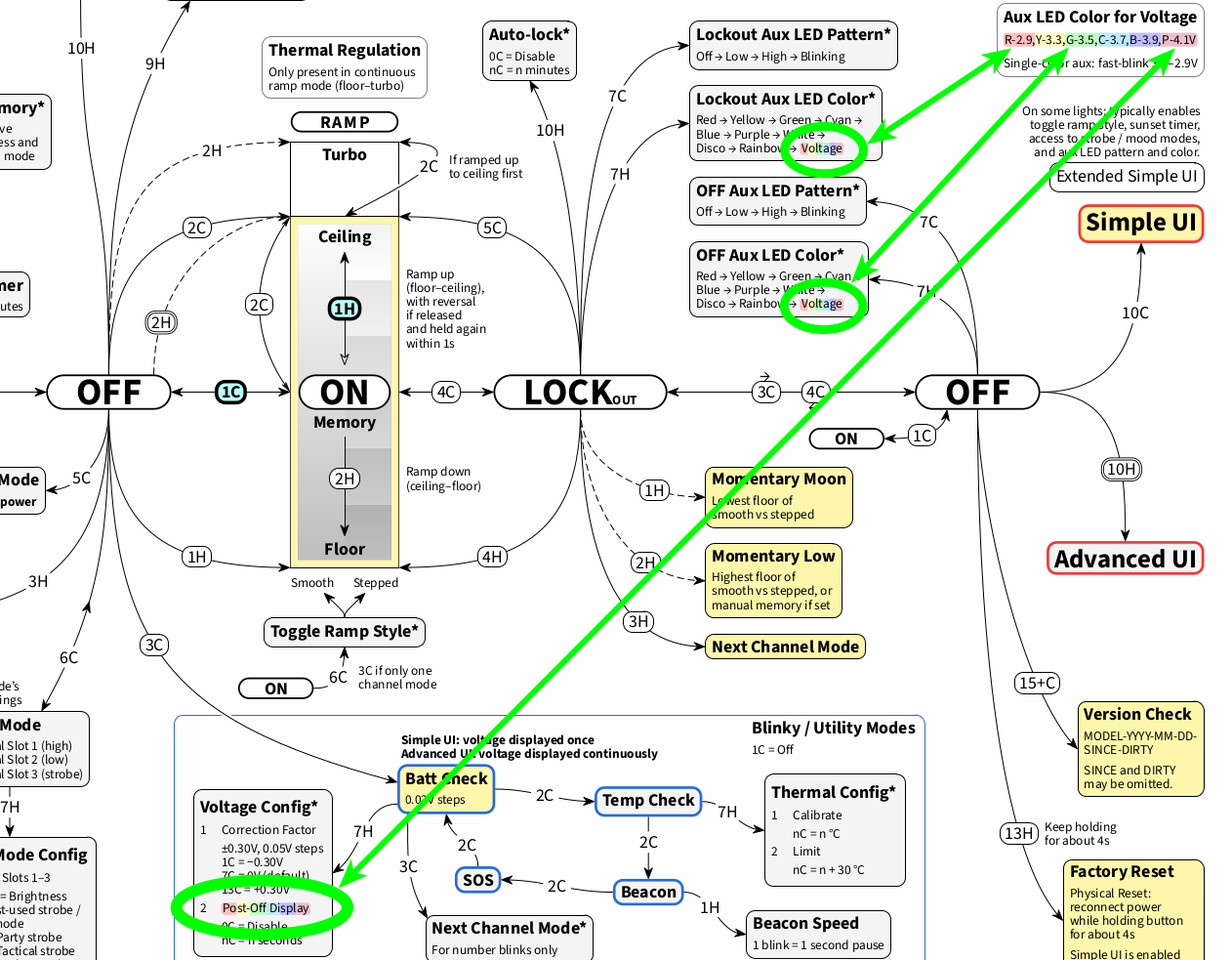
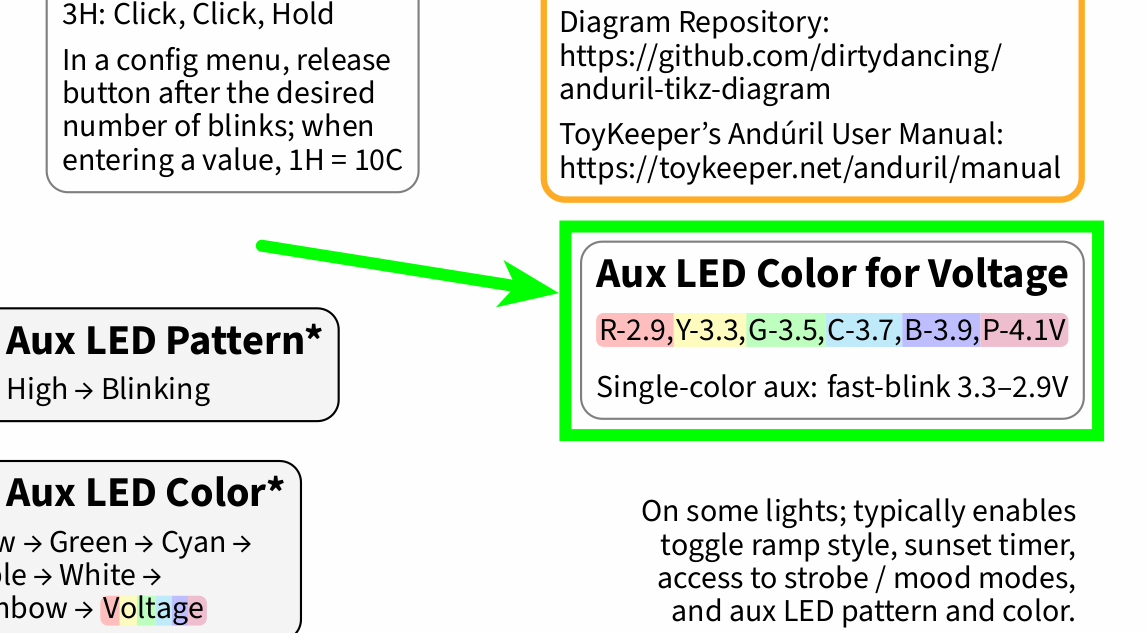
These are the colors that the post-off voltage display is showing (diagram source):
So a battery check with 3C from Off probably would have blinked out 4.10V, on the edge of turning to 4.08V (the battery voltage resolution is 0.02V steps in the most recent Anduril 2 release 2024-04-20).
Just adding a link here to a post of mine in a different BLF thread, to make the information available in this Anduril 2 UI diagrams thread why the “vanilla” Anduril 2 turbo style layout looks different now in this generic diagram by myself:
Also just adding a link to a post of mine in another BLF thread, to make the information available in this thread how the background coloring for Post-Off Voltage Display and Aux Voltage came about:
Hi folks, I just wanted to share some Anduril 2 diagram news and background information.
By now, the “vanilla” generic diagram by myself (diagram source) has been online for almost 8 months, and the diagram releases have been incremented from 01 to 42. To recap, here is a comparison of the initial diagram release 01:
A lot of details have changed, also only in the TikZ code itself, which I have been writing from scratch with a simple text editor. I would like to think that this diagram has reached a “final” status for the current Anduril 2 release 2024-04-20 by now; that is, at least until the next diagram detail gets picked up.
So I wanted to say thank you for the feedback that you have been providing, and for bringing up various Anduril 2 aspects that have led to changes in the diagram. Please feel free to keep on providing feedback here on BLF. I have been following the development of Anduril 2 diagrams for a while and have given quite a bit of feedback to others myself:
For example, back in the day when @containerfan moved from Reddit to Lemmy (before moving on to GitHub, the current diagram source), I opened a Lemmy.World account as “lowprofile” to help with those diagrams, cf. this Lemmy.World thread. This is just the public part of our conversation; ever since, we have also been exchanging private messages about all sorts of diagram details.
And going back even further, about two years ago, I gave feedback to jameshome by opening a series of issues over at GitHub (diagram source). Just recently, jameshome collected several of these open issues in a new milestone called Firmware 20240420, which is presently due. This is why in the near future, we may see an updated version of this Anduril 2 diagram as well.
So here is to keeping the Anduril 2 diagrams moving forward!
Ideally, the Anduril 2 diagrams can not only inspire each other (cf. for example the Credits in my Readme), but the documentation in the diagrams may also contribute to improving the documentation in the excellent Anduril User Manual by @ToyKeeper (pinging TK here just for her information).
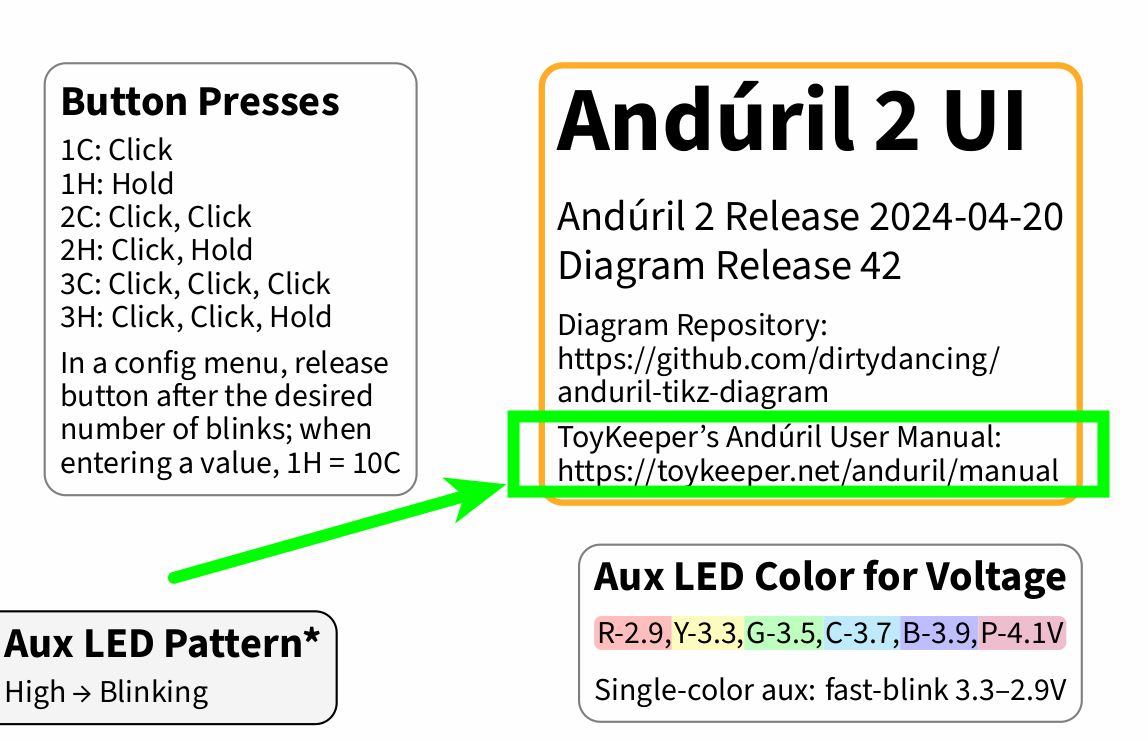
For example, the diagram by myself includes a link to TK’s text manual:
and currently there are several details present in this diagram that are not in the text manual. To give an overview of these documentation details, so far I have opened these (currently open) pull requests and issues over at TK’s Anduril GitHub repository, in chronological order:
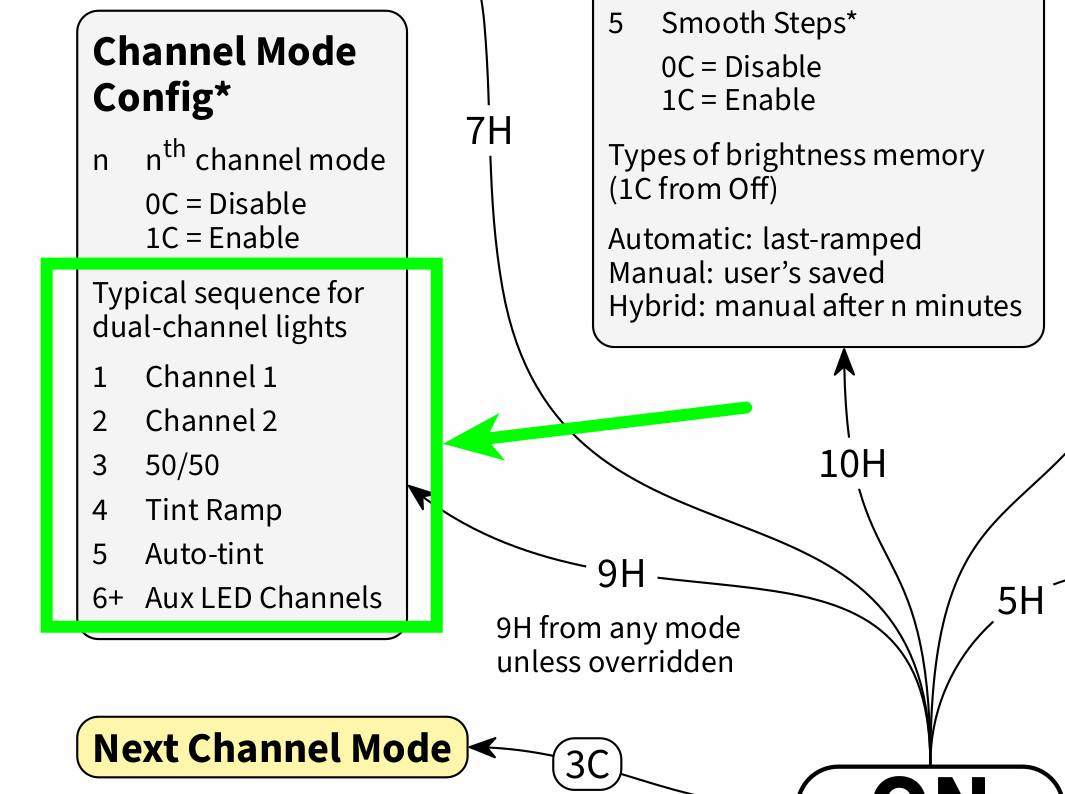
Further details that are present in this diagram, but not in the text manual include the typical channel mode sequence for dual-channel lights (cf. source code):
Right now, there are quite a few open pull requests and issues over at TK’s Anduril GitHub repository, and although I consider documentation to be an important (albeit arduous) part of a project, all of the documentation details listed here may not be high up on TK’s list of priorities. So in any case, what I would recommend is: patience.
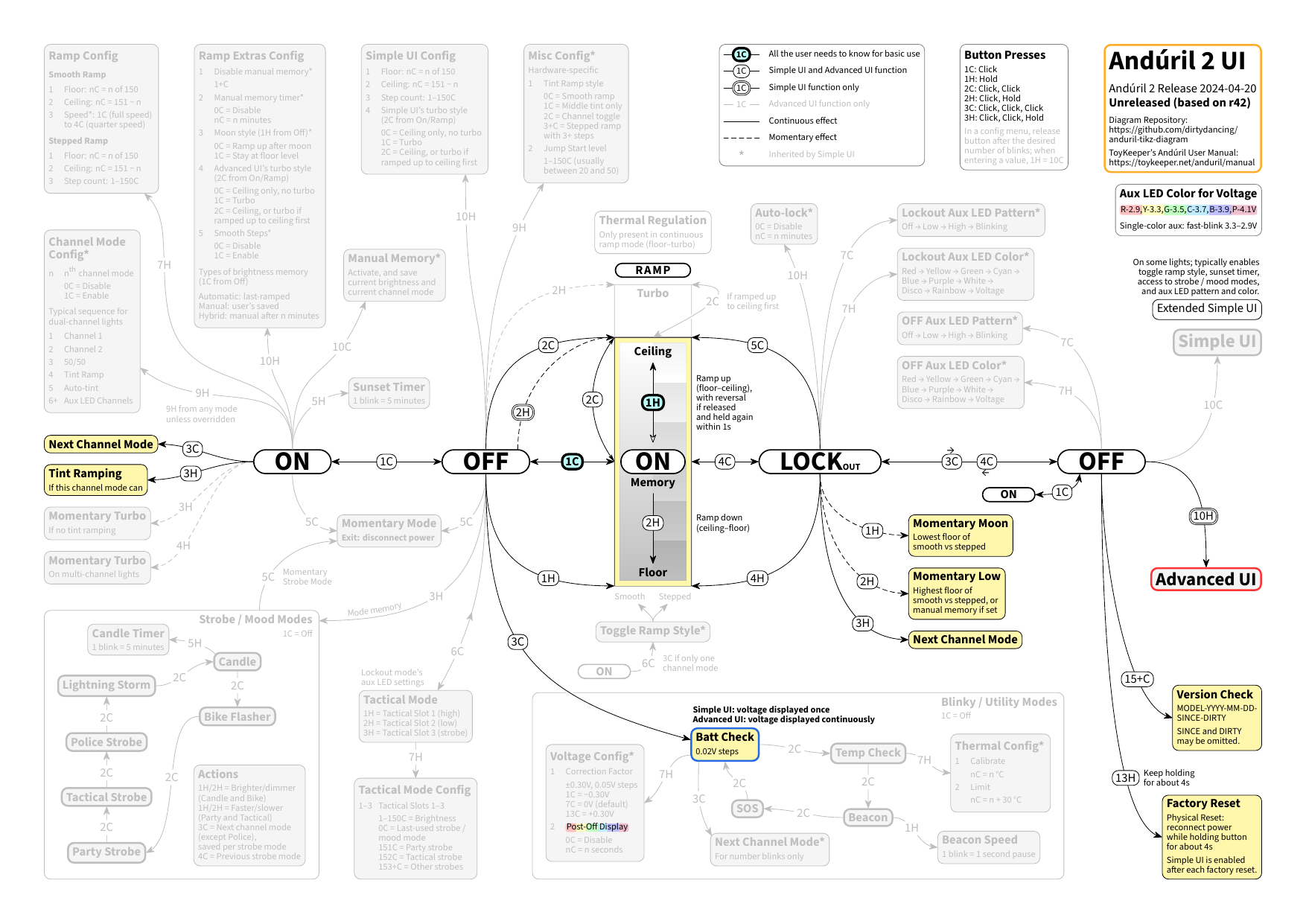
Coming back to this from a different angle: while this is still the same comprehensive Anduril 2 diagram, in order to prevent a possible information overload, for example it is pretty straightforward to “dim” all the Advanced UI details (and still have them at hand if needed), as exemplified here:
In general, because the style formats are defined separately from the diagram content, it would also be very easy to go “full color”, for example when printing in black and white is not of relevance. Anyway, this is only to point out the available visual possibilities.
And of course, as a small detail in the wake of the extensive Post-Off Voltage Display discussion, I have left the colored POVD “undimmed” to preserve its discoverability, because the POVD is currently also enabled by default in Simple UI.
Edit: also “dimmed” the config menu part in Button Presses, as there is no config menu in Simple UI.