Nope,I already tried that but doesn’t affect the 3ch tint ramp…
But thanx for the advice 
1 Thank
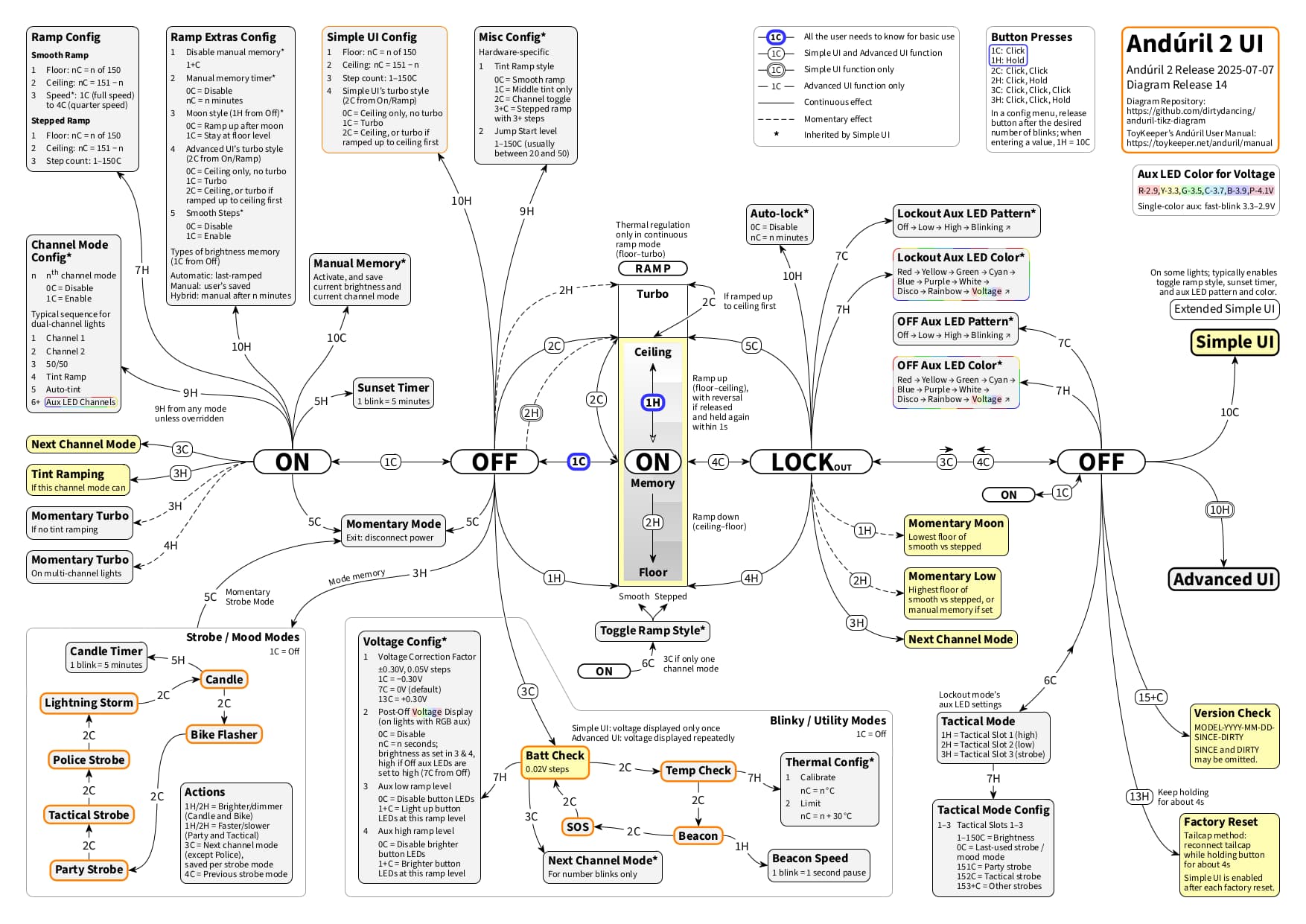
Diagram news: By now, there is an exemplary dark mode edition (for Anduril 2 release 2025-07-07 only):

With this dark mode edition, the idea is not only to demonstrate the color setting possibilities that come with the diagram, but also to visually emphasize the triad of basic use, Simple UI, and Advanced UI. This triad may be even more discernible in dark mode.
For those interested, in the TEX source file the colors are mainly defined in the color settings within the preamble, as can be seen for the generic diagram and in comparison for the dark mode edition.
Anyway, the diagram now also comes in black. 
This dark mode edition has been in the making at my end for a while now. Coincidentally, someone over at Reddit just very recently had a similar idea and posted a dark mode version of the diagrams by @containerfan. So I take it that the dark mode style may well prove to be useful.
Edit 2025-08-12: Updated dark mode diagram image following a new release.
Edit 2025-08-15: Updated dark mode diagram image to reflect yesterday’s new release. Following TK’s manual, I have added a colored emphasis on configuring Simple UI via Advanced UI (via Simple UI Config and via Inherited by Simple UI). By now, this is basically what I had in mind for a visualization in dark mode. If someone is interested and has further ideas on this and the use of colors, just let me know.
4 Thanks
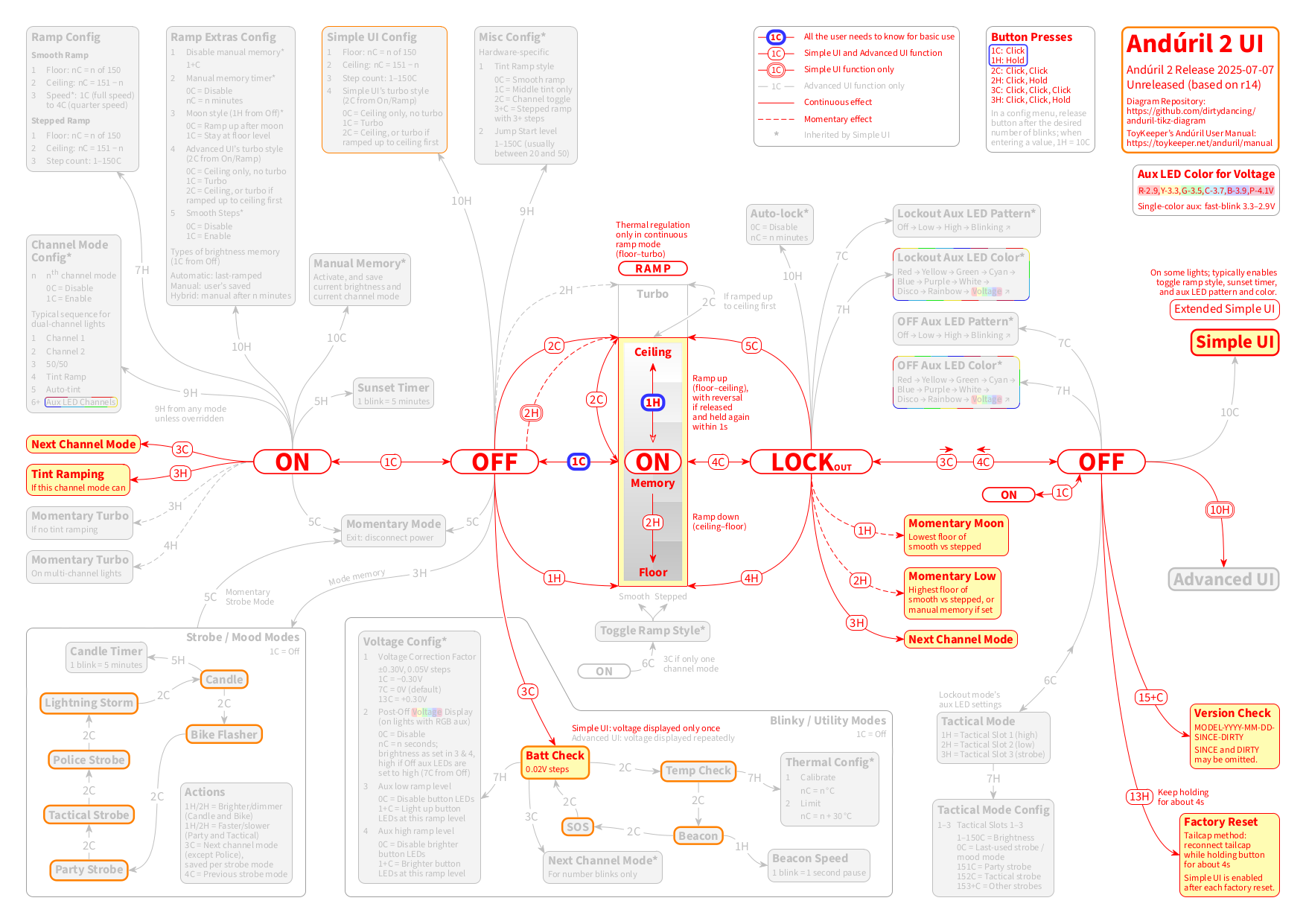
Diagram update: fwiw, by now it is possible to make extensive color modifications by just changing one color setting for Simple UI and/or for Advanced UI. This may be useful to know.
To briefly illustrate, for example when intending to hightlight Simple UI and to dim Advanced UI, you could change the basic Simple UI color (any-draw) from black to red and the basic Advanced UI color (advanced-draw) from any-draw (which was black and now is red) to lightgray.
This would make this diagram:
look like this:
4 Thanks
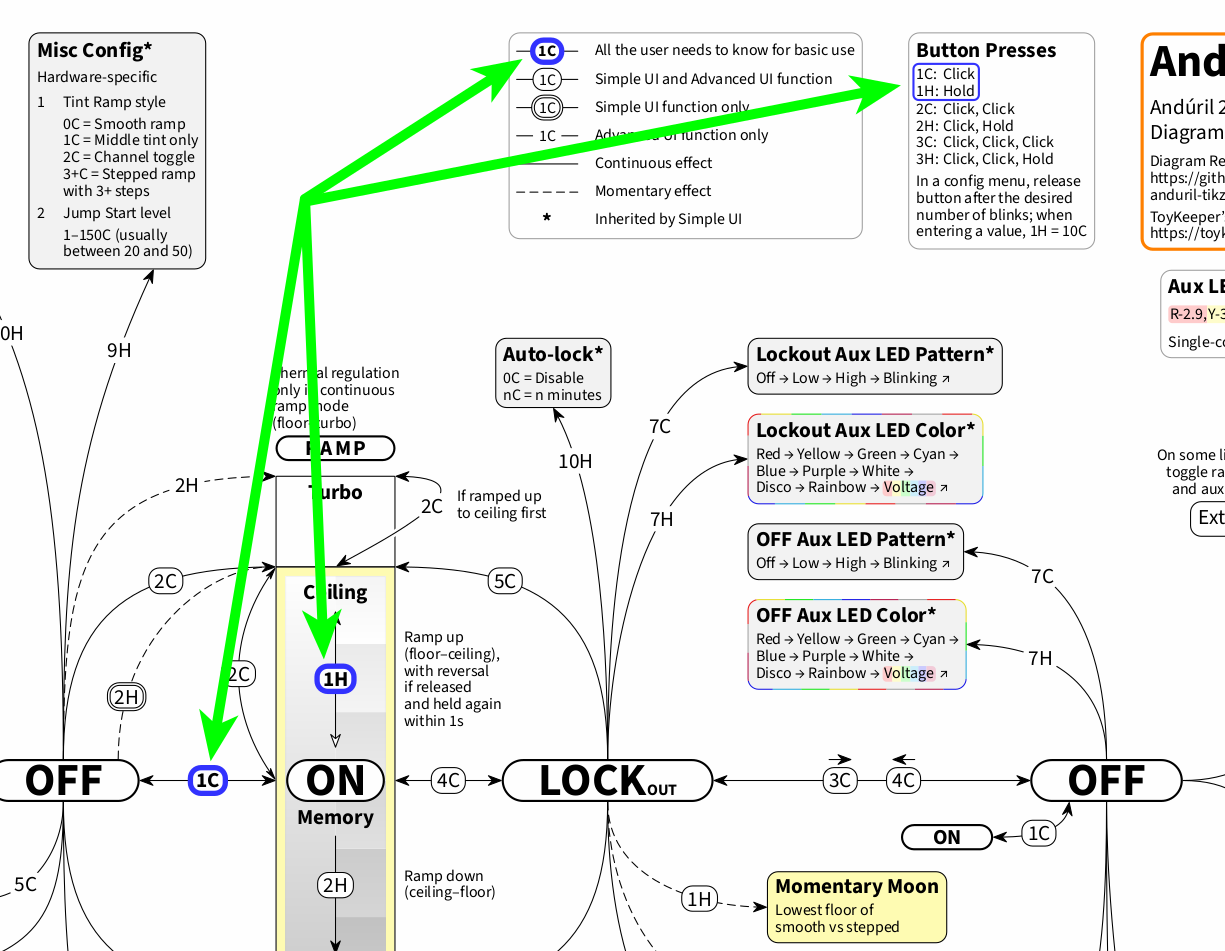
Diagram news: Several visual details have changed across the most recent releases of this “vanilla” Anduril 2 generic diagram by myself, so this is to keep those interested up to date.
Basic use / quick start (see TK’s manual) is emphasized more strongly, and what the button presses 1C (Click) and 1H (Hold) mean is visually emphasized as well:
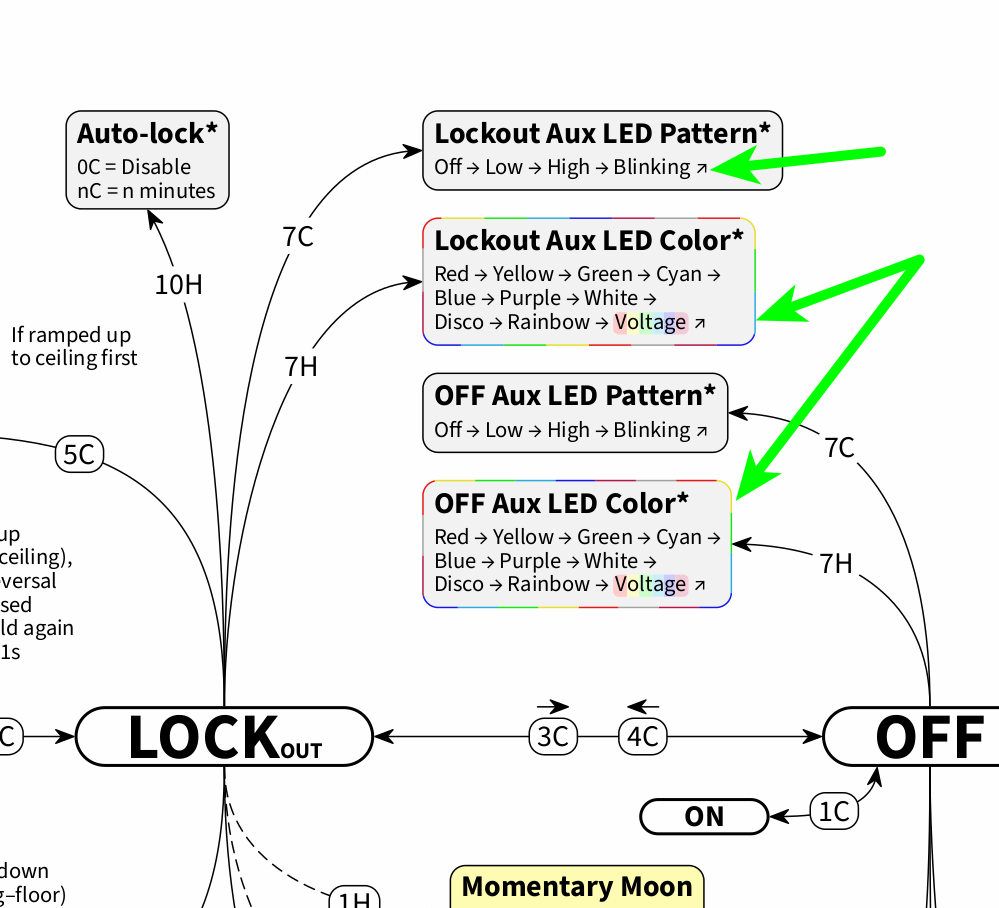
There is an extra arrow at the end of all the aux LED settings, to indicate that they cycle, and the seven single aux LED colors feature around the aux LED color settings for Off and Lockout:
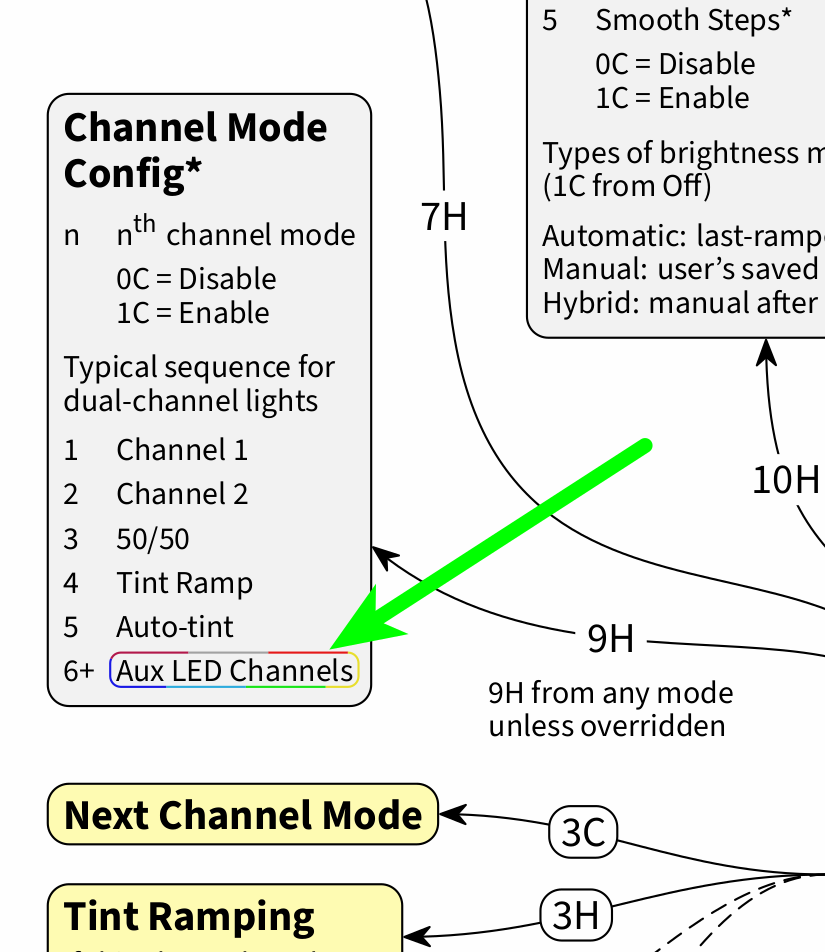
Furthermore, the aux LED channels over at Channel Mode Config also feature the aux LED colors:
The aux LED colors for voltage show for “voltage” consistently, to illustrate at a glance where the voltage colors come into play (for the aux LED color settings and for Post-Off Voltage Display, POVD):

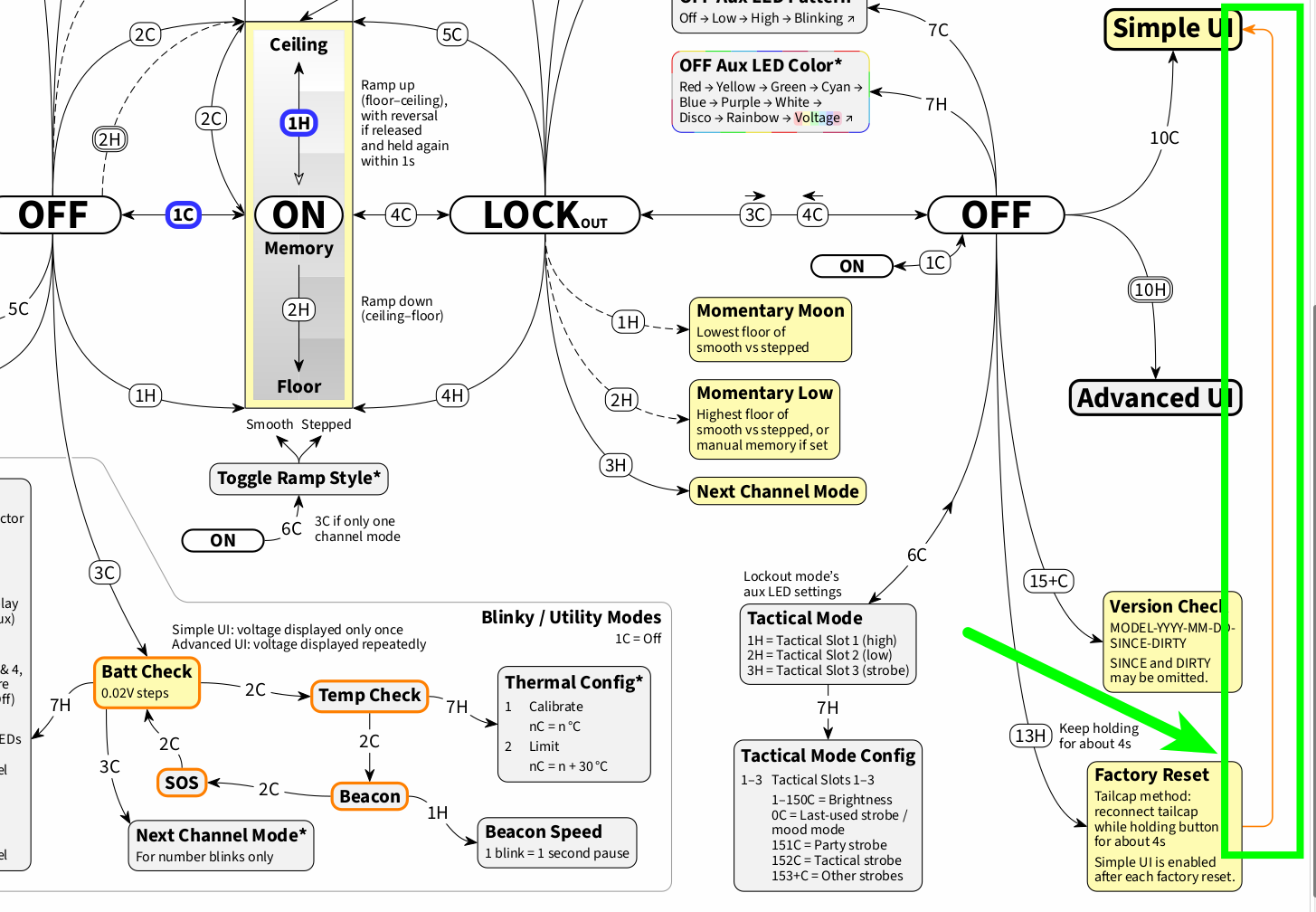
Finally, there is a connection from Factory Reset to Simple UI, to visualize the effect that a factory reset has, and to demonstrate how to “restart” Anduril 2 in case the user has gotten lost in the outer realms of Anduril 2 configuration and wants to return to the central point of reference, the brightness ramp with its basic use:
8 Thanks
Thank you for your outstanding dedication to producing the most up to date, and easy to read flow chart:
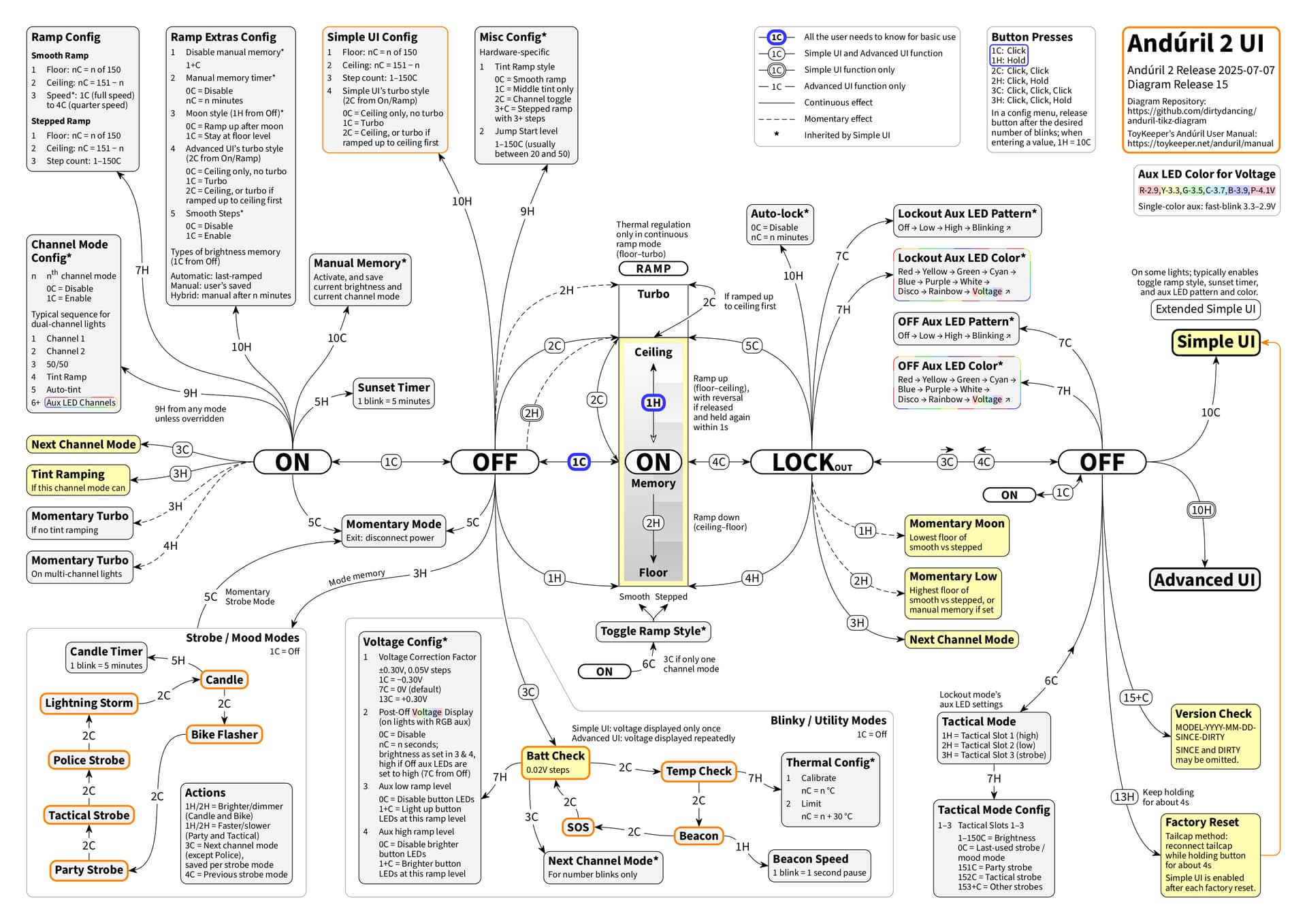
It is especially helpful to have the Channel Mode Config Menu include all the details. And also the very complete list of POVD options as of firmware 2025-07-07
Thank You!
4 Thanks
Your visual representation of ToyKeeper’s Anduril User Manual is very much appreciated and has been especially useful when explaining Anduril to new users.
Thanks for all the detail and care you have committed to this effort.
1 Thank
Great to hear this, thank you for your feedback!
Love the new chart. Thanks for all the effort!
1 Thank
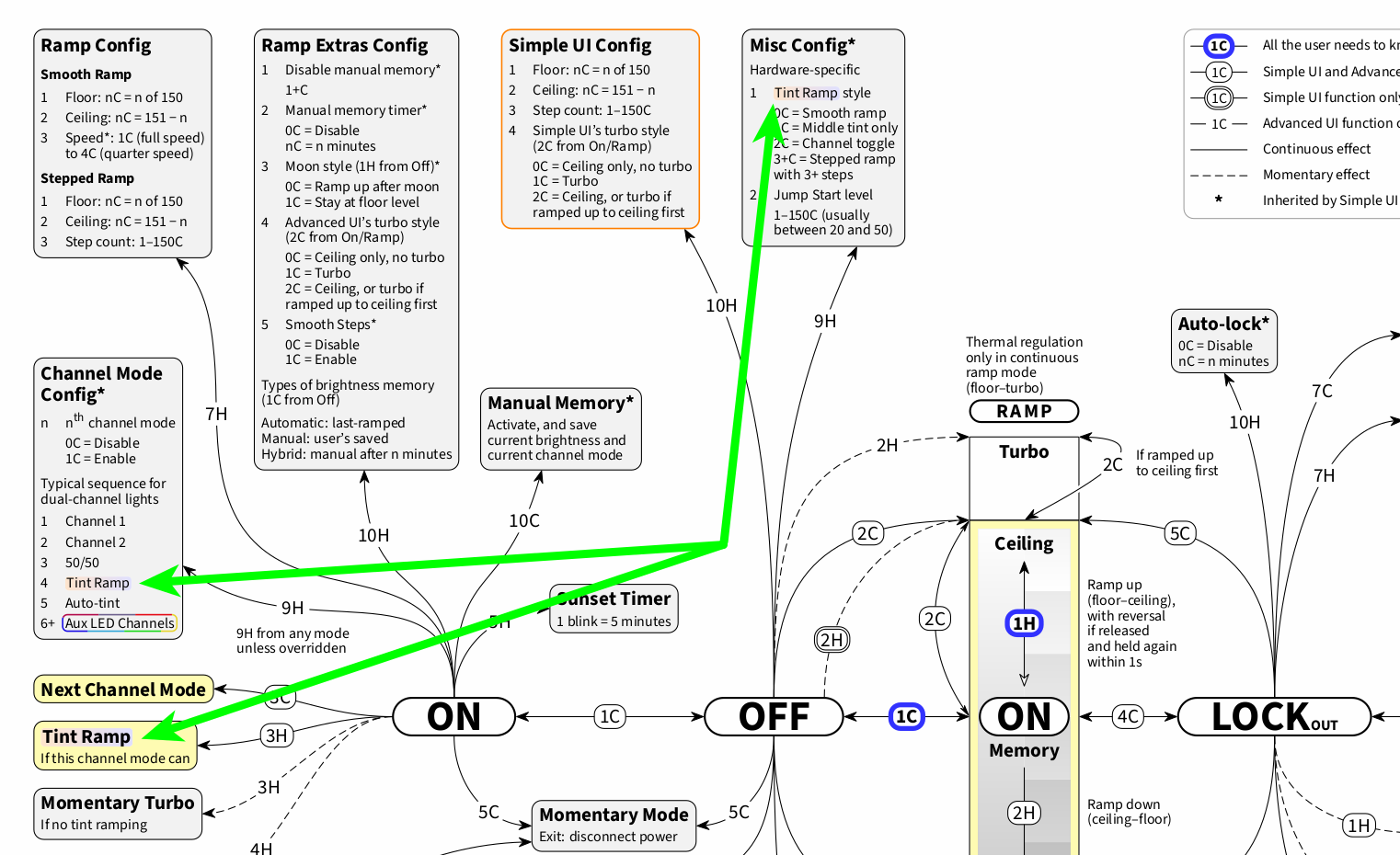
Just adding another diagram detail: the instances of Tint Ramp are now visually connected by a common background color gradient (source):
2 Thanks
This is just to keep track of how visually highlighting the UI switch lines came about, see this post of mine.
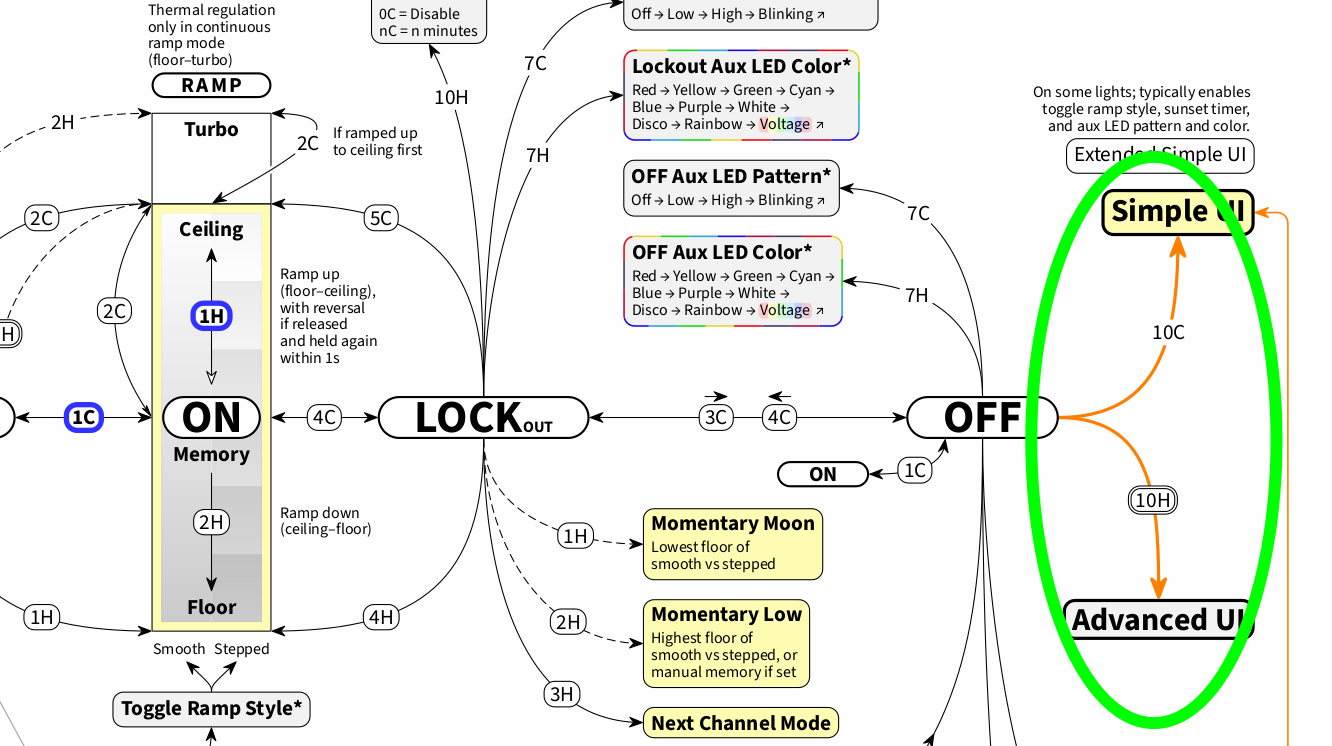
3 Thanks
@Shirtgrinder
Tagged for useful reference materials
1 Thank
New anduril 2 user here(DA1) for only a week. I’ve had the FW3A for many years and cant believe i never bothered adjusting the ceiling ramp. now that i have i love the light even more.
Just checking but for lights with anduril 2 and Switch aux lights, there is no setting to have the switch light on with the main light on? its either on/off in OFF mode or lockout mode right?
actually yes, but only with single color button lights
if the button is RGB, it is Always Off when main LEDs are On
this is one of the reasons I prefer single color button lights (I like Amber)
By default, an Amber button always turns ON when the main LEDs turn on (there are also options to make it turn Off when main LEDs are On, at specific outputs, in settings related to POVD, as of firmware 2025-07-07..)
so for example, the Amber button on my D3AA (which I updated to firmware 2025-07-07) is configured in my personal options to stay Off if I use the light below 8 lumens, but it comes ON if I use the light above 8 lumens.
the lumen level trigger for Amber switch button lights also affects POVD. iow, below 8 lumens there is no 4 second Voltage color Aux, when I turn the light off. The purpose is to prevent Voltage Aux from coming on when I use the light from my nightstand at low outputs, late at night.. such as for a middle of the night bathroom visit.
details in these posts:
POVD details
1 Thank
oh! thanks for the info. Now that i know this i may choose the single color button when i buy my next emisar. Looking at the D3AA as well. POVD looks complicated. definitely have to save your links for later when i configure.
The D3AA is a great little light. Just a bit chunky..
also consider the upcoming KR1AA discussed here, Im just waiting for V2, due out any day now.
KR1AA is a smoother, more slenderized sibling of the D3AA (same great AA/14500 driver w NoPWM):
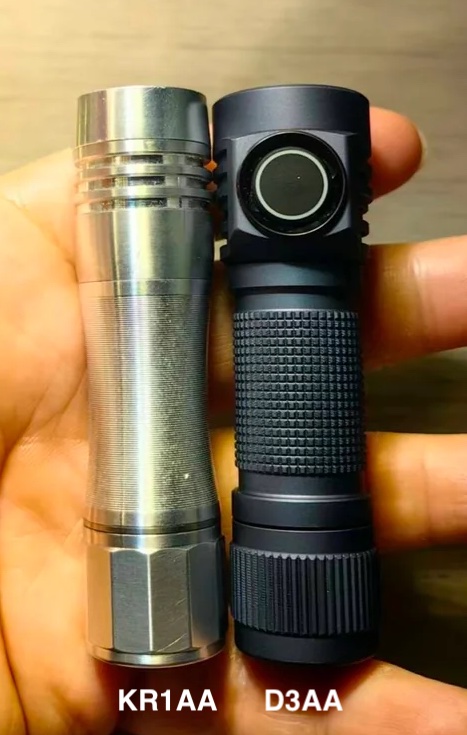
(pic from here)
yes, POVD is a bit overwhelming at first.. will be glad to help answer any questions when the time comes
That does look more pocket friendly. Going to be a tough choice.
1 Thank
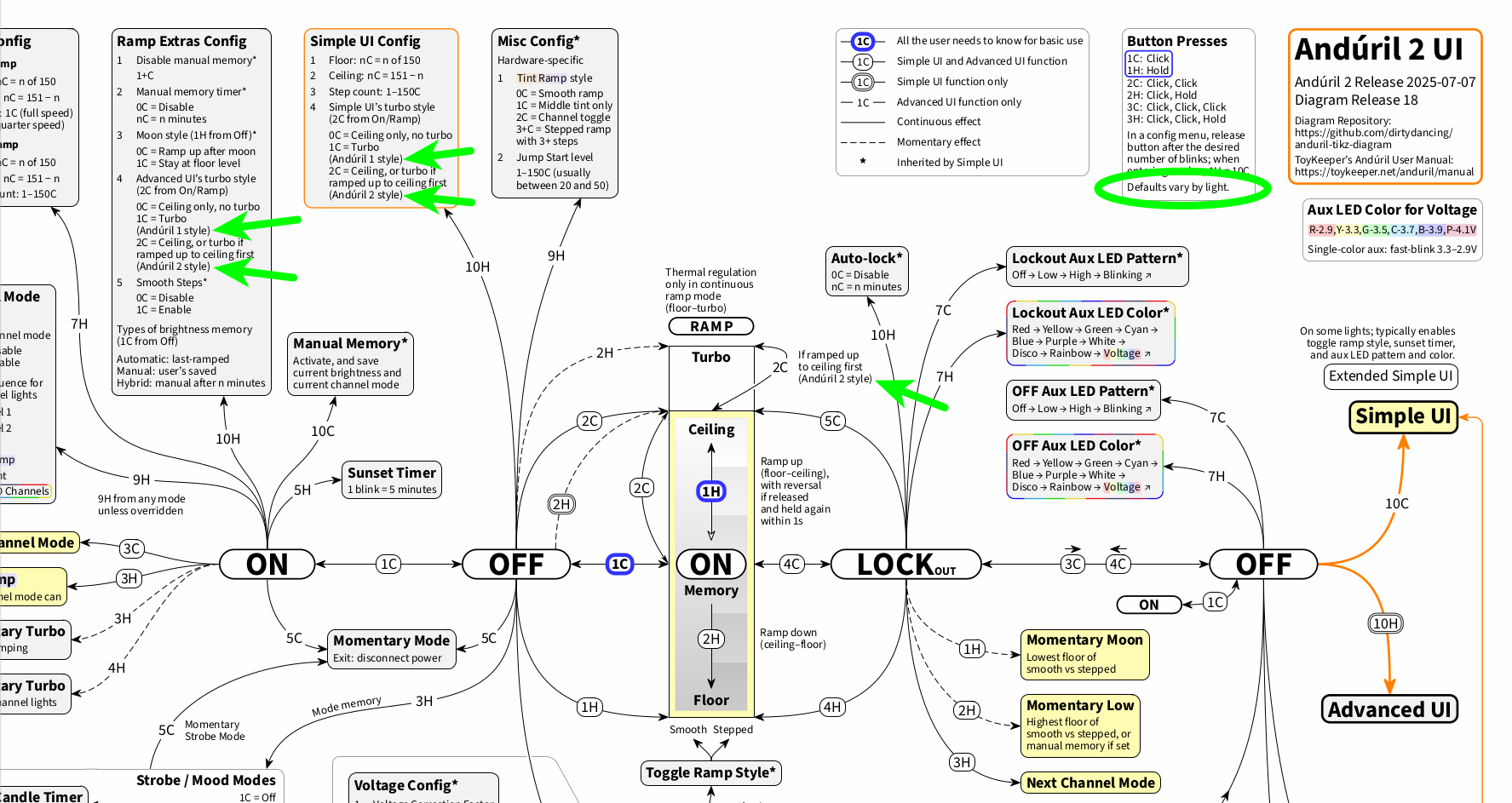
This is to keep track of why the Anduril 1 and 2 turbo style information was added, see this post of mine.
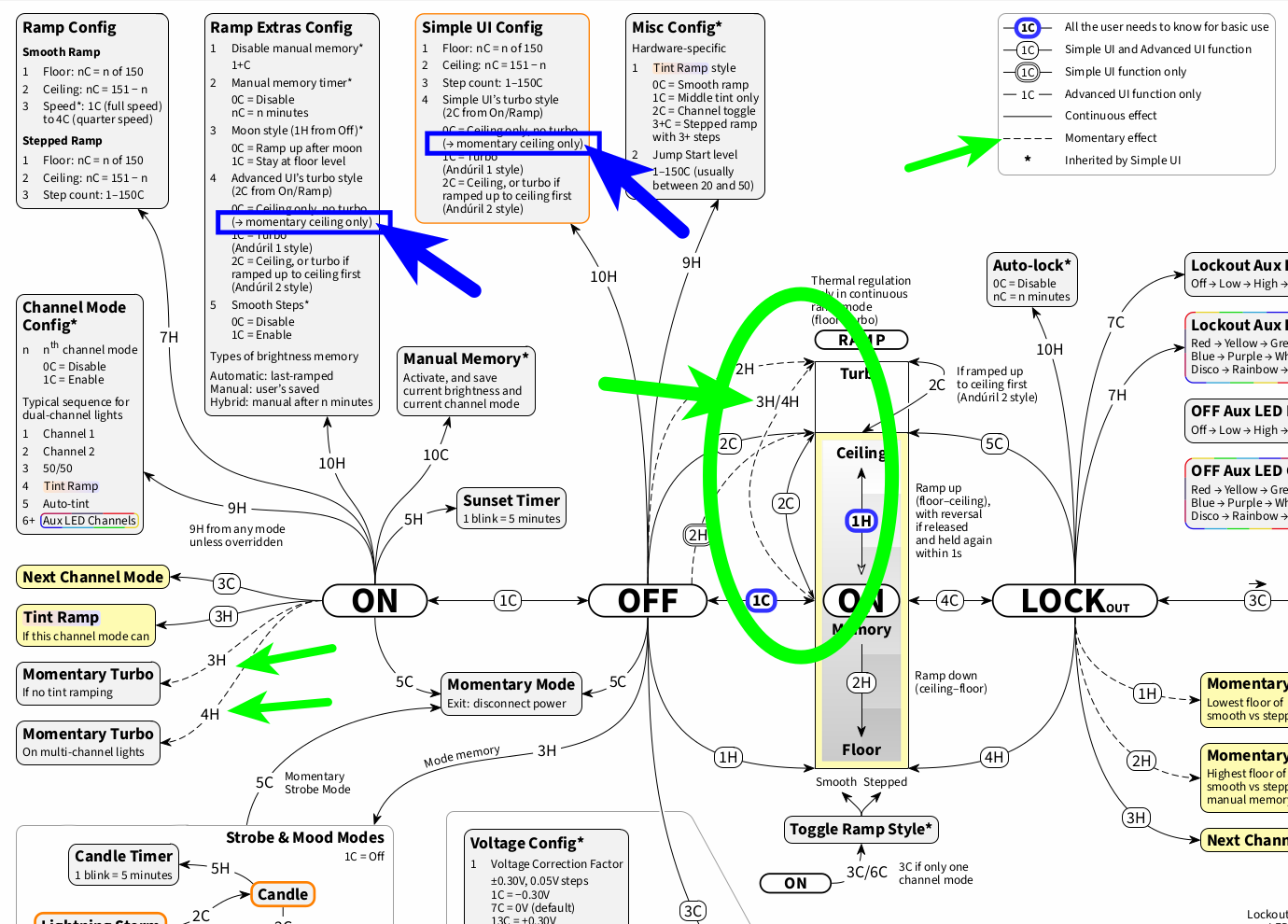
And this is just to keep track of how momentary ceiling for the turbo styles (for 0C) and momentary turbo from On (3H/4H) in the ramp image came to be, see this post of mine:
Pretty much happened to both Anduril 2 and the visual representation since I was here. I only use older Anduril 2 lights. Thank you for your amazing work! If I well understood there is no direct representation of the simple mode on this new chart but you can emphasis Simple mode functionality while greying out the rest. I would love to convince flashlight makers and users to use Anduril 2 even if they only want simple functionality. They still fear from getting lost even in Simple mode…
2 Thanks
Yes, and it seems to me that the idea that Andruil is just too complicated for most people to use is a self perpetuating myth. I have gifted at least a dozen TS10 lights to people who have never owned anything other than something available in a big box store. This over the last two years. The worst thing that has happened is one person got the aux lights turned on when he didn’t want them on. When setup properly in simple mode operation can’t get much simpler.
2 Thanks